Preview

Description
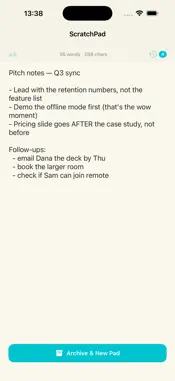
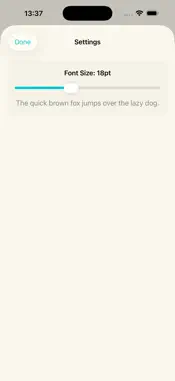
ScratchPad is the fastest way to jot something down on your iPhone or iPad. One persistent scratchpad that's always exactly where you left it — no sync, no accounts, no list clutter. Just open and write. Most note apps make you create a note, name it, file it, and find it again later. ScratchPad does the opposite: there's a single full-screen pad waiting for you the moment you open the app. Type a phone number, a grocery list, a half-formed idea, a quote, a draft message — anything. It's saved automatically as you type. When a pad is done, tap "Archive & New Pad" to tuck it into History and start fresh on a clean page. Need an old note back? Open History and restore it with one tap. Key features: • Instant-open editor — the app launches straight into a full-screen pad with the keyboard ready. • Always saved — every keystroke is persisted automatically. Force-quit, switch apps, restart — your text is still there. • Archive & start fresh — clear the page without losing it. Archived pads move to History. • History with restore — browse past pads, see when each was saved and how long it is, and restore any of them instantly. • Word + character count — a live count sits at the top while you write. • Adjustable font size — set a comfortable text size from 12 to 28 pt. • Landscape support — rotate for a wider writing surface on iPad or iPhone. Privacy by design: ScratchPad collects nothing. No analytics, no ads, no tracking, no account, no network requests. Everything you type stays on your device. There is no cloud, because there is nothing to sync. ScratchPad is for you if: • You want a notepad you can open and write in within one second. • You're tired of note apps that bury one line of text under folders and tags. • You like a single, always-available scratch surface for quick thoughts. • You care about a simple, fast app that respects your time and your data. PREMIUM Unlock everything with a 3-day free trial, then an affordable subscription — cancel anytime. No ads, no tracking; everything stays on your device. — LEGAL — Terms of Use: https://web-levi.web.app/terms-of-use Privacy Policy: https://web-levi.web.app/privacy-policy — SUPPORT — Questions or feedback? Contact us at: [email protected]
What's New
Version 1.1.0 2026-06-12
• ScratchPad Premium with a 3-day free trial • Refined onboarding and paywall • Performance improvements and bug fixes Technical Analysis
Package Overview Basic metadata
Bundle ID
com.levi.scratchpad Current Version 1.1.0
Minimum iOS 17.0
Package Size App Store Size
Package Metadata 1 / 2 version records
Detailed binary, privacy manifest, framework, and Info.plist results have not been indexed for this package yet. The verified App Store and archive metadata above remains available.
Developer Information
Known Version Records
1 version record with stored package metadata • 2 known version records
Stored metadata does not guarantee a package is currently available to download.
| Details | Version / IDs | Version date | Action |
|---|---|---|---|
| 731.0 KB | v1.1.0 App Store ID: 886086017Build: 1.1.0 | 2026-06-12 02:51:56 | Get Version |
| Not archived | App Store ID: 885896041 | Unknown | Request Version |