Preview




Description
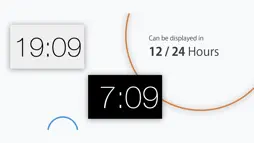
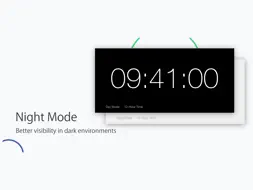
Big Clock is designed specifically for iOS users. With an optimised layout for iOS devices, the time can be shown from edge to edge on the display for better readability and usability. For devices adopting XDR or Liquid Retina display technologies, a more crisp and clear font can be shown. FEATURES * Dark mode (night mode) is supported natively in app. The clock face can be viewed comfortably whenever it is in day time or in dark. * The clock can be displayed in either 12/24 time format. * Styling your own clock face with bold font, or to choose showing/hiding the seconds counter. * Timing and clock styling are made within the app. No network connection is required. For accurate time display, please make sure your phone’s clock is in-sync with the timezone that you’re in. * As no third-parties is involved within the process, all data are kept within the app. Made by PPES Developers & Contributors
What's New
Version 1.1.0 2021-09-30
v1.1.0 (Build 3) - Bugs related to the core counter feature is fixed, where the clock’s counting feature may paused unexpectedly on app switches or the control ... Technical Analysis
Package Overview Package analysis available
Bundle ID
com.ppes.bigclock Current Version 1.1.0
Minimum iOS 14.0
Package Size App Store Size
Package Metadata 1 / 2 version records
Bolts
org.cocoapods.Bolts v1.1.0iOS 8.0+146.86 KB
Parse
org.cocoapods.Parse v1.1.0iOS 9.0+2.02 MB
Known Version Records
1 version record with stored package metadata • 2 known version records
Stored metadata does not guarantee a package is currently available to download.
| Details | Version / IDs | Version date | Action |
|---|---|---|---|
 5.25 MB | v1.1.0 App Store ID: 844404009Build: 3 | 2021-09-30 12:06:16 | Get Version |
| Not archived | App Store ID: 830613747 | Unknown | Request Version |