
Preview




Description
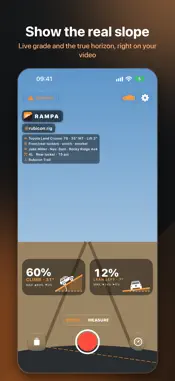
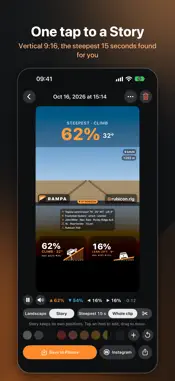
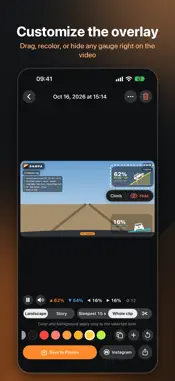
Ever climbed a hill that looked like a gentle slope once you posted the video? Your camera tilts with your rig, so the horizon tilts too and every climb looks flat. Rampa fixes that. See the real slope • Two gauges on your video: one for climb and descent, one for side slope. Each shows a ramp at the true angle with your vehicle on it, the grade in big numbers (62%), the angle next to it (32°), and the max for the run. • The true 0° horizon drawn back into the picture. When the hill is too steep for the frame, a small arrow at the edge shows where level is. • Calibrate once on level ground. The phone can sit in the mount at any angle. • Mount the phone sideways for the widest view; the gauges and buttons turn with it. • Tap the trail to lock focus there, so the camera doesn't focus on the dashboard. • Side-slope warning with vibration and sound at the grade you choose. • Optional ride details on the video: vehicle, tires, lift, mods, driver, co-driver, club, trail, tire pressure, 2H/4H/4L, and lockers. • Optional speed and altitude. Your location is only used on your device. Edit and share • Change the look right on the video. Drag any gauge where you want it, give it one of 22 colors and a dark, clear, or light background, or hide it. Your layout applies to all your clips. • Turn a landscape clip into a vertical 9:16 Story for Reels and TikTok, with the steepest moment as the headline and big gauges below. Or keep it landscape for YouTube. • Rampa finds the steepest 15 seconds for you, or you can export the whole clip. • Save to Photos, share directly, or export a still of the steepest moment. • Add your @username so viewers can find you. • Videos are stored clean and the gauges are drawn when you export, so you can change the look anytime. • Instagram: send the steepest 15 seconds straight to your Story, or save for Reels and posts and open Instagram in one tap. Filmed with another camera? • Action cameras: compatible with GoPro HERO5 and later, including MAX. Rampa reads the motion data saved in the file and draws the slope and the horizon. You can set the lens and pick a frame where the vehicle sits level. • Any camera: record in Measure mode on your phone (camera off, big gauges on screen) while another camera films. Rampa matches the two by the clock, and you can fine-tune by tenths of a second. • No data at all: draw a line along the slope on a frame and Rampa works out the angle. Vehicle card, clubs and ride summary • Vehicle card: a card to share with your rig, its records and your photo. • Clubs and events: set up a club badge and share it by QR code or link; members show it on their videos. • Ride summary: your route on a map, elevation and the steepest moments, shared as an image, video or GPX. • Rampa Pro is a one-time purchase, no subscription: video from other cameras, every card style, creating a club, summary video and GPX, trimming, resizing items and videos without the signature. Apple Watch • Start and stop recording from your wrist, and switch between Video and Measure. • Live climb and side slope on your watch, with the side-slope warning tapping your wrist. • Optional camera preview to check your framing. It uses more battery, and frames are only sent while the camera page is open on the watch. Privacy • No account needed. Your videos stay on your device. • Only anonymous crash reports and usage statistics: no names, no location, no video. Mount your phone firmly; the angles come from its sensors. Rampa is for recording and sharing, not a safety instrument. Always drive within your limits and your vehicle's. Available in 10 languages.
What's New
Version 1.1.0 2026-10-20
• Vehicle card: a card to share with your rig, its records and your photo. • Clubs and events: set up a club badge and share it by QR code or link; members show... Technical Analysis
Package Overview Basic metadata
Bundle ID
com.phisoftware.rampa.app Current Version 1.1.0
Minimum iOS 16.0
Package Size App Store Size
Package Metadata 0 / 0 version records
Detailed binary, privacy manifest, framework, and Info.plist results have not been indexed for this package yet. The verified App Store and archive metadata above remains available.
Developer Information
Known Version Records
0 version records with stored package metadata
Stored metadata does not guarantee a package is currently available to download.
| Details | Version / IDs | Version date | Action |
|---|