Preview









Description
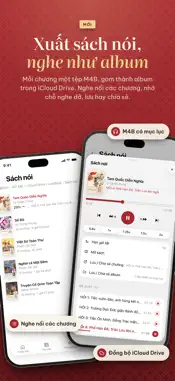
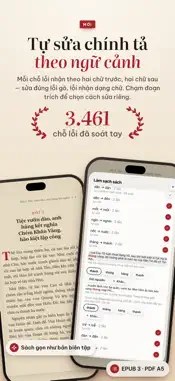
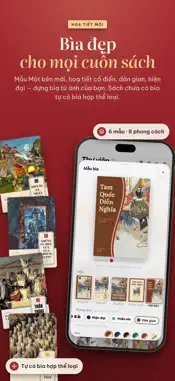
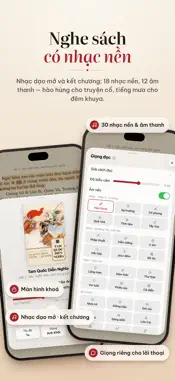
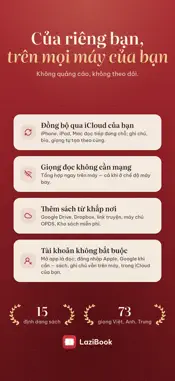
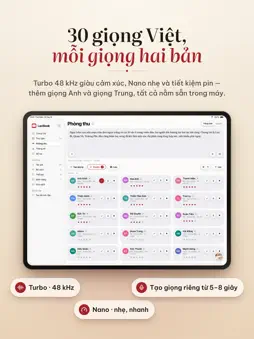
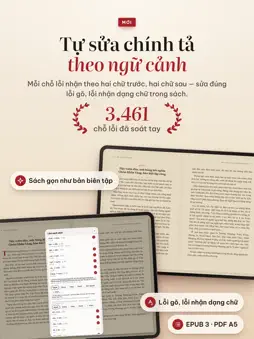
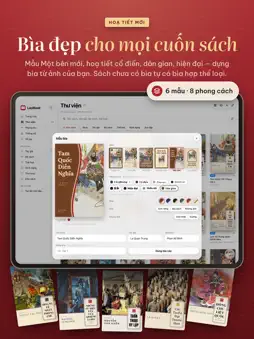
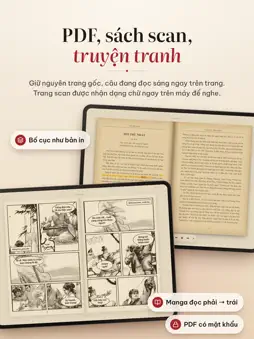
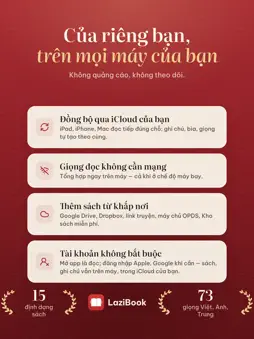
Read and listen to your own books in natural voices. Open EPUB, PDF, Kindle, Word files or comics, tap Listen and LaziBook reads to you — speech is generated right on your iPhone or iPad, with no internet and no ads. LISTEN • Tap Listen and reading starts from the page you are on; the current sentence is highlighted, each word lights up as it is spoken, and pages turn by themselves. Tap any word to read from there. • Keeps reading with the screen locked, with controls on the Lock Screen, Dynamic Island and headphones. • Background sound: 18 music themes, 12 ambient sounds (rain, a stream, campfire…), chapter intro and outro music. • A separate voice for dialogue, custom pronunciations for any word, and Speak for any selected passage. • Speed 0.75–2×, sleep timer and an Up Next queue. • M4B audiobooks: export each chapter as a file, gathered into an album per book; listen in the app, save or share. VOICES ON YOUR DEVICE • 30 Vietnamese voices from the North, Centre and South, each in two editions: Turbo, with expressive 48 kHz audio (iPhone 13 / SE 3 and later, iPads with A15 or M1), and Nano, light and battery-friendly on every device. LaziBook switches to the matching Nano voice when Turbo can't keep up. • 37 English and 6 Chinese voices. LaziBook picks the right voice for the language of each book and each sentence. • Studio: pauses, emotions, multi-voice scripts, MP3 with cover art. • Create your own voice from 5–8 seconds of recording — processed on your device, never uploaded. BOOKS THAT LOOK THE PART • Book effect with page edges, spine and pages that curl under your finger; two pages on a landscape iPad, or vertical scrolling. • Cover templates: 6 layouts, 8 styles, 6 palettes each — design a beautiful cover from your own picture; books without a cover get one that suits their genre. • Vietnamese spelling by context: 3,461 hand-reviewed error spots (two words either side) fix typos and OCR errors; tap a snippet to fix just that spot. • Clean Up & Convert: rewrite a book as a tidy EPUB 3 laid out like an edited edition — red chapter titles, a large initial, rebuilt contents; turn TXT, Word, Kindle and text PDFs into EPUB 3, or export an A5 PDF. • Six light and dark themes; highlights in five colours, notes, bookmarks and a Notebook; footnotes open in place. LOOK UP AND TRANSLATE • Look up a word or a whole passage with Lazidi (Vietnamese, English, Chinese, Japanese) or the built-in Dictionary. Pinyin and Sino-Vietnamese readings above Chinese characters. • Translate books into Vietnamese, English or Chinese on your device, in the style of the story: read side by side or listen to the translation; edit any sentence, keep a names list. One-time 440 MB download. PDFS AND COMICS • PDFs keep their original printed layout, with the current sentence highlighted on the page; scanned pages are recognized on your device and read aloud. • Comics in CBZ, CBR, CB7, CBT and PDF: right-to-left reading for manga, vertical scrolling for webtoons. LIBRARY • 15 formats: EPUB, PDF, MOBI, PRC, AZW, AZW3, DOCX, TXT, RTF, Markdown, FB2, CBZ, CBR, CB7, CBT. • Add books from Files, Google Drive, Dropbox, OPDS servers (Calibre, Komga, Kavita…), or paste a Wikisource, Project Gutenberg or story-site link; Free Books to listen right away. • Books live in iCloud Drive › LaziBook, shared with your iPad and Mac; progress, highlights, notes, covers and voices sync through iCloud — and, if you turn it on, through Google Drive with e-readers. • Quick Find, book status, smart shelves, reading and listening statistics with a daily goal; widgets and a Read button for Control Center. PRIVACY No ads, no tracking; account optional. Your books, notes and voices stay on your device and in your own iCloud or Google Drive; LaziBook only receives anonymous reading and listening time (no device ID, none of your titles). Note: DRM-protected books cannot be opened. Requires iOS 16.4; English voices need iOS 18. Translation needs an A13 chip and 4 GB of RAM.
What's New
Version 1.8 2026-11-08
• LaziBook account (optional): sign in with Apple or Google from the person button on Home. One Google sign-in also turns on Google Drive sync and adding books ... Technical Analysis
Package Overview Basic metadata
Bundle ID
com.lazibook.app Current Version 1.8
Minimum iOS 16.4
Package Size App Store Size
Package Metadata 0 / 0 version records
Detailed binary, privacy manifest, framework, and Info.plist results have not been indexed for this package yet. The verified App Store and archive metadata above remains available.
Developer Information
Known Version Records
0 version records with stored package metadata
Stored metadata does not guarantee a package is currently available to download.
| Details | Version / IDs | Version date | Action |
|---|