
Preview






Description
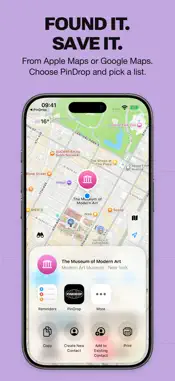
Save, plan and share locations. Turn places you want to visit into guides you can actually use. Keep a weekend plan, a collection of cafés or your next city trip together in PinDrop. SAVE A PLACE WHEN YOU FIND IT Search inside PinDrop, select a place on the built-in Apple Maps map, or share a location from Apple Maps or Google Maps. Import a photo or screenshot, check the name and address, and save the place to a list. Add your own map point when the place you need is missing. SEE THE WHOLE PLAN Open a guide to see its places together on the map. Filter by category, search within a list, sort your stops and mark the places you have visited. Move or copy places between guides as your plans change. KEEP THE LITTLE DETAILS Save shared list notes for meeting points, packing lists and ideas. Pin a note, add useful links or keep a short description with each place. MAKE ROOM FOR EVENTS Mark any saved place as a personal event with its own name, date and time. Import a calendar event or an ICS file and keep the venue with the plan. Events have their own filter, so they are easy to find. PLAN TOGETHER Share a list through iCloud and edit it with the people you invite. List history shows who added or changed what, with names, avatars and timestamps. Optional notifications keep you up to date. Changes are saved locally before syncing. TAKE YOUR PLACES WITH YOU Use PinDrop on iPhone and iPad. On iPad, a floating list panel leaves room to explore the map. iCloud features require an available iCloud account and network connection. Map search and directions use Apple Maps or Google Maps. START FREE, GO FURTHER WITH PLUS Two personal lists are free, with all features. Get PinDrop Plus when you need more room: unlimited personal lists with Family Sharing for up to six people. Lists shared with you by someone else do not count toward your two-list limit. Choose Plus Monthly, Plus Yearly or Plus Lifetime. All three unlock unlimited personal lists and support Family Sharing. Lifetime is a one-time purchase with no automatic renewal. Monthly and Yearly are auto-renewable subscriptions; Yearly is charged in full once a year. Localized prices are shown before purchase. Payment is charged to your Apple Account on confirmation. Subscriptions renew automatically unless cancelled at least 24 hours before the period ends. Manage or cancel them in your Apple subscription settings. Restore Purchases is available if you reinstall PinDrop or use another device. Buying Lifetime does not cancel an existing subscription; manage its renewal separately with Apple. If Plus expires, choose two personal lists to keep editing. Other lists remain readable, exportable and deletable. Nothing is automatically deleted. Terms of Use: https://www.apple.com/legal/internet-services/itunes/dev/stdeula/ Privacy Policy: https://subliminalmemories.com/pindrop/ STREET ILLUSTRATIONS Street illustration data © OpenStreetMap contributors, available under the Open Database Licence (ODbL). https://www.openstreetmap.org/copyright
What's New
Version 1.1.1 2026-11-07
Bug fixes Technical Analysis
Package Overview Basic metadata
Bundle ID
com.peterolofsson.PinDrop Current Version 1.1.1
Minimum iOS 26.0
Package Size App Store Size
Package Metadata 0 / 0 version records
Detailed binary, privacy manifest, framework, and Info.plist results have not been indexed for this package yet. The verified App Store and archive metadata above remains available.
Known Version Records
0 version records with stored package metadata
Stored metadata does not guarantee a package is currently available to download.
| Details | Version / IDs | Version date | Action |
|---|