
Preview




Description
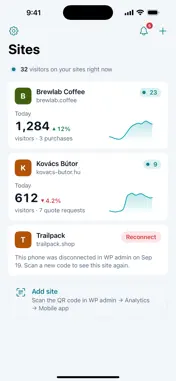
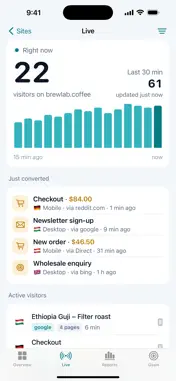
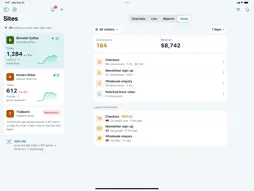
Must-Have Analytics brings the statistics of your WordPress sites to your iPhone and iPad. Connect any site that runs the Must-Have Analytics plugin by scanning a QR code in WP admin, and see what is happening on it at a glance. WHAT YOU GET • Overview: visitors, pageviews, bounce rate and conversions compared with the previous period, a clear chart, and your top pages, traffic sources, countries and devices. • Live: who is on your site right now, what they are reading, where they came from, and the conversions that just happened. • Reports: pages, landing and exit pages, traffic sources, UTM campaigns, countries, devices, goals, site search and WooCommerce reports. • Filters: the same filters as in WP admin – traffic source, UTM, country, device, pages, visitor type, goals and events. • Views: save a set of filters with a date range, such as "Reddit ads" or "Returning buyers", and switch between them with one tap. • Goals: conversions, conversion rate and revenue for every goal. • Notifications: get notified about new orders, refunds, sign-ups, goal conversions, traffic spikes or when tracking stops – every time, hourly or in a daily summary, with quiet hours. • Activity: one feed of the latest conversions and events across all your sites. PRIVATE AND SECURE Your analytics stay on your own WordPress site. The app reads them directly from your site with a read-only key that never leaves your phone, no passwords are shared, and you can disconnect a phone at any time in WP admin. REQUIREMENTS The Must-Have Analytics WordPress plugin (version 1.0.5 or later) with an active licence on each site you want to connect.
What's New
Version 1.0.1 2026-10-03
• Report charts: reports show the same charts as in WordPress admin • Sessions: browse sessions and tap a conversion or an active visitor to see every page, goa... Technical Analysis
Package Overview Basic metadata
Bundle ID
com.musthaveplugins.analytics Current Version 1.0.1
Minimum iOS 17.0
Package Size App Store Size
Package Metadata 0 / 0 version records
Detailed binary, privacy manifest, framework, and Info.plist results have not been indexed for this package yet. The verified App Store and archive metadata above remains available.
Developer Information
Known Version Records
0 version records with stored package metadata
Stored metadata does not guarantee a package is currently available to download.
| Details | Version / IDs | Version date | Action |
|---|