
Preview


Description
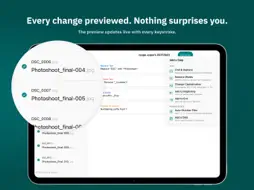
Umbe is a focused, modern batch file renamer for iPad. Import any number of files, build a stack of rename rules, and watch the new names update live as you work. When everything looks right, hit Rename. Done. --- BUILT FOR REAL WORKFLOWS Photographers coming home from a shoot. Online sellers naming product photos. Parents finally organising years of family pictures. Document wranglers taming a folder of client invoices. These are the people Umbe is made for — people who need to rename a hundred files consistently, repeatedly, and without fiddling with the Files app one by one. --- STACK RULES, BUILD PIPELINES Every rename is a pipeline. Add as many rules as you need, in any order, and Umbe applies them in sequence to every file: • Replace Text — find and replace any string in the filename • Add Prefix / Add Suffix — prepend or append any text • Number Sequence — auto-number files with configurable start, step, padding, and separator • Change Case — lowercase, UPPERCASE, Title Case, or camelCase • Remove Text — strip a pattern from every filename at once • Date (Fixed) — stamp files with a specific date in any format • Date from Metadata — pull the EXIF date-taken from photos and use it in the name --- LIVE PREVIEW — ALWAYS ON The preview column updates the instant you change anything. You see the exact output name for every file before anything is touched. Conflicts — two files that would end up with the same name — are flagged inline in red so you can fix them first. --- PRESETS FOR REPEATING JOBS Save any rule stack as a named preset and reapply it in one click next time. Presets are stored locally on your iPad, not in the cloud. --- UNDO ANYTHING Made a mistake? One click undoes the entire batch rename and restores every original filename, right in the same session. --- NATIVE AND PRIVATE Umbe is a native iPad app built in SwiftUI. No subscription, no account, no internet connection required. Your files stay on your device. --- PERFECT FOR: • Photographers: DSC_0001.JPG → Iceland-2026-03-14-001.jpg • Online sellers: photo.jpg → ceramic-mug-blue-large-01.jpg • Document organisers: scan.pdf → 2026-03-14_invoice_acme.pdf • Family archivists: IMG_4821.jpg → 2018-Christmas-001.jpg
What's New
Version 1.1 2026-06-12
- Several under-the-hood improvements for performance and usability. Technical Analysis
Package Overview Basic metadata
Bundle ID
Alley-Cat.Umbe Current Version 1.1
Minimum iOS 26.0
Package Size App Store Size
Package Metadata 0 / 2 version records
Detailed binary, privacy manifest, framework, and Info.plist results have not been indexed for this package yet. The verified App Store and archive metadata above remains available.
Developer Information
Known Version Records
0 version records with stored package metadata • 2 known version records
Stored metadata does not guarantee a package is currently available to download.
| Details | Version / IDs | Version date | Action |
|---|---|---|---|
| Not archived | App Store ID: 886532812 | Unknown | Paid / Arcade |
| Not archived | App Store ID: 886396217 | Unknown | Paid / Arcade |