Preview



Description
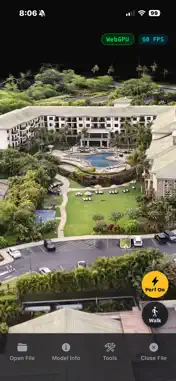
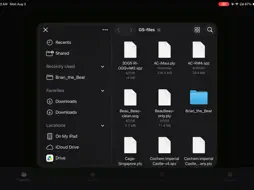
3DGS Viewer is a fast, private, fully offline viewer for 3D Gaussian Splatting scenes. Open your captures straight from your device and explore them in crisp, real-time 3D — no account, no cloud, no internet connection required. Built as a native rendering engine (not a web wrapper), it reads raw splat files directly from memory for instant loading and smooth navigation, even on scenes with millions of splats. WHY YOU'LL LOVE IT • Truly offline & private — no servers, no sign-in, no tracking, no data collection. Your 3D files never leave your device. • Broad format support — uncompressed .ply and .splat, plus compressed .spz (versions 1–4) and .sog. • Fast GPU rendering — WebGPU compute accelerates splat sorting where available, with automatic WebGL2 fallback on older devices. • Crisp, artifact-free edges — a custom viewing system removes the spiky shapes that ruin straight lines on balconies, railings and buildings. • Handles huge scenes — open multi‑million‑splat models with an adjustable Splat Limit to balance detail and performance. • View-dependent color — optional spherical-harmonics rendering (SPZ v4) for richer reflections and highlights. • Walk mode — move through your scene in first person. • Capture & share — save high-resolution photos, or record turntable and cinematic flythrough videos (MP4/H.264) straight to your Photos library. • Level & orientation tools — straighten a tilted scene or flip it right-side up in one tap. • Battery & thermal aware — the render loop eases off during static viewing to reduce power draw. OPEN FILES THE EASY WAY (iOS) Tap Open File and pick from Apple's Files screen — it shows every provider you have (On My iPhone/iPad, iCloud Drive, Google Drive, Dropbox, and more). ONE-TIME PURCHASE — NO SUBSCRIPTIONS, NO ADS Pay once and own it. Every feature is included — no subscriptions, no ads, no in-app purchases, and no data collection. PERFECT FOR Photogrammetry and 3D-scanning enthusiasts, real-estate and architecture visualization, VFX and research workflows, and anyone who wants to view Gaussian Splat captures on the go — completely offline. Questions or feedback? Email [email protected]
What's New
Version 1.5.7 2026-10-07
Improved Video and Photo capture and export quality. Speed and stability improvements. Technical Analysis
Package Overview Basic metadata
Bundle ID
com.abacusai.gsviewerios.t1785261945 Current Version 1.5.7
Minimum iOS 15.1
Package Size App Store Size
Package Metadata 0 / 0 version records
Detailed binary, privacy manifest, framework, and Info.plist results have not been indexed for this package yet. The verified App Store and archive metadata above remains available.
Developer Information
Known Version Records
0 version records with stored package metadata
Stored metadata does not guarantee a package is currently available to download.
| Details | Version / IDs | Version date | Action |
|---|