
Preview




Description
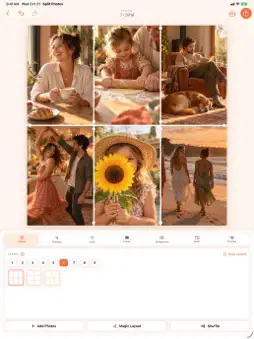
Turn your photos and clips into beautiful collages in seconds. Pick a layout, drop in your photos, and Split Photo does the rest — portraits land in tall slots, landscapes in wide ones, and faces are framed automatically. Then make it yours with Looks, text, stickers, frames and backgrounds, and export at the perfect size for wherever you're sharing. LAYOUTS FOR EVERY MOMENT • Grids, diagonals and hero layouts for 1 to 9 photos • Drag the dividers to reshape any layout, or tilt them for angled splits • Magic Layout picks the template that fits your shots best • Hearts, stars, circles and more for something special FAST TO FILL • Add up to 9 photos at once — each one placed where it fits • Browse your library beside the canvas and drag photos straight into slots • Make a collage right from the Photos share sheet, or ask Siri MAKE IT YOURS • Colour Looks — Vivid, Warm, Mono, Film and more — on one photo or the whole collage • Text, emoji, editorial stickers, frames, textures and date stamps • Solid, gradient and photo-blur backgrounds, borders and rounded corners • Every aspect ratio, from square to Story VIDEO COLLAGES • Mix video clips and Live Photos with your stills • Trim each clip, play them together or in order, and export as MP4 AT HOME ON EVERY SCREEN • iPhone, iPad and Mac — including iPhone Duo, with your collage and tools side by side when it's open • On Mac: menu bar commands, keyboard shortcuts, and save straight to a file • Available in English, Spanish, French, German, Japanese, Chinese, Korean, Portuguese and Italian SPLIT PRO — ONE PURCHASE, NO SUBSCRIPTION, NO ADS Free includes every standard layout, overlay and background. Split Pro is a single lifetime unlock that adds: no watermark, video collages, 4K and print export, special shapes, every Look, unlimited drafts synced through iCloud, and your own saved layouts. Buy once, use it on all your devices. Create, customise and share your favourite moments with Split Photo.
What's New
Version 1.2 2026-10-22
• Frames now take your background colour — gradients and photo blur included — and scalloped and stamp edges can be transparent, white or black • Location stamp... Technical Analysis
Package Overview Basic metadata
Bundle ID
peterlgray.Split-Photos Current Version 1.2
Minimum iOS 18.6
Package Size App Store Size
Package Metadata 0 / 0 version records
Detailed binary, privacy manifest, framework, and Info.plist results have not been indexed for this package yet. The verified App Store and archive metadata above remains available.
Known Version Records
0 version records with stored package metadata
Stored metadata does not guarantee a package is currently available to download.
| Details | Version / IDs | Version date | Action |
|---|