Preview




Description
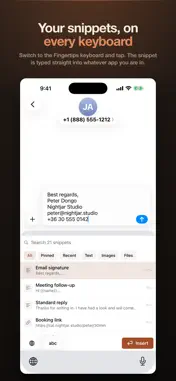
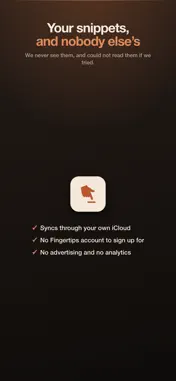
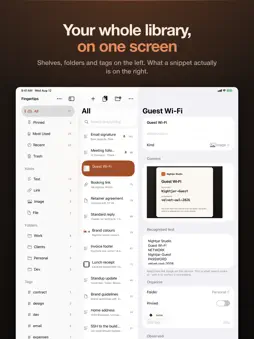
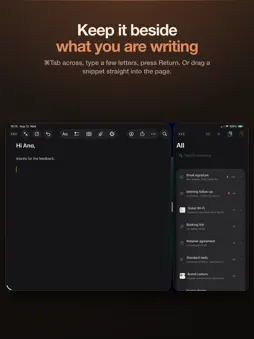
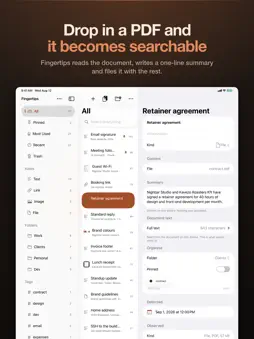
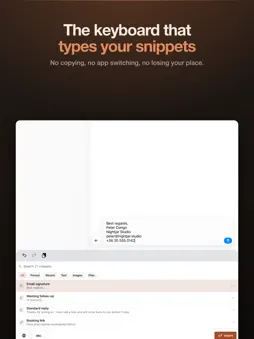
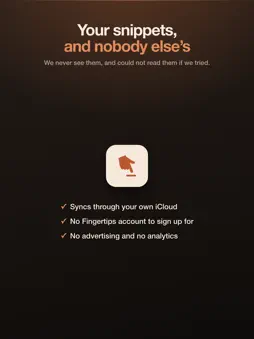
Switch to the Fingertips keyboard and tap. The snippet is typed straight into whatever app you are in - no copying, no app switching, no losing your place. On iPad, keep Fingertips open beside your work and drag snippets straight across into what you are writing. Fingertips keeps the text, images and files you send over and over - your signature, your address, the paragraph you rewrite every week - in one place, and hands them back wherever you are typing. FINDS WHAT YOU SAVED Type a few letters and the right snippet is already at the top. Five thousand snippets stay fast, because the speed budgets were written down before the first line of code. UNDERSTANDS WHAT YOU SAVED Save a screenshot and find it later by a word that only appears inside the image. Titles and tags are suggested for you. All of it runs on your device using Apple's own on-device models - nothing is sent away to be read. TEMPLATES THAT ASK A snippet can have named blanks. Use it and Fingertips asks for the two things that change, then fills in the rest. Dates and the current clipboard fill themselves in. BUNDLES Select a cover note, a PDF and your signature and make them one bundle. Copy it and all of it goes at once. Where only one thing can be pasted at a time, step through it item by item, in the app or from the Fingertips keyboard on iPhone and iPad. FORMATTING THAT STAYS Bold, italics and links are kept, and paste formatted wherever formatting is accepted. Remove Formatting turns a snippet back into plain text. KEEPS ITSELF TIDY Folders, tags and smart shelves. Drag a snippet onto a folder to file it, or select several and pin, tag, move or copy them together. Deleting puts a snippet in the trash for thirty days, because this is where people keep the only copy of something they wrote once. BRING WHAT YOU HAVE Moving from TextExpander, Raycast or Alfred, or from your text replacements? Import the snippets you exported, abbreviations and fill-ins included. Each import is tagged with the app it came from, and one Undo takes it back. EVERYWHERE YOU WORK Widgets put the snippets you pick one tap away, or the ones you use most if you would rather not choose. Spotlight searches them. Shortcuts and App Intents can reach every text snippet and link, so your automations can use them too. YOURS, NOT OURS Your snippets sync between your devices through your own private iCloud database. That is your Apple Account - there is no Fingertips account to sign up for, no server of ours holding your data, and no advertising or analytics tracking. We never see your snippets and could not read them if we tried. WHAT IT COSTS Free for fourteen days with nothing held back. Then $9.99 once, covering Mac, iPad and iPhone forever. No subscription. A NOTE ON THE KEYBOARD The Fingertips keyboard asks for Full Access, and the reason is dull: without it a keyboard extension cannot read the snippets the app saved for it. It is not permission to watch you type. Nothing you type is logged, stored or sent anywhere.
What's New
Version 1.4.0 2026-10-01
New in 1.4 Import from the app you're leaving. Choose Import Snippets from the ⋯ (iPhone: Library) menu and pick a file exported from TextExpander, Raycast or ... Technical Analysis
Package Overview Basic metadata
Bundle ID
app.fingertips Current Version 1.4.0
Minimum iOS 26.0
Package Size App Store Size
Package Metadata 0 / 0 version records
Detailed binary, privacy manifest, framework, and Info.plist results have not been indexed for this package yet. The verified App Store and archive metadata above remains available.
Developer Information
Known Version Records
0 version records with stored package metadata
Stored metadata does not guarantee a package is currently available to download.
| Details | Version / IDs | Version date | Action |
|---|