
Preview

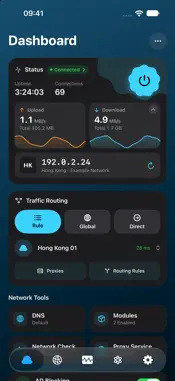


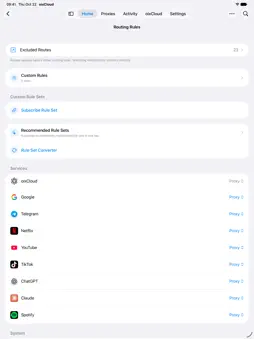
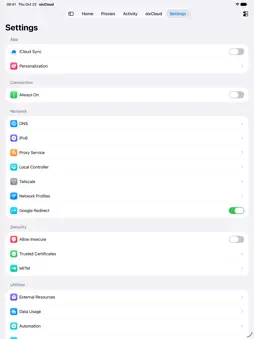
Description
oixCloud is a native proxy client for iPhone and iPad. Manage your servers and subscriptions, choose how traffic is routed, and connect from one place. CONNECTIONS AND SUBSCRIPTIONS Import supported configurations by link, file or QR code. Test server latency, switch nodes and organize subscriptions, proxy chains and policy groups. Supports protocols including Shadowsocks, VLESS, Trojan, Hysteria2, SOCKS5, Snell and AnyTLS. ROUTING AND NETWORK TOOLS Choose rule-based, global or direct routing. Configure rule sets, DNS, ad blocking and direct routing for selected regions. Always On uses the system's on-demand VPN connection. Connection events and diagnostics help investigate network problems. TAILSCALE Connect to your tailnet from the app, with support for MagicDNS, subnet routes, exit nodes and compatible self-hosted Headscale servers. RULES AND MODULES Import supported modules and manage their rules and scripts. Optional MITM features inspect and rewrite selected traffic on your device after you enable them and trust the required certificate. Only install scripts from sources you trust: scripts can make their own network requests. iCLOUD AND APPLE TV Choose which categories to sync between your iPhone and iPad: proxies, rules, modules, MITM, automation, settings and account. View sync status and use Sync Now; Recently Deleted can restore nodes and subscriptions deleted on this device within three days. Sync to Apple TV is a separate switch. Publish proxies, subscriptions, chains, policy groups, rule sets and your oixCloud sign-in to Apple TV using the same Apple Account. Apple TV keeps its own connection and routing settings and does not receive modules. For sync compatibility, update all participating devices to 1.34 or later; versions 1.33 and earlier use a different sync system. STRICT NO-LOGS POLICY The oixCloud service does not collect or record your traffic contents, visited websites or DNS queries. Local connection diagnostics help with troubleshooting; diagnostic packages you choose to export may contain anonymized connection metadata. Optional iCloud sync stores the configuration categories you enable. Your chosen server provider and third-party scripts may have their own data practices. Use your own compatible servers and subscriptions, or sign in to an existing oixCloud account to retrieve managed nodes. Server access and any related service charges depend on your provider.
What's New
Version 2.5.2 2026-11-14
Configuration and Import: Support common sing-box JSON/JSONC proxies, policy groups, routes and rule sets. Improve Clash, Surge, text and extensionless rule sub...Configuration and Import: Support common sing-box JSON/JSONC proxies, policy groups, routes and rule sets. Improve Clash, Surge, text and extensionless rule subscription compatibility while preserving TLS version bounds and certificate or public-key SHA-256 pins Proxies and Protocols: Add WireGuard, Direct proxies, Plain TLS fingerprints and file/AJSON imports, plus CDN support for AnyTLS. Refine Hollow naming and traffic multiplier, HTTP/3, WARP and CDN labels. Long proxy lists on iPhone and iPad can collapse by group Rules and Policies: Organize routing rules on iPhone and iPad into Services, Custom and Settings, with direct access to matching priority. Add optional enhanced rules for a specific service, disabled by default and using the same enable/disable controls and target picker as other services. When enabled, these rules take priority over all other routing rules and block UDP STUN; shared-service rules may also affect other apps. By default, module rules in compatible formats such as Surge take precedence over custom rule sets and regular built-in rules, while preserving manually customized ordering. Correct automatic Tailscale routing priority. Route to proxies, policy groups or chains, with policy groups available at every chain hop. Auto Select and Smart move away from failing or unresponsive proxies more promptly. Improve large rule-set memory handling with a shared 200,000-rule limit for enabled custom rule sets Subscriptions: Reorder proxies and retain that order after updates. Add shortcuts for sharing and updating subscriptions. Respect automatic update intervals and keep existing configurations through temporary outages or service errors DNS and Apple TV: Refine global and per-domain DNS settings and iCloud delivery from iPhone or iPad to Apple TV. Apple TV offers an independent DNS sync switch and local editing when sync is off. Improve timeout and dual-stack address handling Latency and Diagnostics: Use the median of multiple round trips and retain individual results. Distinguish DNS, connection, TLS and latency-test failures, and identify common network protocols in request diagnostics. Fix Network Check remaining unavailable after connection status changes on iPhone and iPad Scripts and MITM: Support full jq 1.7 and Loon JSON rewrites. Allow MITM request scripts to rewrite URLs across origins. Refine certificate rejection handling, wildcard exclusions and client-source controls. Request cancellation no longer incorrectly disables decryption Logs and Interface: Clarify native module labels (.amod). Search, filter, pause and inspect logs on iPhone and iPad. Group script history by execution with timing, results and issue summaries. Refine list editing, proxy filters and Traditional Chinese for Hong Kong Accounts and Sync: Preserve custom routing order when syncing through iCloud. Require an email verification code for account deletion on iPhone and iPad. Try available routes during service outages and preserve newer settings and selections during refresh and iCloud sync, preventing stale devices from overwriting changes. Review and apply a recommended node filter after signing in when one is available Connections and Stability: Improve VPN recovery after unexpected disconnections, network changes, Wi-Fi/cellular transitions and background suspension. Fix idle AnyTLS CDN disconnections, configuration saving, resource cleanup and cancellation affecting later name resolution. Refine Wi-Fi Direct gateway DNS handling. Refresh saved tunnel settings when starting from Control Center, widgets or Shortcuts. After updating, open the app while disconnected or reconnect through one of these entries or the app to refresh existing settings Local Network: Fix some iPhone and iPad configurations that routed local network traffic through the VPN Technical Analysis
Package Overview Basic metadata
Bundle ID
com.oixcloud.app Current Version 2.5.2
Minimum iOS 18.0
Package Size App Store Size
Package Metadata 0 / 0 version records
Detailed binary, privacy manifest, framework, and Info.plist results have not been indexed for this package yet. The verified App Store and archive metadata above remains available.
Developer Information
Known Version Records
0 version records with stored package metadata
Stored metadata does not guarantee a package is currently available to download.
| Details | Version / IDs | Version date | Action |
|---|