Preview




Description
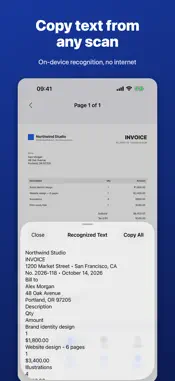
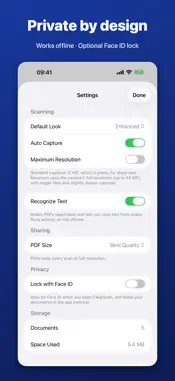
ClearScan turns paper into clean, searchable PDFs, and it does everything on your iPhone. No account, no subscription, no cloud. Buy it once and it's yours. SCAN IN SECONDS • Point the camera at a page: ClearScan finds the edges and captures automatically as soon as you hold still. Move to the next page and it captures again. • Shot at an angle? Pages are straightened and keep their real proportions, so an A4 sheet still looks like an A4 sheet. • Sideways or upside down? Pages are turned upright automatically. • Need a perfect crop? Drag the corners with a built-in magnifier. • Start scanning instantly: press and hold the app icon, ask Siri, or put "Scan Document" on the Action button. SCANNER-QUALITY PAGES • Enhanced mode removes shadows and uneven light for crisp black text on white paper. • Choose Enhanced, Original, Gray or Black & White for each page. • Standard 12 MP captures, or the camera's full resolution for fine print. SEARCHABLE TEXT • Text is recognized on the device, so every PDF you share is searchable and copyable. • Search your library by document name or by any word inside your scans. • Copy the recognized text of any page with one tap. ORGANIZE AND MERGE • Merge several scans and PDFs into one document, in the order you choose. • Touch and hold a page, then drag it into place: other pages move aside as you go. • Move pages to another document or split them into a new one. • Import PDFs and pictures from Files, Photos, Mail or any app's Share menu, even long PDFs with hundreds of pages. SHARE THE WAY YOU NEED • Share a searchable PDF, save it to Files or iCloud Drive, or share pages as images or text. • Smaller File mode makes PDFs about a quarter of the size to fit email attachment limits. • Password-protect a PDF before you send it: it can only be opened with your password. • PDFs are prepared in the background, so sharing is instant. PRIVATE BY DESIGN • Works fully offline. ClearScan never connects to the internet. • No account, no ads, no tracking, no data collected. • Optional Face ID lock, and documents are hidden in the app switcher. Questions or ideas? https://pltnkv.cc/clearscan/support/ Privacy Policy: https://pltnkv.cc/clearscan/privacy/
What's New
Version 1.1 2026-11-11
• Password-protected PDFs: choose Share Password-Protected PDF in a document's menu. The PDF opens only with your password, and ClearScan never stores it. • Sca...• Password-protected PDFs: choose Share Password-Protected PDF in a document's menu. The PDF opens only with your password, and ClearScan never stores it. • Scan in one step: press and hold the ClearScan icon and choose Scan Document, or say "Scan with ClearScan" to Siri. The Scan Document shortcut also works from Spotlight, the Shortcuts app and the Action button. Technical Analysis
Package Overview Basic metadata
Bundle ID
com.pavel.clearscan Current Version 1.1
Minimum iOS 17.0
Package Size App Store Size
Package Metadata 0 / 0 version records
Detailed binary, privacy manifest, framework, and Info.plist results have not been indexed for this package yet. The verified App Store and archive metadata above remains available.
Developer Information
Known Version Records
0 version records with stored package metadata
Stored metadata does not guarantee a package is currently available to download.
| Details | Version / IDs | Version date | Action |
|---|