
Preview





Description
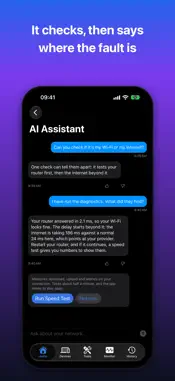
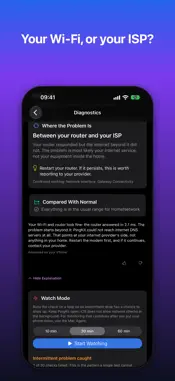
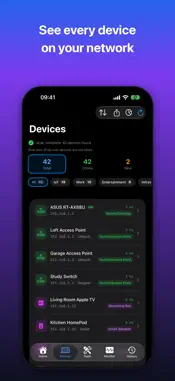
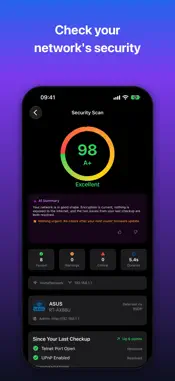
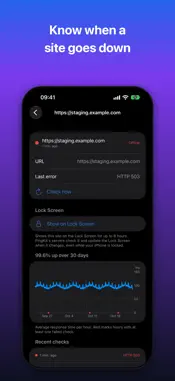
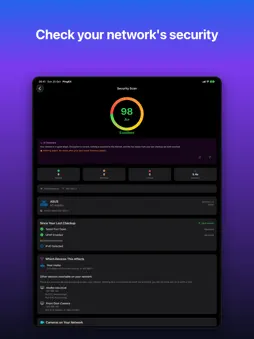
Watch your home network from a device of your own that stays on, such as a Raspberry Pi, a NAS, a computer with Docker or Home Assistant, and get the alert on your iPhone with Guardian. The PingKit Agent for Docker and Raspberry Pi is free to run, and so are its status and the last 24 hours of its timeline on your iPhone. PingKit is a network scanner, Wi-Fi speed test, ping test and uptime monitor for your own network: 19 tools, free, no ads, no account. Is it your Wi-Fi, or is it your ISP? PingKit Guardian finds out, with a 1-week free trial. It tests your iPhone, your network, your router and the internet beyond it, and says in plain words where the problem is and what to do. Uptime monitor and internet-down alerts: Uptime Watch checks one website every hour free, ten sites or TCP ports every 5 minutes with Guardian, and notifies you when one goes down or recovers. The companion Mac Agent, while awake, records when your home internet went down and came back and alerts your iPhone. Devices on your network are found automatically and named from what they announce. Ask "Why is my internet slow?" and get a real answer. GUARDIAN ($2.99/mo): • Alerts from your agent on your iPhone, and an outage on your Lock Screen as a Live Activity • Your agent's dashboard: devices, the full timeline, outages, loss and latency, speed tests • Internet Outage Report: your dated outages, ready to show your ISP • Where the problem is: your device, network, router, ISP, or beyond • Fix It walkthrough: an ordered checklist for your router • Uptime Watch: 10 sites or TCP ports, checked every 5 minutes • Cert Monitor: 5 domains, with expiry alerts • Session Watch: game regions, two-hour sessions, lag under load and where it is • Router mode: every port your router forwards from the internet • Cameras on your network, and whether each answers from the internet • Wake from anywhere through your Mac, with a Control Center button • Watch Mode, trends per network, what changed since your last checkup • Mac Agent monitoring while your Mac is awake: a morning briefing, alerts for the devices you choose, a scan or speed test from anywhere • 90 days of history from your Mac and your agent • The assistant answers through Apple Private Cloud Compute • Private iCloud sync between the Mac Agent and your iPhone GUARDIAN PLUS ($9.99/mo): • Cert Monitor: 50 domains • Alerts by email, with a Monday summary, or to a webhook • Sleep, restart and shut down your Macs and Linux machines • Four- and eight-hour gaming sessions, history as a spreadsheet • Several Macs, up to 5 agents, 365 days of history, and up to 5 household phones per agent • Scheduled reports and the signed ISO 27001 Compliance PDF • Everything in Guardian 19 FREE TOOLS: Smart Diagnostics, Speed Test, Ping, Visual Traceroute, MTR, Connection Monitor, Port Scanner, Bonjour Browser, Security Scan, Device Discovery, My Network, DNS Lookup, Whois, IP Geolocation, SSL Inspector, HTTP Analyzer, Subnet Calculator, Wake-on-LAN, Network Interfaces. AI THAT EXPLAINS YOUR NETWORK: Answers are written on your iPhone by Apple Intelligence where your iPhone and language allow, or with Guardian by Apple Private Cloud Compute. AI explanations and the assistant are free without a subscription: answers written on your iPhone are unlimited, and PingKit's own service gives you 15 a week, up to 5 a day. PRIVACY FIRST: All 19 tools run on your device. No accounts, no tracking, no advertising. The Mac Agent syncs through your personal iCloud. When an answer needs PingKit's own service, PingKit asks first, and you can withdraw that permission at any time. PingKit Guardian: $2.99/mo or $24.99/yr. Guardian Plus: $9.99/mo or $79.99/yr. 1-week free trial on every plan. Cancel anytime. Terms of Use: https://www.apple.com/legal/internet-services/itunes/dev/stdeula/ Privacy Policy: https://pingkit.app/privacy-policy.html Terms of Service: https://pingkit.app/terms-of-service.html
What's New
Version 4.0.0 2026-11-14
PingKit 4.0 watches your home network from a device of your own that stays on. - Pair the PingKit Agent for Docker and Raspberry Pi, on a Raspberry Pi, a NAS, ...PingKit 4.0 watches your home network from a device of your own that stays on. - Pair the PingKit Agent for Docker and Raspberry Pi, on a Raspberry Pi, a NAS, a computer with Docker or Home Assistant. Running it is free, and so are its status and its last 24 hours on your iPhone. - With Guardian, your agent tells your iPhone when the internet goes down and comes back, when a new device joins, and when a device you chose goes offline. - With Guardian, an outage shows on your Lock Screen and in the Dynamic Island as a Live Activity, and your home network shows in a widget, in Control Center and on your Apple Watch. - Internet Outage Report, with Guardian: your dated outages, ready to show your ISP. - Ask Siri: "Is my home internet up with PingKit?" - Guardian Plus: up to 5 agents, each with up to 5 iPhones in your household. - No agent yet? Open the demo agent from the Monitor tab. - Plus smaller fixes and improvements. Technical Analysis
Package Overview Basic metadata
Bundle ID
com.networkutility.app Current Version 4.0.0
Minimum iOS 17.0
Package Size App Store Size
Package Metadata 1 / 20 version records
Detailed binary, privacy manifest, framework, and Info.plist results have not been indexed for this package yet. The verified App Store and archive metadata above remains available.
Developer Information
Known Version Records
1 version record with stored package metadata • 20 known version records
Stored metadata does not guarantee a package is currently available to download.
| Details | Version / IDs | Version date | Action |
|---|---|---|---|
| 22.48 MB | v2.1.3 App Store ID: 890127613Build: 2.1.3 | 2026-09-02 09:10:44 | Get Version |
| Not archived | App Store ID: 890030395 | Unknown | Request Version |
| Not archived | App Store ID: 889976595 | Unknown | Request Version |
| Not archived | App Store ID: 889832824 | Unknown | Request Version |
| Not archived | App Store ID: 889797058 | Unknown | Request Version |
| Not archived | App Store ID: 887848793 | Unknown | Request Version |
| Not archived | App Store ID: 887809309 | Unknown | Request Version |
| Not archived | App Store ID: 887511039 | Unknown | Request Version |
| Not archived | App Store ID: 887204440 | Unknown | Request Version |
| Not archived | App Store ID: 886809401 | Unknown | Request Version |
| Not archived | App Store ID: 886730533 | Unknown | Request Version |
| Not archived | App Store ID: 884368345 | Unknown | Request Version |
| Not archived | App Store ID: 884054433 | Unknown | Request Version |
| Not archived | App Store ID: 883951909 | Unknown | Request Version |
| Not archived | App Store ID: 883881016 | Unknown | Request Version |
| Not archived | App Store ID: 883713584 | Unknown | Request Version |
| Not archived | App Store ID: 883488802 | Unknown | Request Version |
| Not archived | App Store ID: 883121900 | Unknown | Request Version |
| Not archived | App Store ID: 883015164 | Unknown | Request Version |
| Not archived | App Store ID: 882544177 | Unknown | Request Version |