Preview



Description
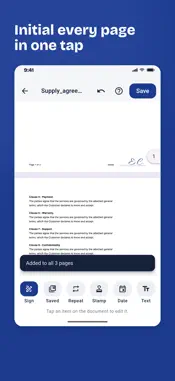
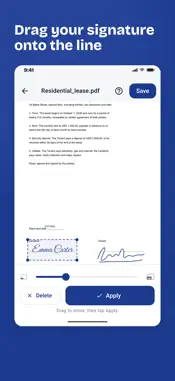
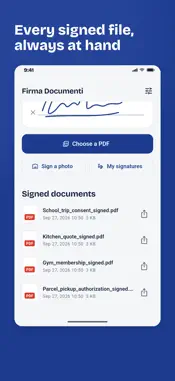
Sign contracts the way many European businesses still require: stamp and signature, initials on every page, approval of specific clauses. From your iPhone, in a minute, with no printer and no account. BUILT FOR PEOPLE WHO SIGN CONTRACTS • Company stamp: company name, address and VAT number in a double-framed stamp, in blue, red or black ink. Create it once and place it under your signature • Initial every page: place your initials once and "Every page" puts them in the same spot on all pages • Clause approval: a ready-made formula to specifically approve clauses (Italian Civil Code arts. 1341-1342), then add the second signature • "Read and approved", "Accepted", place and date in one tap HOW IT WORKS 1. Open a PDF from Mail, WhatsApp or Files with "Open in", pick a file, or scan a sheet of paper with the camera. 2. Sign with your finger, or type your name and pick a handwriting style. 3. Add the stamp, initials, date and text, then save and send. SCAN AND SIGN • Built-in scanner: frame the page, edges are cropped and straightened, several pages become one PDF • Sign JPG and PNG photos too SIGN YOUR WAY • Draw your signature in blue, black or green ink, with three pen sizes • Or type it: three handwriting styles ready to use • Save up to 5 signatures and reuse them with one tap • Move and resize each item before applying it; Undo also removes initials placed on every page EVERYTHING STAYS ON YOUR PHONE Documents are never uploaded: the app works offline and the developer never sees your files. Signed files are in the app archive and in Files > On My iPhone. FREE, WITH A CHOICE Free with unobtrusive ads. Remove them forever with a single purchase, no subscription. Note: the app places an image of your handwritten signature and stamp on the PDF (simple electronic signature). It does not replace a qualified digital signature required for some official filings.
Technical Analysis
Package Overview Basic metadata
Bundle ID
com.firmadocumenti.app Current Version 2.1.0
Minimum iOS 13.0
Package Size App Store Size
Package Metadata 0 / 0 version records
Detailed binary, privacy manifest, framework, and Info.plist results have not been indexed for this package yet. The verified App Store and archive metadata above remains available.
Developer Information
Known Version Records
0 version records with stored package metadata
Stored metadata does not guarantee a package is currently available to download.
| Details | Version / IDs | Version date | Action |
|---|