
Preview

Description
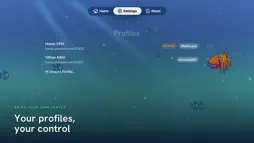
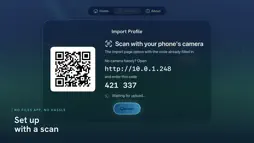
Cuttlefish turns your Apple TV into a private device with a single switch. It's an always-on VPN client for any WireGuard® or AmneziaWG server you run yourself — your home router, a self-hosted box, or a privacy-router appliance. Flip the big switch on the Home screen and your whole Apple TV is protected: every app's traffic flows through the encrypted tunnel you control. Flip it off and you're back to normal. No accounts. No subscriptions. No servers of ours. Cuttlefish connects only to the server you configure, and collects nothing about you. BRING YOUR OWN SERVER Cuttlefish doesn't sell VPN service — it connects to yours. Paste or upload a standard WireGuard or AmneziaWG .conf profile and you're set. Full WireGuard and AmneziaWG support! IMPORT WITHOUT A KEYBOARD Apple TV has no Files app, camera, or comfortable text entry — so Cuttlefish runs a tiny, temporary importer on your local network. Open the link on your phone or laptop (or scan the on-screen QR code), enter the six-digit code, and upload your profile. The importer runs only while that screen is open and never touches the internet. ONE BIG SWITCH The Home screen answers the only question that matters from the couch: is my VPN on? A single oversized switch connects and disconnects, with a clear status line, live upload/download counters, and how long you've been protected. Keep several profiles and choose which one the switch controls; switching while connected hands the tunnel over automatically. PRIVATE BY DESIGN - No analytics, no tracking, no third-party SDKs. - Your profiles and private keys are stored in the device Keychain and never leave your Apple TV through the app. - The only request Cuttlefish makes besides the tunnel itself is an optional public-IP check, and only when you tap it. REQUIREMENTS - Apple TV 4K (2017) or later, tvOS 18 or later. - A WireGuard or AmneziaWG server you control, and its .conf profile. Cuttlefish is independent and unaffiliated. WireGuard is a registered trademark of Jason A. Donenfeld.
What's New
Version 0.12.0 2026-09-16
A fresh new way to add profiles, plus DNS fixes. • Redesigned profile import: scan the QR code on your TV and you land on a new, colorful import page in Cuttle... Technical Analysis
Package Overview Basic metadata
Bundle ID
com.foobar-it.cuttlefish Current Version 0.12.0
Minimum iOS 18.0
Package Size App Store Size
Package Metadata 0 / 0 version records
Detailed binary, privacy manifest, framework, and Info.plist results have not been indexed for this package yet. The verified App Store and archive metadata above remains available.
Developer Information
Known Version Records
0 version records with stored package metadata
Stored metadata does not guarantee a package is currently available to download.
| Details | Version / IDs | Version date | Action |
|---|