Preview



Description
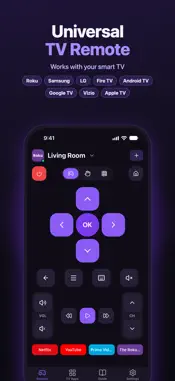
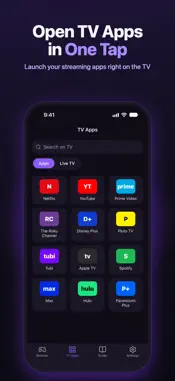
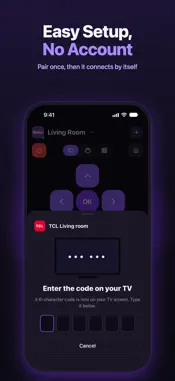
Lost the TV remote again? Use your iPhone. TV Remote is a universal remote control for your smart TV: Roku, Samsung, LG, Android TV, Google TV, Fire TV, Vizio and Apple TV. It works over your home Wi-Fi, with nothing to plug in and no account to make. WORKS WITH - Roku TVs and Roku streaming players - Samsung Smart TV (Tizen, 2016 and newer) - LG Smart TV (webOS) - Android TV and Google TV (Sony, TCL, Hisense, Philips and more) - Amazon Fire TV and Fire TV Stick - Vizio SmartCast - Apple TV EVERYTHING A REMOTE DOES, AND MORE - D-pad with OK, Back, Home and Menu - Touchpad: swipe to move and tap to select - Volume, mute, channel up and down - Play, pause, rewind and fast forward - Number pad for channels and PINs - Keyboard: type searches and passwords on the TV with your phone keyboard - Power button, and power on for Samsung and LG TVs that allow it OPEN YOUR TV APPS IN ONE TAP See the apps installed on your TV and open them right from your phone. Your favourite streaming apps sit on the remote screen for quick access. ALL YOUR TVS IN ONE APP The app finds smart TVs on your Wi-Fi by itself. Add every TV in your home, give each one a name like Living Room or Bedroom, and switch between them in a second. Each TV is paired only once. EASY SETUP 1. Connect your iPhone and TV to the same Wi-Fi. 2. Open the app and tap your TV. 3. Allow the phone on the TV, or type the code it shows. That is it. Next time the app connects by itself. HELP WHEN YOU NEED IT A built-in guide shows how to connect each TV brand, what works on your TV, and answers to common questions, like what to do if the TV is not found. PRIVATE BY DESIGN No sign up and no personal data collected. The app talks only to the TVs on your own Wi-Fi, and to the App Store to show Apple TV app pictures. Pairing keys stay on your phone. GOOD TO KNOW - Your iPhone and TV must be on the same Wi-Fi network. - When iOS asks to find devices on your local network, tap Allow. - iPhone has no infrared, so the app works with Wi-Fi smart TVs, not older TVs without Wi-Fi. TV Remote is an independent app and is not affiliated with, endorsed by, or sponsored by Roku, Samsung, LG, Google, Amazon, Vizio, Apple or any TV brand. All product names and trademarks belong to their owners and are used only to describe compatibility. Questions or ideas? Tap Contact us in Settings. We read every message.
Technical Analysis
Package Overview Basic metadata
Bundle ID
com.apps.tvremote.universal Current Version 1.0
Minimum iOS 15.1
Package Size App Store Size
Package Metadata 0 / 0 version records
Detailed binary, privacy manifest, framework, and Info.plist results have not been indexed for this package yet. The verified App Store and archive metadata above remains available.
Developer Information
Known Version Records
0 version records with stored package metadata
Stored metadata does not guarantee a package is currently available to download.
| Details | Version / IDs | Version date | Action |
|---|