
Preview


Description
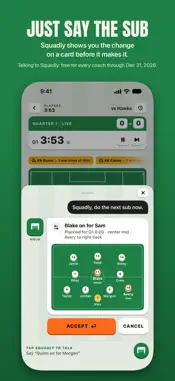
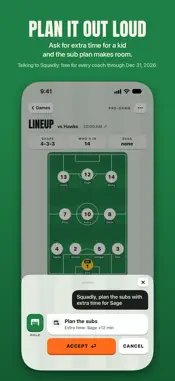
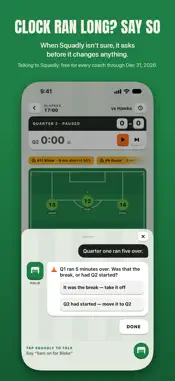
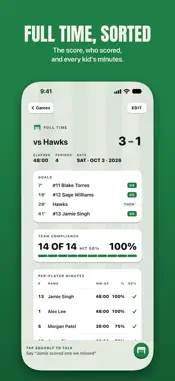
If you coach youth soccer, you know the drill: a paper roster on a clipboard, tally marks for who's played, and a nagging feeling you've left someone on the bench too long. Squadly does that counting for you. It keeps a running clock on every player's minutes, gives you a heads-up before anyone falls short of your league's playing-time rules, and answers "who's due to go in?" at a glance. You get to actually watch the game. Just say it • Press the Squadly button and talk: "Sub Maya for Leo." "Start the clock." "Quarter one ran five over." • Hand it a whole plan before kickoff: "Make our lineup, start Maya, and balance the minutes." • Ask questions too: "How many minutes has Tim got?" "Did we beat United?" • Squadly shows you every change on a card first, and asks when it isn't sure • Rather type? Type it instead On game day • A live clock with each player's minutes ticking up next to their name • Every kid's minutes at full time, while the game is still going • A fair-time meter that goes green once everyone's had their share • Warnings before a player can't mathematically reach half the game, not after • A reminder 30 minutes before kickoff, then one tap starts the clock • Live Activity, Dynamic Island and Apple Watch, so the clock's always in reach • Clock ran long? Fix it during the game or after. Overtime is its own period. Plan the subs before kickoff • Drag players across a timeline to plan the whole game, period by period • Or tap once and let Squadly plan the rotation for you • Change your mind mid-game and it replans around what's already happened • Planned subs wait for your tap • More than one plan for the same game, and kids who can only make part of it Before kickoff • Drag players into a formation to build your lineup (4-3-3, 4-4-2, whatever you run) • 5v5, 6v6, 7v7, 9v9 and 11v11, with formations for each • Set your defaults once: formation, period length, number of periods • Save the lineups and sub plans you come back to every week Your roster • Give a player every position they actually play, in the order you'd play them • Mark as many goalkeepers as you rotate. A defender who takes a turn in goal is still a defender. • Import your roster from TeamSnap, or from a CSV • See each kid's minutes, games, and fair-share record across the whole season Coach with a partner • Add an assistant coach and you both see the same roster, lineup and clock, live • Either of you can run the game from your own phone On your computer • Sign in at heysquadly.com with the same account and plan your team on a big screen • Drop in a roster or schedule from a spreadsheet, a PDF or a screenshot • Swap ideas with other coaches in Team Talk, free with every account Talking to Squadly is Squadly Pro. It's free for every coach through Dec 31, 2026. No payment needed. Nothing renews. Rosters, lineups and the game tools stay free. No ads, no trackers, and your roster stays between you and your team. Privacy Policy: https://soccerdude1812.github.io/squadly-legal/ Built for rec-league and youth-soccer coaches who want every kid to get their fair share of the field.
What's New
Version 2.0.2 2026-11-20
You can no longer end a game by accident. END GAME now always asks "End the game?" first, including late in the final quarter or half while the clock is running...You can no longer end a game by accident. END GAME now always asks "End the game?" first, including late in the final quarter or half while the clock is running. Cancel keeps the game and the clock exactly as they were. Technical Analysis
Package Overview Basic metadata
Bundle ID
app.squadly.coach Current Version 2.0.2
Minimum iOS 17.0
Package Size App Store Size
Package Metadata 0 / 0 version records
Detailed binary, privacy manifest, framework, and Info.plist results have not been indexed for this package yet. The verified App Store and archive metadata above remains available.
Developer Information
Known Version Records
0 version records with stored package metadata
Stored metadata does not guarantee a package is currently available to download.
| Details | Version / IDs | Version date | Action |
|---|