
Preview





Description
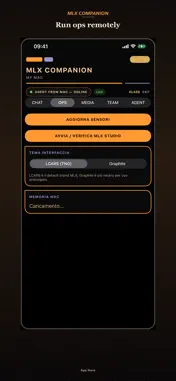
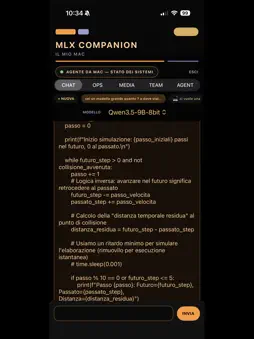
MLX Companion is the iOS client for MLX Studio on your Mac. The app does not run AI models on your phone. Chat, agent tasks, image/video generation, and collaboration run on your Apple Silicon Mac, while iPhone and iPad act as a mobile remote with a tailored UI. WHAT YOU CAN DO - Chat with MLX models loaded on your Mac - Remote agent and session history synced with the Mac web UI - Monitor operations (training, generation, jobs in progress) - Browse media generated on your Mac - Team / collaboration hub when enabled in MLX Studio - Home screen widget with Mac status (RAM, job, connection) HOW IT WORKS 1. Install and run MLX Studio on your Mac (Apple Silicon). 2. Enable MLX Link in MLX Studio's Link tab. 3. Open MLX Companion on iPhone and complete pairing (QR on the same network or MLX Link relay). 4. Use the app anywhere: fast LAN at home, MLX Link relay (HTTPS) when away. REQUIREMENTS - Mac with MLX Studio installed and running - Apple ID for App Store (no MLX account required) - Initial pairing with your Mac PRIVACY Prompts and files stay on your Mac. The app only stores a pairing token in the iOS Keychain. MLX does not run inference in a cloud service. MLX Companion is an open-source companion app for MLX Studio users. It is not a standalone cloud chatbot.
What's New
Version 1.5.2 2026-10-17
Support URL refresh, updated App Store screenshots and product page creatives. Technical Analysis
Package Overview Basic metadata
Bundle ID
app.mlxstudio.companion Current Version 1.5.2
Minimum iOS 17.0
Package Size App Store Size
Package Metadata 0 / 0 version records
Detailed binary, privacy manifest, framework, and Info.plist results have not been indexed for this package yet. The verified App Store and archive metadata above remains available.
Developer Information
Known Version Records
0 version records with stored package metadata
Stored metadata does not guarantee a package is currently available to download.
| Details | Version / IDs | Version date | Action |
|---|