
Preview







Description
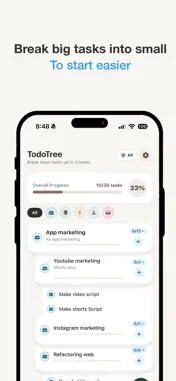
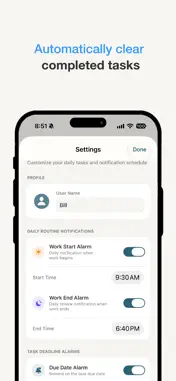
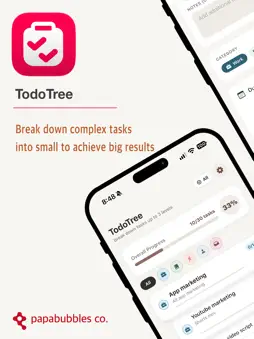
TodoTree is a daily task management app that breaks down complex to-dos into a three-level tree structure while automatically organizing them and providing reminders. It relieves the anxiety of not knowing where to start and allows you to experience achieving major goals through the accumulation of small accomplishments. Why TodoTree? Solving the problem of feeling overwhelmed despite keeping records Simply listing tasks can actually increase pressure as the list grows longer. When important tasks mix with trivial ones and the relationships between tasks are unclear, your brain wastes energy trying to decide what to do first. TodoTree focuses on structuring and visualizing tasks to reduce this cognitive load. 3-Level Tree Structure: Turning big tasks into "actions you can take right now" The core of TodoTree is breaking down tasks into up to three levels: Level 1 (Major Category): Overall project or large task (e.g., App marketing) Level 2 (Medium Category): Execution unit (e.g., YouTube marketing) Level 3 (Minor Category): Specific actions to take at your desk right now (e.g., Write video script, Write Shorts script) Breaking tasks down this way turns a massive undertaking—like eating an entire elephant—into bite-sized pieces that are easy to start. The inline add (+) button lets you create sub-items while maintaining context, ensuring your workflow remains uninterrupted. Work and life at a glance with 5 categories With five categories—Work, Study, Health, Personal, and Lifestyle/Travel—and a pastel-toned UI, you can intuitively see where your focus lies. When you set a category for a parent item, it automatically applies to the sub-items, which display it as "Inherited from Parent" (read-only). This eliminates the need to select a category every time, reducing errors and ensuring consistent data organization. Progress Bar: A Numerical Measure of Achievement The "Overall Progress" bar at the top tracks completed items against the total workload in real-time, displaying precise progress—such as "12/30 tasks (40%)." Checking a box instantly marks the task as complete, while the visual feedback of the filling bar boosts motivation; it replaces the vague question "Did I get much done today?" with a clear answer: "I’m at the 40% mark." Intelligent Notifications: Rely on Routine, Not Willpower TodoTree’s notifications are designed not merely as reminders, but as rituals that frame the beginning and end of your day. Start-of-day notification (e.g., 09:30): Briefs you on the task tree to focus on today. End-of-day notification (e.g., 18:40): Reviews incomplete tasks and helps you wrap up the day neatly. You can also select multiple advance alerts (e.g., 1 day, 3 days, or 1 week before a deadline) and set high-precision timers down to the minute. By automatically shifting you into "work mode" at scheduled times, the system reduces the need to rely on willpower. Self-Cleaning List: Eliminating Digital Clutter An accumulation of completed items can obscure what is truly important. TodoTree displays context-specific actions when you swipe an item to the left: options to edit or delete appear for active tasks, while archive or delete options appear for completed ones—preventing accidental errors. Its "linked cleanup" logic ensures that deleting or archiving a parent task also processes its sub-tasks, leaving no digital debris behind. You can design your own data lifecycle by setting retention periods (e.g., 1 week, 2 weeks, or 1 month) and choosing whether to automatically delete items or move them to the archive. The Future of TodoTree: Collaboration, Insights, and Integrations Terms: https://www.papabubbles.com/support/termsTodoTree --------------------------------------------------------------------- Developer Contact [email protected]
What's New
Version 1.5.0 2026-10-29
TodoTree has been updated. - Widget support * Widgets are available in various sizes. * You can mark tasks as complete directly from the widget. * You can...TodoTree has been updated. - Widget support * Widgets are available in various sizes. * You can mark tasks as complete directly from the widget. * You can check your progress directly from the widget. - CloudKit support allows for seamless use across multiple devices. - App stability has been improved. Experience the new and improved TodoTree. Technical Analysis
Package Overview Basic metadata
Bundle ID
com.papabubbles.PBTodoTree Current Version 1.5.0
Minimum iOS 27.0
Package Size App Store Size
Package Metadata 0 / 0 version records
Detailed binary, privacy manifest, framework, and Info.plist results have not been indexed for this package yet. The verified App Store and archive metadata above remains available.
Developer Information
Known Version Records
0 version records with stored package metadata
Stored metadata does not guarantee a package is currently available to download.
| Details | Version / IDs | Version date | Action |
|---|