Preview




Description
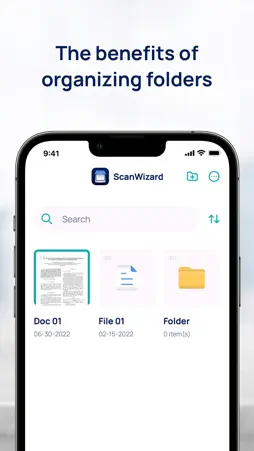
*** OVERVIEW *** Capture, convert, edit, annotate, sign, and organize documents, receipts, whiteboards, business cards, or books with ScanWizard! ScanWizard is a powerful mobile scanner app with many useful features you won't find anywhere else. Scan any document, receipts, notes, business cards, books, photos, pictures, or even whiteboards at lightning speed. With our OCR feature, you can use various filters to enhance the result, organize your scanned files, crop, straighten, and extract text from images. You can save the scanned files in JPEG or PDF format according to your needs and preference! Gone are the days of needing a scanner machine to scan a document. The phone camera is all you need to start scanning documents. However, there are still many things you can't do with just an ordinary phone scanner app, which makes you switch apps to handle the documents and image files you've just scanned. That's why we created ScanWizard and added powerful and essential features to make driving documents with your phone seamless and efficient. Read more and learn about what you can do with ScanWizard. *** SCANWIZARD DOCUMENT AND PHOTO SCANNER FEATURES *** EDIT YOUR SCANS Use our filter to enhance your scan results for a more professional, readable, and elegant effect. Adjust the brightness, contrast, color balance, or other features. You can also crop and straighten the document. ADD A STAMP OR WATERMARK TO PROTECT YOUR FILE Add a stamp to mark your documents or a watermark to protect your images and documents. OCR ABILITY With the OCR feature, we can extract text from an image when you scan the document with your camera. You can save the scanned files as JPEG or PDF and share them easily. ANNONATE YOUR DOCUMENT Add annotations and comments to your document directly in our app. You don't need to buy or download other document annotation apps. MANAGE YOUR FILES Set up and create structures in folders to store your documents neatly. Create folders, add dates, and organize your scanned files based on your preferences. SIGN YOUR DOCUMENTS Sign any document digitally from anywhere, anytime, hassle-free. Working remotely becomes super convenient with ScanWizard. With ScanWizard, you get more features than other similar apps that only provide basic scanning functionality. With ScanWizard, you don't have to download multiple apps to get editing, signing, annotating, and structured file-saving tools. The quality of the scanned documents is also impressive, which is why we believe ScanWizard is the best document scanner for iOS devices. It's hassle-free, quick, and user-friendly. You can work from anywhere, anytime, and quickly handle all necessary documents! So, what are you waiting for? Download and use ScanWizard now and enjoy scanning, editing, and organizing in one app! *** TO SUM UP *** Please feel free to send feedback to us! Do you encounter any issues while using our app? Let us know! Don't forget to share our app with your colleagues and clients so they can also take advantage of this super handy camera scanner app. Please take a moment to rate and review ScanWizard if you love it. *** LEGAL ***
All personal data is protected: • Privacy Policy: https://www.scanwizard.app/privacy/. • Terms & Conditions: https://www.scanwizard.app/terms/.
What's New
Version 1.3 2025-10-14
Here's a list of updates that have been implemented: • Improvements to the user interface and experience have been made. • Optimizations have been added to enha...Here's a list of updates that have been implemented: • Improvements to the user interface and experience have been made. • Optimizations have been added to enhance performance. Technical Analysis
Package Overview Basic metadata
Bundle ID
com.scanZi.scanner Current Version 1.3
Minimum iOS 14.0
Package Size App Store Size
Package Metadata 1 / 4 version records
Detailed binary, privacy manifest, framework, and Info.plist results have not been indexed for this package yet. The verified App Store and archive metadata above remains available.
Developer Information
Known Version Records
1 version record with stored package metadata • 4 known version records
Stored metadata does not guarantee a package is currently available to download.
| Details | Version / IDs | Version date | Action |
|---|---|---|---|
| 52.48 MB | v1.3 App Store ID: 878897668Build: 1.3 | 2025-10-14 22:31:51 | Get Version |
| Not archived | App Store ID: 859352755 | Unknown | Request Version |
| Not archived | App Store ID: 856836425 | Unknown | Request Version |
| Not archived | App Store ID: 851225851 | Unknown | Request Version |