
Preview









Description
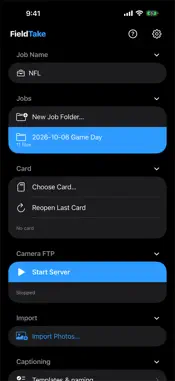
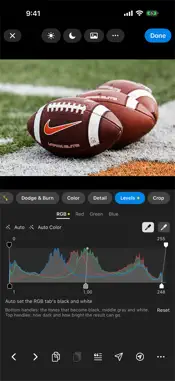
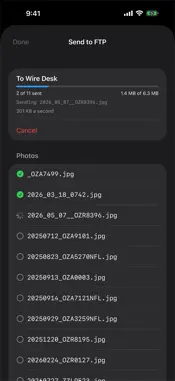
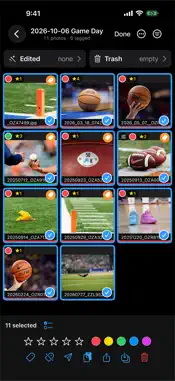
FieldTake is a working tool for wire and sports photographers: take photos off a card or straight from the camera, pick the keepers, caption them, make quick edits, and send them, on an iPad, or on an iPhone held upright with every screen laid out for the phone. BRING PHOTOS IN • From a card through a USB-C reader: the whole card, or only the photos you pick while browsing it. Frames protected in the camera arrive tagged. • Straight from the camera over FTP as you shoot, by cable or Wi-Fi; a step-by-step guide shows what to enter in the camera. • From the Files app (JPEG and RAW) or the Photos library, with Import Photos. • A RAW and its JPEG show as one frame. • Voice memos from the camera play with their photos. CULL • A contact sheet showing every photo whole, horizontal or vertical. • Stars, color labels and tags, on one photo or many at once, written in the standard fields other photo tools read (a RAW's in an .xmp sidecar Photo Mechanic reads). • Filter by tag, stars, label, edited or unsent; sort by file name or capture time. • A large view with swipe, zoom, highlight and shadow warnings and a histogram. CAPTION • IPTC templates, including ones made in other apps, with {variables} for dates, the job, file name, sequence number and other fields. • Code replacement: a short code becomes the full name, from plain tab-separated code files. • A full metadata editor; copy and paste captions. • Rename photos as they arrive, your way. EDIT, WITHOUT CHANGING THE ORIGINAL • Exposure, contrast, highlights, shadows, whites, blacks, temperature, tint, vibrance, saturation, clarity. • Levels with Red, Green and Blue tabs, Auto and eyedroppers. • A free-form Curve drawn over the photo, and crop, rotate and straighten. • RAW files too, on Apple's own RAW development, with the camera's white balance in kelvin, a neutral eyedropper and the engine's noise reduction and sharpening. • Work through a take without leaving the editor: Previous and Next, Copy and Paste Edits, Caption, and Send & Next, which sends in the background while you move on. SEND AND KEEP • Send to saved FTP destinations, edited copies included; a RAW goes as a full-size JPEG with its caption inside. Each photo is checked, retried if the connection drops, and marked as sent. • When arena Wi-Fi crawls, FieldTake offers to finish the send over cellular. • Archive a job to a drive or an FTP server, checked; a rerun copies only what changed. • Share to any app. PRIVATE BY DESIGN No accounts, no analytics, no servers of its own. Your photos stay on your device, under On My iPad (or On My iPhone) › FieldTake in Files, and go only where you send them. GOOD TO KNOW • For iPad with iPadOS 17 or later, and iPhone with iOS 17 or later. Each device keeps its own jobs. • Sending and receiving use plain FTP. SFTP and FTPS are not supported yet. • RAW support uses Apple's own RAW engine, so it covers the cameras Apple supports. Video files are copied and kept with the job. • The camera and the iPad or iPhone must share a network (a cable, a switch, a router or Wi-Fi); Personal Hotspot doesn't work. SUBSCRIPTION FieldTake is free to download. Bringing photos in, editing, captioning and sending need a subscription: FieldTake Monthly at $4.99 a month, with a 7-day free trial, or FieldTake Yearly at $49.99 a year, with a 14-day free trial. One free trial per person, and one subscription for your iPad and iPhone. Without one, your jobs and photos stay open to look through, share, archive and delete. Payment is charged to your Apple Account at confirmation. The subscription renews automatically unless canceled at least 24 hours before the end of the current period; the renewal is charged in the 24 hours before then. Manage or cancel it in Setup › Subscription or in your Apple Account settings. Privacy Policy: https://ozllc.co/fieldtake/privacy.html Terms of Use: https://www.apple.com/legal/internet-services/itunes/dev/stdeula/ Questions or problems: [email protected]
What's New
Version 1.3.1 2026-11-12
• New Job Folder: the box is now the folder's whole name. Type any name, or tap Add variable to put in the Job Name or today's date. It starts as today's date a...• New Job Folder: the box is now the folder's whole name. Type any name, or tap Add variable to put in the Job Name or today's date. It starts as today's date and the Job Name, the same name the camera, a card and Import give a folder they make. • Ingesting a card from the Card section now asks where the photos go: the current job (the one you last opened, where the camera sends) or a new job folder. Import Photos asks the same, and can also put them into another job. FieldTake asks the first time after it opens and the first time each day, then starts on your last choice. Technical Analysis
Package Overview Basic metadata
Bundle ID
com.ozllc.fieldtake Current Version 1.3.1
Minimum iOS 17.0
Package Size App Store Size
Package Metadata 0 / 0 version records
Detailed binary, privacy manifest, framework, and Info.plist results have not been indexed for this package yet. The verified App Store and archive metadata above remains available.
Developer Information
Known Version Records
0 version records with stored package metadata
Stored metadata does not guarantee a package is currently available to download.
| Details | Version / IDs | Version date | Action |
|---|