
Preview

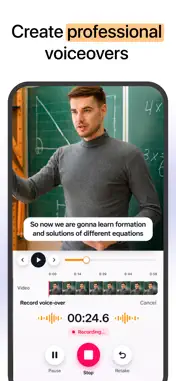


Description
Voice Over: Add Audio to Video is an iPhone and iPad app for adding voice-overs, music and sound effects to your videos. Record your voice while the video plays, or type a script and turn it into a natural voice. Add music, mix every audio track, and save or share your video in a few seconds. WHAT IS VOICE OVER: ADD AUDIO TO VIDEO? It lets you replace or layer the audio of any video: your own voice-over, background music, sound effects and the original sound, all mixed in one place. It is built for adding audio to video, so there are no extra confusing options. KEY FEATURES 1. Voice over video: record a voice-over while watching your video play. Headphones recommended, with echo cancellation on and a live input level meter. 2. Text to speech: type up to 500 characters, pick a voice, language, delivery and pitch, and get a natural voice-over. Add it as subtitles too, split into short lines timed to the voice. 3. Clone your voice: read a 30-second sample in a quiet room and the app scores your take and creates a copy of your own voice. 4. Add music to video: import MP3, M4A, WAV or AIFF from Files, or choose royalty-free in-app tracks (Upbeat, Chill, Cinematic, Acoustic). Loop a track to fit. 5. Sound effects: whooshes, risers, clicks, applause, rain, city and more, in Transitions, UI, Reactions and Ambience. 6. Mix audio: balance the original video, voice-over, music and effects on one mixer. Auto Mix balances all four tracks in one step. 7. Auto ducking: music and original audio drop while you speak, then come back. Choose Low (-6 dB), Medium (-12 dB) or Strong (-20 dB). 8. Edit audio: trim, split, duplicate and replace clips, adjust volume, add fade in and fade out, and change speed from 0.5x to 2x with pitch preserved. Every edit is one undoable step. 9. Subtitles: choose font, size, colour and position. 10. Export and share: save video with audio, or export the mix as audio only (m4a). Video keeps its original resolution and frame rate. Save to Photos or share to any app. NOTE: If the audio is longer than the video, it is automatically trimmed to the video length. HOW TO ADD A VOICE-OVER AND MUSIC TO A VIDEO 1. Tap New Project and choose a video from Photos. 2. Tap Record to speak over the video, or Text to type a script and pick a voice. 3. Tap Music to add a track, and Effects to add sounds. 4. Tap Mix, turn on Auto ducking, and adjust the levels. 5. Tap Export, then save or share. FREQUENTLY ASKED QUESTIONS How do I add a voice-over to a video on iPhone? Choose a video, tap Record and talk while it plays. Can I turn text into a voice-over? Yes. Type your script, choose a voice and add it to the video. How do I lower the music when I talk? Turn on Auto ducking in the Mix screen. Can I export only the audio? Yes. Choose Audio only to export the mix as m4a. What if my audio is longer than my video? It is automatically trimmed to the video length. PRO SUBSCRIPTION - Unlimited voice-over takes and clips. - Every voice and language, with no cap on text. - Auto Mix, ducking and audio-only export. - Export at your video's original resolution and frame rate. - No ads. - The yearly plan includes a 3-day free trial. SUBSCRIPTION TERMS - Payment is charged to your iTunes account at confirmation of purchase. - The subscription renews automatically unless auto-renew is turned off at least 24 hours before the end of the current period. - You can turn off auto-renewal in your account settings after purchase. - The renewal amount is charged within 24 hours before the end of the current period. - Any unused portion of a free trial is forfeited when you purchase a subscription. - As per policy, the current subscription cannot be cancelled during the active subscription period. Once purchased, refunds are not given for any unused portion of the subscription period. Terms of use - https://www.outthinkingindia.com/terms-of-use/ Privacy policy - https://www.outthinkingindia.com/privacy-policy/
What's New
Version 2.2 2026-11-06
+ Record a voice-over while your video plays + Turn text into a natural voice, or clone your own + Add music and sound effects, with auto ducking + Mix, edit an...+ Record a voice-over while your video plays + Turn text into a natural voice, or clone your own + Add music and sound effects, with auto ducking + Mix, edit and export your video or audio only Technical Analysis
Package Overview Package analysis available
Bundle ID
com.outthinking.audiovideomixing Current Version 2.2
Minimum iOS 18.0
Package Size App Store Size
Package Metadata 1 / 7 version records
BAShimmerButton
org.cocoapods.BAShimmerButton v0.1.0iOS 8.0+119.09 KB
CTAssetsPickerController
org.cocoapods.CTAssetsPickerController v3.3.1iOS 8.0+536.35 KB
FacebookCore
org.cocoapods.FacebookCore v0.9.0iOS 8.0+188.33 KB
FBLPromises
org.cocoapods.FBLPromises v2.4.0iOS 9.0+179.79 KB
FBSDKCoreKit
org.cocoapods.FBSDKCoreKit v5.15.1iOS 8.0+1.54 MB
FirebaseABTesting
org.cocoapods.FirebaseABTesting v10.23.0iOS 11.0+120.28 KB
FirebaseCore
org.cocoapods.FirebaseCore v10.23.1iOS 10.0+205.25 KB
FirebaseCoreInternal
org.cocoapods.FirebaseCoreInternal v10.23.0iOS 10.0+364.53 KB
FirebaseInstallations
org.cocoapods.FirebaseInstallations v10.23.0iOS 10.0+265.94 KB
FirebaseMessaging
org.cocoapods.FirebaseMessaging v10.23.0iOS 11.0+531.56 KB
FirebaseRemoteConfig
org.cocoapods.FirebaseRemoteConfig v10.23.0iOS 11.0+455.0 KB
FirebaseRemoteConfigInterop
org.cocoapods.FirebaseRemoteConfigInterop v10.23.0iOS 11.0+134.27 KB
FirebaseSharedSwift
org.cocoapods.FirebaseSharedSwift v10.23.0iOS 11.0+509.74 KB
GoogleDataTransport
org.cocoapods.GoogleDataTransport v9.4.1iOS 9.0+401.01 KB
GoogleUtilities
org.cocoapods.GoogleUtilities v7.13.0iOS 9.0+308.98 KB
GPUImage
org.cocoapods.GPUImage v0.1.7iOS 8.0+4.25 MB
GSIndeterminateProgressBar
org.cocoapods.GSIndeterminateProgressBar v0.1.0iOS 8.0+92.99 KB
GSKStretchyHeaderView
org.cocoapods.GSKStretchyHeaderView v1.0.4iOS 8.0+126.22 KB
Lottie
org.cocoapods.Lottie v2.5.3iOS 8.0+564.39 KB
Masonry
org.cocoapods.Masonry v1.1.0iOS 8.0+193.77 KB
MGCollapsingHeader
org.cocoapods.MGCollapsingHeader v1.0.6iOS 8.0+114.69 KB
MZCroppableView
org.cocoapods.MZCroppableView v0.1.0iOS 8.0+113.19 KB
nanopb
org.cocoapods.nanopb v2.30910.0iOS 9.0+85.53 KB
PureLayout
org.cocoapods.PureLayout v3.0.2iOS 8.0+123.83 KB
TYCyclePagerView
org.cocoapods.TYCyclePagerView v1.2.0iOS 8.0+181.07 KB
WYPopoverController
org.cocoapods.WYPopoverController v0.2.2iOS 8.0+241.5 KB
Developer Information
Known Version Records
1 version record with stored package metadata • 7 known version records
Stored metadata does not guarantee a package is currently available to download.
| Details | Version / IDs | Version date | Action |
|---|---|---|---|
 67.98 MB | v2.1 App Store ID: 867098696Build: 2.4 | 2024-06-28 13:20:40 | Get Version |
| Not archived | App Store ID: 849688720 | Unknown | Request Version |
| Not archived | App Store ID: 843395201 | Unknown | Request Version |
| Not archived | App Store ID: 841460088 | Unknown | Request Version |
| Not archived | App Store ID: 820025935 | Unknown | Request Version |
| Not archived | App Store ID: 622752839 | Unknown | Request Version |
| Not archived | App Store ID: 587242893 | Unknown | Request Version |