
Preview


Description
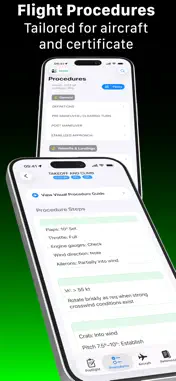
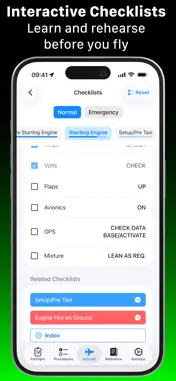
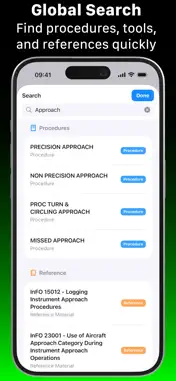
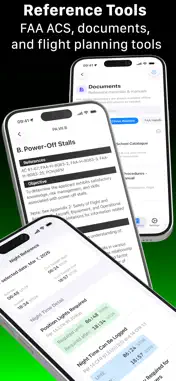
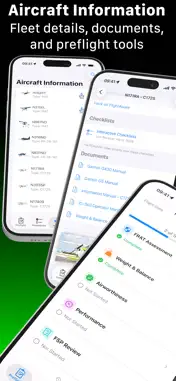
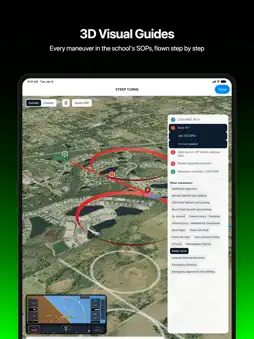
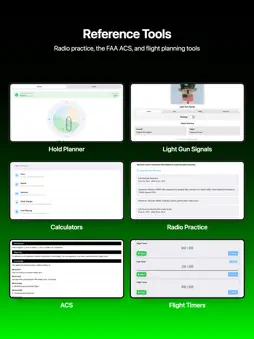
Cirrus Aviation App Train Smarter. Arrive Prepared. Fly More. The Cirrus Aviation App is a training and preflight companion for Cirrus Aviation pilots and students. It brings procedures, aircraft information, study tools and preflight preparation into one place, built around the way the school trains. Instead of searching through documents or assembling planning materials before a lesson, you can prepare in advance and arrive ready to fly. One-time purchase provides long-term access throughout your training. --- Preflight Workflow The Cirrus Aviation App opens directly to a guided preflight workflow designed to help pilots prepare thoroughly before every flight. A structured five-step process walks you through risk assessment, weight and balance, airworthiness, performance, and FSP review. --- Procedures Library -Always Up-to-Date Procedures are updated with routine app updates, and the app verifies it is running the latest version on every launch. -Smart Filtering Browse procedures by certificate and aircraft type. -3D Visual Procedure Guides Every maneuver, stall, takeoff and landing, emergency and instrument procedure flies as a 3D guide, from outside or from the cockpit, with each line of the procedure shown where it happens and the panel reading along with it. Built for every airplane in the fleet. Visual Procedure Guide Settings sets how they open, down to whether the camera stays locked with the airplane as it turns. -Linked Procedures Tap to jump directly between related procedures and references. --- Learning and Review Tools -Learning Mode Flash-card-style procedure review designed to support memorization and self-testing. -Global Search Search procedures, study tools, and reference material instantly across the app. --- Interactive Aircraft Checklists Interactive checklists are available for: -C172S NAV II -C172S NAV III -DA-42NG -Pipistrel Alpha -Elixir The school's PDF checklists are included for every airplane, and import into ForeFlight in one step. --- Aircraft Information -Fleet information, including aircraft equipment -Aircraft tracking links -Aircraft-specific reference documentation -Video links to the school's recommended systems and aerodynamics videos --- Reference and Study Tools Regulations and Handbooks -The full FAR/AIM, searchable and readable offline -Handbook Library: FAA handbook sections by topic, with the ACS elements each covers, opening your own copy at that section Interactive Learning -Runway signage and markings -ATC light gun signals -Holding pattern planner and trainer -Induction icing and partial panel helpers -Nighttime reference tool -Aviation calculators, including hydroplaning speeds -Radio Practice Mode: the school's departure and arrival calls, with a fill-in version of each FAA Resources -Searchable ACS for Private, Instrument, Commercial, and CFI -Lookup of 3,600+ aeronautical abbreviations -NASA ASRS reports relevant to local operations Planning and Risk Management -Flight Risk Assessment tools -Personal minimums tracking -Flight timers --- Operations and Practical Features -Course syllabi for each certificate -End-of-course checklist with photos and notes, shared as one PDF -Logbook audit, endorsement, flight review and IPC helpers -Document revision tracking -Export procedures and planning reports to PDF, each procedure as text or as its 3D guide --- Designed for Real Training The Cirrus Aviation App supports real flight training workflows. It is not a replacement for instruction, but a tool that helps you prepare more effectively, so instructor time is spent flying rather than reviewing documents. Whether you are working toward your first certificate or continuing your training, it stays a structured, always-current reference. Download the Cirrus Aviation App and train with clarity, consistency, and confidence.
What's New
Version 2026.12 2026-11-24
The 3D Visual Procedure Guides Visual Procedure Guide Settings has a new Camera section. Locked View, on unless you turn it off, keeps the camera with the airp...The 3D Visual Procedure Guides Visual Procedure Guide Settings has a new Camera section. Locked View, on unless you turn it off, keeps the camera with the airplane as it turns, so a view from behind the tail stays behind the tail. Turned off, the camera holds its heading instead, which suits the ground reference maneuvers, the stalls, the emergency descent and the IFR basics, where the road or the pylon stays in frame. The Stabilized Approach, the Proc Turn & Circling Approach and the DA-42NG's Go Around now fly in the landing configuration, with the flaps each airplane's Normal Takeoff and Landing calls for on short final. The heading bug now sits on the heading the airplane is flying rather than its ground track, so on a ground reference maneuver the magenta track diamond stands off the bug by the wind correction angle. The yoke is held back through the landing roll out, as the Soft and Short Field procedures' "After touchdown: Hold back pressure" step calls for. Course Syllabi All eight Training Course Outlines were updated to the school's November 2026 revisions. Bug fixes. Technical Analysis
Package Overview Basic metadata
Bundle ID
Bland.CirrusAviation Current Version 2026.12
Minimum iOS 17.0
Package Size App Store Size
Package Metadata 0 / 0 version records
Detailed binary, privacy manifest, framework, and Info.plist results have not been indexed for this package yet. The verified App Store and archive metadata above remains available.
Known Version Records
0 version records with stored package metadata
Stored metadata does not guarantee a package is currently available to download.
| Details | Version / IDs | Version date | Action |
|---|