
Preview



Description
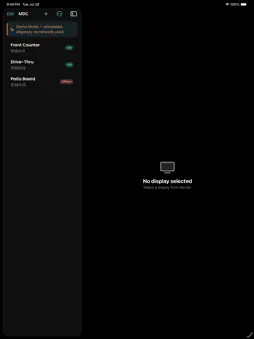
Menuboard Manager MDC finds and controls Samsung commercial displays — menuboards, drive-thru screens, patio boards — over your local Wi-Fi network, using Samsung's MDC protocol. Built for technicians and installers standing in front of a panel, not an office desk. Find displays. Sweep your subnet automatically, or add a display manually by IP if the network is locked down. No account, no cloud, no setup beyond joining the store's Wi-Fi. See live status. Power, input source, volume, mute, model, serial and firmware, refreshed automatically and on demand. Change settings. 47 read/write settings in a grouped, searchable form. Stage changes and apply them together, to one display or several at once, with a per-display, per-setting result — no guessing which one actually failed. Power and reboot, singly or in bulk, with confirmation before anything that could black out a store. Save profiles. Store a named set of settings — "Morning Open", "Evening Close" — and apply it to any display in one tap. Keep an audit trail. Every change is logged locally with a timestamp, target display, operator name, and exactly what was applied. Exportable to CSV via the share sheet. Try it without a panel. Demo Mode simulates three displays end to end — scanning, status, settings, bulk apply, profiles, history — so you can learn the app, train staff, or take it for a spin on a plane with no network and no permission required. Menuboard Manager MDC is free, works with no account, and sends nothing anywhere — it talks only to displays on your local network. It's a companion to Menuboard Manager, the digital-signage platform from OSM Solutions.
What's New
Version 1.1.0 2026-11-10
NEW: Connect Claude Use Claude on your Mac to check on your displays and, if you allow it, control them. • Ask Claude in plain English: "Which displays are of...NEW: Connect Claude Use Claude on your Mac to check on your displays and, if you allow it, control them. • Ask Claude in plain English: "Which displays are off?", "What input is the lobby screen on?", "What changed on the drive-thru display this week?" • Let Claude turn displays on and off, reboot them, change settings, or apply your saved profiles. Each kind of change is off until you switch it on. • Nothing changes without your approval. Claude shows exactly what it will change first, and acts only after you say yes. • Every change made through Claude is recorded in your change history, marked "via Claude". • Stays on your network. Claude connects over your local Wi-Fi only while the app is open, and access turns itself off after 8 hours. You can cut it off instantly at any time. Turn it on in Settings → Claude Access. Requires Claude Code or Claude Desktop on a Mac on the same Wi-Fi network. ALSO IN THIS VERSION • Fixed an issue where checking a display that was switched off or unreachable could leave the app waiting indefinitely. Technical Analysis
Package Overview Basic metadata
Bundle ID
com.osmsolutions.menuboardmanager.mdc Current Version 1.1.0
Minimum iOS 18.0
Package Size App Store Size
Package Metadata 0 / 0 version records
Detailed binary, privacy manifest, framework, and Info.plist results have not been indexed for this package yet. The verified App Store and archive metadata above remains available.
Developer Information
Known Version Records
0 version records with stored package metadata
Stored metadata does not guarantee a package is currently available to download.
| Details | Version / IDs | Version date | Action |
|---|