
Preview



Description
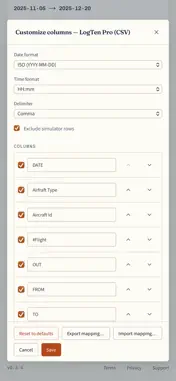
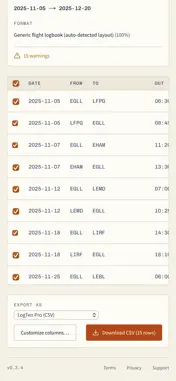
Logbook PDF Converter turns your airline-issued flight-hour PDFs into clean CSV (or JSON) files that drop straight into the logbook app you already use. WHY THIS EXISTS Most operators send pilots a monthly PDF report of their flights. Almost no logbook app can import that PDF directly. Pilots end up retyping every leg by hand — date, route, times, aircraft, function — every month, for an entire career. This app deletes that work. HOW IT WORKS Drop your PDF. The app reads the rows, picks out date, departure, arrival, out / in times, total time, aircraft type, registration, function, and PIC, and renders them in a preview table. Pick the rows you want to export, choose the logbook profile, hit Download. That's it. The parser is source-agnostic. It doesn't match on operator names or magic header strings — it matches on the structural shape of a flight row (one date, two airport codes, two clock times, a duration). That means it works across operators, and works on the next operator without a code change. SUPPORTED LOGBOOK PROFILES - LogTen Pro (the LogTen-accepted CSV schema, byte-for-byte) - ForeFlight Logbook - MccPilotLog - AAFelog - Safelog - Generic CSV (anything that imports CSV) - JSON (the canonical FlightLeg array, for power users) CUSTOMISE ANYTHING Rename headers, hide columns, reorder columns, switch date format (ISO / US / EU), switch time format (HH:mm / decimal hours), switch delimiter (comma / semicolon / tab). Save your mapping per profile; export the mapping as JSON to share between devices. PRIVACY Your PDFs never leave your device. Not "we promise we won't look", but "there is no server, there is nowhere for them to go". The app is 100% on-device: - No account, no sign-in - No analytics, no telemetry, no crash reporting - No outbound network requests for your data - The privacy nutrition label is empty because there is nothing to collect This is enforced in the test suite — every release runs an automated check that asserts no request leaves your device. OFFLINE READY Once installed, the app works without a network connection. Convert PDFs at FL370. OPEN SOURCE The full source is on GitHub. The parser, the export profiles, and the privacy claim are all reviewable. The project is MIT-licensed. ACCESSIBILITY Designed for WCAG 2.1 Level AA: full keyboard navigation, screen-reader labels on every interactive element, focus trapping in dialogs, no colour-only state cues. axe-core runs against every release in CI. VERIFY BEFORE IMPORTING The parser handles the layouts tested by the maintainer, but real-world operator PDFs vary. Always verify the converted output against your source PDF — row for row — before importing it into your logbook of record. Mistakes in flight-time accounting can affect currency, regulatory reporting, and recency calculations; they are yours to catch. SUPPORT Email [email protected] or file an issue at github.com/orad86/logbook-pdf-converter. Redact pilot / crew names before sharing a sample PDF.
What's New
Version 0.3.5 2026-09-07
Fixes two problems from 1.0: the Download button could do nothing, and some reports wouldn't open on iPhone or iPad. Both work now. Also in this release: - A ... Technical Analysis
Package Overview Basic metadata
Bundle ID
com.aerologic.logbookpdfconverter Current Version 0.3.5
Minimum iOS 15.0
Package Size App Store Size
Package Metadata 0 / 1 version records
Detailed binary, privacy manifest, framework, and Info.plist results have not been indexed for this package yet. The verified App Store and archive metadata above remains available.
Developer Information
Known Version Records
0 version records with stored package metadata • 1 known version records
Stored metadata does not guarantee a package is currently available to download.
| Details | Version / IDs | Version date | Action |
|---|---|---|---|
| Not archived | App Store ID: 885763184 | Unknown | Request Version |