
Preview



Description
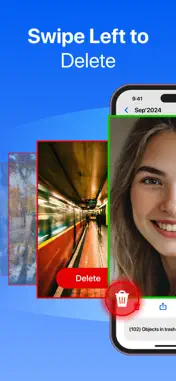
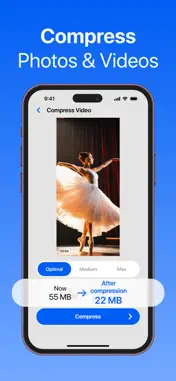
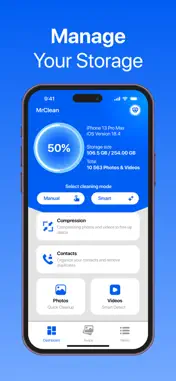
MrClean: Photo Calendar turns your photo library into a calendar you can actually get through. Instead of one endless camera roll, you see your year month by month, review one month at a time and decide what stays. The app also keeps contacts, calendar events and private notes in order. HOW IT WORKS Photo Calendar Your home screen shows every month of the year with its photo count and review status, so you always know where you left off. On this day See photos taken on today's date in earlier years and swipe through them to keep the best memories. Swipe to decide Open a month from the calendar or today's On this day photos and swipe left to mark a photo for deletion or right to keep it. Then open Review, check what you marked and delete it in one step. Smart scan Choose a period and categories, and Smart scan looks for similar shots, exact duplicates, screenshots, large videos and screen recordings. In every group of similar photos the best one stays, and one tap picks a different favorite. Contacts Merge contacts that share the same phone number, remove entries with no phone or email, and save your address book as a .vcf backup file. Birthdays Upcoming birthdays from your contacts in one list, with an option to add them to your calendar. Calendar Clear out events that already ended and remove extra copies of the same event. Future dates of recurring meetings stay untouched. Locked notes Write notes with text and photos and protect the private ones with your own passcode and Face ID. Widgets Keep On this day or your swipe progress on the Home Screen. ACCESS AND PRIVACY Photo library access is needed to build your calendar and find items to review. Contacts and calendar access is used only for the contact, birthday and event tools, and Face ID only to open locked notes. Photos, contacts and events are processed on your device. Every photo deletion asks for your confirmation, and deleted items stay in Recently Deleted for 30 days. MADE FOR SHORT SESSIONS Review a month while waiting for coffee or clear old screenshots before a trip. Progress is saved for each month, so you can stop at any time and continue later. Download MrClean and give your photo library a calendar of its own. PREMIUM Browsing, scanning and reviewing are free. Premium is needed to finish an action: delete photos and videos, merge or remove contacts, create contact backups, delete events and lock notes. Plans: weekly with a 3-day free trial, or yearly. The current price is shown in the app before you subscribe. Payment is charged to your Apple Account when you confirm the purchase, or when the free trial ends. The subscription renews automatically unless you turn it off at least 24 hours before the current period ends; the renewal is charged within 24 hours before that date. You can manage or cancel it anytime in Settings your name Subscriptions. An unused part of a free trial ends when you buy a subscription. By using MrClean, you agree to our Privacy Policy and Terms of Use: Privacy Policy: https://optstroi.info/privacy_policy.html Terms of Use: https://optstroi.info/terms_of_use.html
What's New
Version 1.8 2026-10-29
MrClean has been rebuilt! * New design: every screen has been redrawn with brighter colors and simpler navigation. * Photo Calendar: your library is laid out ...MrClean has been rebuilt! * New design: every screen has been redrawn with brighter colors and simpler navigation. * Photo Calendar: your library is laid out month by month with photo counts and review status, so you can pick up where you stopped. * On this day: photos taken on today's date in past years, ready to swipe through. * Swipe from the calendar: open any month or On this day, swipe left to delete and right to keep, then confirm everything in Review. * Smart scan: choose the categories you need and see all results on one screen. In each group of similar photos the best one stays, and you can pick another. * Contacts: merge contacts that share a phone number, remove incomplete entries and keep several backups as .vcf files. * Birthdays: upcoming birthdays from your contacts, with an option to add them to your calendar. * Calendar cleanup: remove past events and duplicate copies. Recurring meetings keep their future dates. * Locked notes: notes with text and photos, protected by your own passcode and Face ID. * Widgets: On this day and Swipe on your Home Screen. * Better handling of limited access to photos and contacts, plus clearer empty states and error messages. Technical Analysis
Package Overview Basic metadata
Bundle ID
com.smartandswipe.mrcleaner Current Version 1.8
Minimum iOS 18.0
Package Size App Store Size
Package Metadata 1 / 8 version records
4.0 / 5.0 (4 ratings)
Detailed binary, privacy manifest, framework, and Info.plist results have not been indexed for this package yet. The verified App Store and archive metadata above remains available.
Known Version Records
1 version record with stored package metadata • 8 known version records
Stored metadata does not guarantee a package is currently available to download.
| Details | Version / IDs | Version date | Action |
|---|---|---|---|
| 72.12 MB | v1.7 App Store ID: 884458355Build: 1.7 | 2026-04-14 00:14:28 | Get Version |
| Not archived | App Store ID: 881530725 | Unknown | Request Version |
| Not archived | App Store ID: 880511740 | Unknown | Request Version |
| Not archived | App Store ID: 880336484 | Unknown | Request Version |
| Not archived | App Store ID: 880241481 | Unknown | Request Version |
| Not archived | App Store ID: 879678398 | Unknown | Request Version |
| Not archived | App Store ID: 877088893 | Unknown | Request Version |
| Not archived | App Store ID: 876982956 | Unknown | Request Version |