
Preview



Description
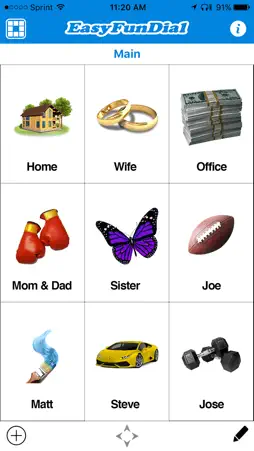
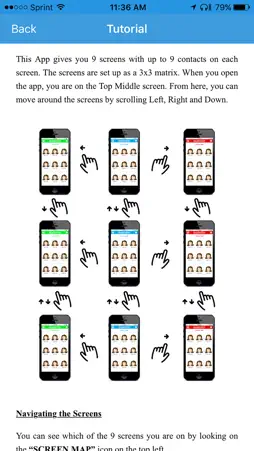
Fastest and easiest to navigate speed dialer using fun images for up to 81 contacts. Easy to see and click from arm’s length. SAVE TIME AND MAKE DIALING FUN If you are not a fan of voice dialing, chances are that you are still using the Contacts app. This is slow and inefficient since finding your contact takes a lot of time. Widget shortcuts require a lot of swiping and save little time. Other fav dialer apps use dialing with photos (requiring you to have a pic of every contact in your phone), create clutter with too many non-essential features, and have busy screen layout so it takes time to scan the screen until you find your contact. We just couldn’t find the perfect dialer for our personal use. That’s when we decided to create EasyFunDial! WHY USE IMAGES RATHER THAN JUST NAMES OR PHOTOS Yes, it's more fun but it's also faster. Spotting the image of a ring that you associated with your spouse or a baseball with your child or a deck of cards with your poker buddy or a money stack with your shopaholic friend is faster than looking for a photo or just the name. Getting and uploading a photo of every contact is also a pain. Plus, would you rather be looking at the photo of your boss or an image of a poop emoticon!? (but don’t get fired! :) Please choose our App because it’s THE: FASTEST The fastest way to dial is to associate your favorite contacts with images and to view them in a simple 3x3 matrix along with the contact’s name below each image. This simple feature is what makes our app the world’s fastest image dialer. EASIEST TO SEE AND CLICK When you open EasyFunDial, you can easily see the 9 images on each screen from far away. So even if you don’t have your glasses or if you need to click from an arm length away (e.g. when the phone is clipped to your car dashboard), you can use our app with ease. [never use any apps that require touch while driving]. MOST INTUITIVE TO NAVIGATE (UP TO 81 CONTACTS!) EasyFunDial offers you 9 screens for a maximum of 81 contacts. You can name each screen (e.g. “Family”, “Best Friends”, “Work”) and apply a custom color. As you swipe to navigate between the screens, a screen map on the top left shows which screen you are on and arrows at the bottom show in which directions you can swipe. MOST FUN: CHOOSE FROM 100+ IMAGES EasyFunDial is fun to create and use, testing your imagination and creativity. Choose images for each of your contacts from our library in a variety of categories, including animals, arts, bar & casino, footwear, emoticons, foods, hobbies, love, music, sports, transportation and more. So let your imagination run wild as you associate a unique image with each of your contacts. Scroll down to see some examples below. USING THE APP 1. Open the EFD app (instead of “Contacts” or “Phone” apps as you may be doing now) 2. Click on the image you’ve associated with the contact (their name will also be below) 3. Click “Call” (2nd click avoids butt dialing) Many users move the EasyFunDial app to their Favorites (the 4 apps you pin to the bottom of your screen) since they access it all the time. ADDING CONTACTS 1. Click the + button (bottom left). 2. Find the contact in your address book and click on the number you want to fast dial. 3. Select the image you want to link to this contact from our image library. By clicking the “pencil” (bottom right), you can change the image, delete or change the position of the contacts on the screen via simple drag-and-drop. EXAMPLES OF IMAGE ASSOCIATIONS • Wife: ring, handcuffs, boxing gloves • Husband: beer, cards, drill, golf ball • Mom: police car, fire truck, cookies • Boss: money, sports car, angry emoticon, golf ball • Musician: violin, drums, guitar • Exercise Junkie: dumbells, yoga mat • Hobbyist: bowling, pen, books, paint brush • Brainiac: brain, rubix cube, books • Bar Rat: whiskey, darts, cards • SportsNut: baseball, football, puck • Traveler: airplane, train, car, spaceship • CarJunkie: jeep, motorcycle, bike
What's New
Version 1.8 2026-04-03
Bug fixes and improvements. Technical Analysis
Package Overview Basic metadata
Bundle ID
com.OolaLabs.EasyFunDial Current Version 1.8
Minimum iOS 16
Package Size App Store Size
Package Metadata 0 / 9 version records
Detailed binary, privacy manifest, framework, and Info.plist results have not been indexed for this package yet. The verified App Store and archive metadata above remains available.
Developer Information
Known Version Records
0 version records with stored package metadata • 9 known version records
Stored metadata does not guarantee a package is currently available to download.
| Details | Version / IDs | Version date | Action |
|---|---|---|---|
| Not archived | App Store ID: 884087091 | Unknown | Request Version |
| Not archived | App Store ID: 879946327 | Unknown | Request Version |
| Not archived | App Store ID: 875730196 | Unknown | Request Version |
| Not archived | App Store ID: 875574680 | Unknown | Request Version |
| Not archived | App Store ID: 875234380 | Unknown | Request Version |
| Not archived | App Store ID: 846494759 | Unknown | Request Version |
| Not archived | App Store ID: 837442477 | Unknown | Request Version |
| Not archived | App Store ID: 833801573 | Unknown | Request Version |
| Not archived | App Store ID: 823621195 | Unknown | Request Version |