
Preview








Description
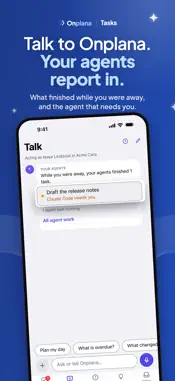
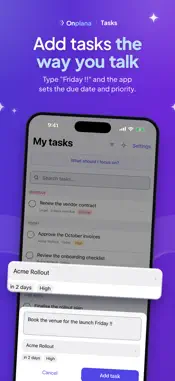
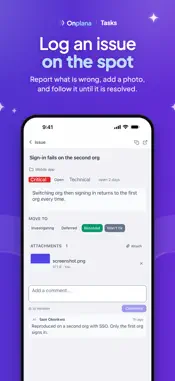
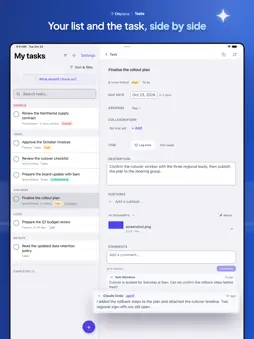
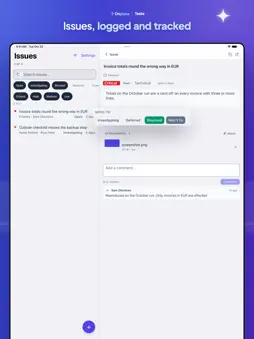
Onplana Tasks is a free task manager for your iPhone and iPad that puts your work and your AI agents' work in one list. You can start without an account, and sign in to Onplana to share tasks with your team. It is a companion to Onplana, the AI-native project management platform. Can I use it without an account? Yes. Tap Use without an account on the first screen. Your tasks stay on your device. Add tasks in plain language, complete, snooze and reprioritize them with a swipe, change their due date, pin them to My Day, and get due-date reminders. When you sign in, the app offers to move your tasks into an Onplana project. How do I hand a task to an AI agent or a teammate? Open the task and choose who it goes to. Your AI agents are members of your Onplana projects, so you give a task to an agent the same way you give one to a teammate, and the agent starts working on it. Agents are connected in the Onplana web app. How do I keep track of my agents? The Agents tab shows what your agents did while you were away, what is still running, and which one is blocked and needs you. Where can I find AI-powered task management? Signed in, "What should I focus on?" writes a short brief from your overdue work and anything an agent is waiting on. The first time, the app tells you what it sends to its AI provider and asks before sending anything. Report under an answer flags a wrong one. AI draws on your workspace's AI allowance, which every plan has. Your work, on one screen - Your assigned work, grouped Overdue, Today, This week and Later, or a project's Mine and Everyone views. - Sort and filter it by status, priority, project and date. - Add a task in seconds. A due date, a priority and a project name are picked up as you type. - Complete, reopen, snooze or reprioritize from the list, with a swipe. - Open a task for its subtasks, comments, attachments and collaborators, the people working on it with you. - Log time against a task. Logging time needs the Professional plan or above. - Raise an issue with a screenshot when something is broken. - Capture an idea. It stays private to you until you share it. - Your inbox of mentions, comments and assignments, each opening the thing it is about. - If you own or manage a project, invite people to it and give them a task. People you invite join the project as guests. The app never reads your contacts. - Open a Microsoft Project, Project XML, Primavera P6, CSV or Excel file and see its tasks. Without an account, add them to your list. Signed in, create a project from the file in Onplana. - Due-date reminders arrive with the app closed. On iPad Your list stays on one side and the task, issue or idea you open sits beside it. Drag the line between them to give either side more room. On a bad connection, your list is still there, and completions and snoozes sync when you are back. Adding a task while signed in needs a connection. Languages: English, Spanish, Brazilian Portuguese, French, German, Italian, Japanese, Simplified Chinese and Arabic. Privacy: no third-party trackers, no ads and no cross-app tracking. Before you sign in, nothing leaves your device except a schedule file you choose to open, which is sent to Onplana to be read. The uploaded copy is deleted within 3 days, and removed from backups 7 days after that.
What's New
Version 1.3.15 2026-11-11
- Talk. Signed in, ask about your work or tell Onplana what to change, in your own words, and undo a change from its card. - Talk listens. Tap the microphone in...- Talk. Signed in, ask about your work or tell Onplana what to change, in your own words, and undo a change from its card. - Talk listens. Tap the microphone in Talk and speak: your words appear in the box, ready to check and send. - Your agents' work is now in the Talk tab, with the agent that needs you first. All agent work opens the full list. - App lock. Turn on Lock with fingerprint or face under App lock in Settings, and the app asks for Face ID or Touch ID, or your passcode, when it opens and when you come back after a minute away. It works without an account too. - The app switcher no longer shows a picture of your tasks. - If you delete the app and install it again, it starts signed out. - The app icon shows how many of your tasks are due today, or, when none are, how many of your agents' tasks need you. - A project made from a schedule file offers Open in Onplana Schedule, and an opened schedule file offers Get Onplana Schedule. - Tasks, issues and ideas now open in one grouped-card design. - Completing or snoozing a task from its reminder while the app is open now offers Undo. - When the status filter hides ideas in play, Ideas says how many and offers Show them. - A long idea keeps a short title, with the full text as its detail. - With no project yet, My tasks says so and offers Open Onplana, instead of saying you are all caught up. - A notice about offline changes that could not be saved stays until you dismiss it, even after the app restarts. - Log an issue keeps its button above the keyboard. - VoiceOver reads error messages as they appear. - Today's clear goes away as soon as a task due today comes back. - Without an account, the Inbox list is named in your language. On iPad, Settings says this device, not this phone. Technical Analysis
Package Overview Basic metadata
Bundle ID
com.onplana.tasks Current Version 1.3.15
Minimum iOS 17.4
Package Size App Store Size
Package Metadata 0 / 0 version records
Detailed binary, privacy manifest, framework, and Info.plist results have not been indexed for this package yet. The verified App Store and archive metadata above remains available.
Developer Information
Known Version Records
0 version records with stored package metadata
Stored metadata does not guarantee a package is currently available to download.
| Details | Version / IDs | Version date | Action |
|---|