
Preview


Description
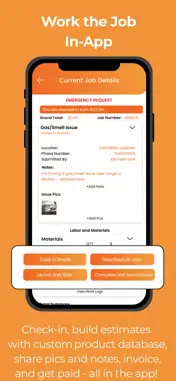
Managing a service business involves more than just completing jobs. You also need to handle customer requests, schedule work, manage technicians, prepare invoices and keep track of payments. ORS Pro brings all of this together in one place. With ORS Pro, service providers can receive requests directly from restaurants looking for their services. It gives you an easier way to find new customers, manage jobs and keep your day-to-day business organised. What You Can Do with ORS Pro Receive Requests from Restaurants Get service requests from restaurants looking for your expertise and connect with potential customers. Find More Business Opportunities Build your customer base by taking on new jobs and developing long-term relationships with restaurants. Manage Your Jobs and Schedule View incoming requests, schedule jobs and keep track of your daily work. Manage Your Team Assign jobs to technicians, coordinate their work and track employee working hours. Create Invoices Prepare invoices while working on jobs and keep your billing organised. Manage Payments Keep track of payments and job-related transactions directly through the app. Handle Supplies Manage the supplies needed to complete your service jobs. Get Directions to Job Locations Navigate to restaurant locations using your preferred maps application. Stay on Top of Your Business Keep job details, customer communication, schedules, invoices and other important activities organised in one place. Whether you're working independently or managing a team of technicians, ORS Pro helps you manage your daily work without having to juggle multiple tools. Getting Started with ORS Pro 1. Register or Log In: Create your account using your email address or log in with your registered credentials. 2. Set Up Your Business Profile: Add your business details and complete your service provider profile. 3. Select Your Service Offerings: Choose the services your business provides. Your membership cost will depend on the number of service offerings selected. 4. Add Your Service Areas: Enter the ZIP codes where you provide services so restaurants can find you in their area. 5. Set Up Your Team: Add your technicians and dispatchers to help manage jobs and daily operations. 6. Activate Your Membership: Review your selected services and membership cost, then complete your membership setup. 7. Start Receiving Requests: Once your setup is complete, start receiving service requests from restaurants and manage your jobs through ORS Pro. Manage your schedules, coordinate technicians, track working hours, create invoices and handle payments, all from one place. Download ORS Pro and manage your service business on the go.
Technical Analysis
Package Overview Basic metadata
Bundle ID
com.orspronew.app Current Version 1.0
Minimum iOS 16.6
Package Size App Store Size
Package Metadata 0 / 0 version records
Detailed binary, privacy manifest, framework, and Info.plist results have not been indexed for this package yet. The verified App Store and archive metadata above remains available.
Developer Information
Known Version Records
0 version records with stored package metadata
Stored metadata does not guarantee a package is currently available to download.
| Details | Version / IDs | Version date | Action |
|---|