
Preview





Description
Most high school students find out their GPA was not what they thought at the worst possible moment - when they are applying to college. GPA Planner exists so that never happens to you. Enter your classes once. See your weighted and unweighted GPA update as you go, on your school's actual grading scale. Then look forward: map all four years, set a goal, and find out honestly whether the courses you have planned can still get you there. WHAT YOU NEED ON WHAT IS LEFT Every class breaks down into weighted categories - tests 40%, homework 20%, the final 20%. GPA Planner does that math live and answers the question you actually care about: "what do I need on the final for an A?" It gives you the number. If an A is already locked in, it says so. If an A is no longer reachable, it says that too, and tells you the best you can still finish with. WEIGHTED VS UNWEIGHTED, EXPLAINED An A in AP Biology is worth more than an A in a regular class - but how much more depends entirely on your district. Set the rules once (10-point or 7-point scale, plus/minus or whole letters, Honors +0.5, AP +1.0, weighted cap) and every number in the app follows your school, not a generic average. THE FOUR-YEAR PLAN Set a goal - say a 4.3 weighted. GPA Planner tells you the average you must hold across every remaining credit to get there. More usefully, it tells you the ceiling: the highest GPA your current course plan can physically produce. If your goal sits above that ceiling, the app says so early, while you can still change your schedule, and tells you how many courses would need to move up to AP to bring the goal back in range. WHAT IF Thinking about adding an AP class next semester? Move a slider and watch your projected final GPA change before you sign up for it. Nothing is committed until you decide. DREAM SCHOOLS Build a list of the colleges you are aiming at and see where your GPA puts you at each one - safety, likely, target or reach - compared against published admitted averages. Over 150 colleges are built in, and you can add any school yourself. SHARE AND COMPARE WITH FRIENDS Send your dream school list to a friend and instantly see the schools you both want. Sharing your GPA is optional and switched off by default. PRIVATE BY DESIGN No account. No login. No server. Every grade you enter stays on your device, and we cannot see any of it. There is no analytics SDK, no advertising, and no tracking of any kind in this app. BUILT FOR HIGH SCHOOL Freshman through senior year. Semesters, trimesters or quarters. Honors, AP, IB and dual enrollment. Pass/fail classes you can exclude. Lock a term when grades go final and it becomes part of your transcript. - GPA Planner requires a purchase to use. - Monthly - $0.99 per month - Yearly - $4.99 per year - Lifetime - $9.99, one time Payment is charged to your Apple Account at confirmation of purchase. Subscriptions renew automatically unless auto-renew is turned off at least 24 hours before the end of the current period. Your account is charged for renewal within 24 hours prior to the end of the current period. You can manage your subscriptions and turn off auto-renew in your Apple Account settings after purchase. The Lifetime option is a one-time purchase and does not renew. Terms of Use: https://gpaplanner.onbaseiq.com/terms.html Privacy Policy: https://gpaplanner.onbaseiq.com/privacy.html GPA figures produced by this app are estimates based on the settings and scores you enter and are not an official academic record. Admitted-GPA figures for colleges are approximate averages compiled from publicly reported admissions data and are provided for reference only. GPA Planner is not affiliated with, endorsed by, or sponsored by any college, university, school, or school district.
What's New
Version 2.0 2026-10-22
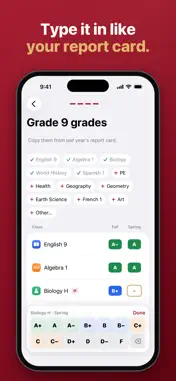
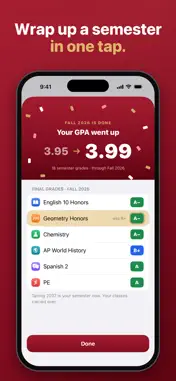
GPA Planner 2.0 is a complete redesign. • Set up on a grid that looks like your report card: pick your classes, then tap in your grades • Weighted and unweight...GPA Planner 2.0 is a complete redesign. • Set up on a grid that looks like your report card: pick your classes, then tap in your grades • Weighted and unweighted GPA together on Home, with a semester-by-semester chart • How we got this: the math behind your GPA, step by step • Match my school: type the GPA your school portal shows and find the rule that makes it match • Final exam: the score you need on the final for the grade you want • Plan ahead: the years to come and summer classes, with your GPA if you reach the grades you aim for • Semester wrap-up: add your final grades when a semester ends • One-page report: copy it as an image, share it as a PDF or save it to Photos • Light and dark mode Your classes and grades from earlier versions carry over. Technical Analysis
Package Overview Basic metadata
Bundle ID
com.onbaseiq.gpaplanner Current Version 2.0
Minimum iOS 18.0
Package Size App Store Size
Package Metadata 0 / 0 version records
Detailed binary, privacy manifest, framework, and Info.plist results have not been indexed for this package yet. The verified App Store and archive metadata above remains available.
Developer Information
Known Version Records
0 version records with stored package metadata
Stored metadata does not guarantee a package is currently available to download.
| Details | Version / IDs | Version date | Action |
|---|