
Preview



Description
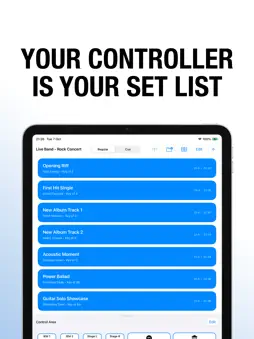
Cue Bear turns your iPad into a professional MIDI controller designed for live performance and based on your show's setlist. Instead of trying to remember what button triggers which cue, Cue Bear combines the setlist and the MIDI controller to create a seamless, stress-free performance-oriented controller. Connect via USB or WiFi and start performing. Download Cue Bear Bridge companion app on cuebear.app/bridge KEY FEATURES Smart Setlist Management Create cues for each song or scene in your show Add metadata: tempo, key, notes, scene numbers Reorder with drag-and-drop Search and filter your library Save and Add Another for quick setup Customizable Control Surface Faders – Vertical or horizontal sliders for smooth parameter control Buttons – Large, easy-to-hit buttons with custom icons Small Buttons – Compact controls for mute, solo, and quick actions Toggles – Latching buttons for effects and scene states Grid layout – Organize controls exactly how you want them Wireless and USB Connectivity WiFi MIDI – Control your Mac wirelessly over the network USB MIDI – Low-latency connection via Lightning cable Automatic device discovery Reconnects automatically if connection drops Works with CueBearBridge companion app (free download) Professional Features Auto-assign MIDI – Automatically assigns unique CC numbers Channel selection – Route to different MIDI channels (1–16) Control Change (CC) and Note messages Velocity control for dynamic expression 128 CC numbers and notes available per channel Visual feedback for control states Project Management Save unlimited projects for different shows Cloud sync via iCloud Drive (optional) Duplicate projects for easy variations Export/import for backup and sharing Autosave keeps your work safe Perfect For Live bands – Monitor mixes and effect switching Theater productions – Control lighting, sound effects, and scene changes Worship services – Mix vocals, band, and click tracks DJ performances – Trigger loops, effects, and hot cues Studio sessions – Record, transport controls, and track mixing Orchestras – Conduct tempo and dynamic changes Educators – Teach music production and MIDI concepts Beautiful Design Clean, modern interface designed for stage visibility Large, finger-friendly controls SF Symbols icon library Edit mode with visual feedback Personalized layout options Performance Optimized Smooth fader response with no lag Low memory footprint Battery efficient for all-day performances Works great with large setlists (100+ cues) Instant response, even with many controls Technical Details Requires iPad running iOS 18.2 or later Compatible with any DAW or software that accepts MIDI input Works with: Ableton Live, Logic Pro, Pro Tools, MainStage, Reaper, QLab, and more Supports standard MIDI protocol Free CueBearBridge companion app for Mac required for wireless connectivity Setup Requirements iPad (any model with iOS 18.2+) Mac computer with CueBearBridge installed (free from cuebear.app) For USB: USB cable For WiFi: Both devices on same network Why Cue Bear Built by performers for performers, Cue Bear is designed for reliability during live shows. No complex menus, no confusing settings—just the controls you need, when you need them. Whether you're playing backing tracks from a DAW for an arena show, running a Broadway-style musical, leading a worship team, or mixing monitors for a rock band, Cue Bear adapts to your workflow.
What's New
Version 1.0.12 2025-11-08
Version 1.0.12 - WiFi Connection Stability Fix Technical Analysis
Package Overview Basic metadata
Bundle ID
Omri-Behr.Cue-Bear Current Version 1.0.12
Minimum iOS 17.0
Package Size App Store Size
Package Metadata 0 / 6 version records
Detailed binary, privacy manifest, framework, and Info.plist results have not been indexed for this package yet. The verified App Store and archive metadata above remains available.
Developer Information
Known Version Records
0 version records with stored package metadata • 6 known version records
Stored metadata does not guarantee a package is currently available to download.
| Details | Version / IDs | Version date | Action |
|---|---|---|---|
| Not archived | App Store ID: 879567222 | Unknown | Paid / Arcade |
| Not archived | App Store ID: 879537723 | Unknown | Paid / Arcade |
| Not archived | App Store ID: 879422119 | Unknown | Paid / Arcade |
| Not archived | App Store ID: 879199572 | Unknown | Paid / Arcade |
| Not archived | App Store ID: 879060342 | Unknown | Paid / Arcade |
| Not archived | App Store ID: 878749644 | Unknown | Paid / Arcade |