
Preview




Description
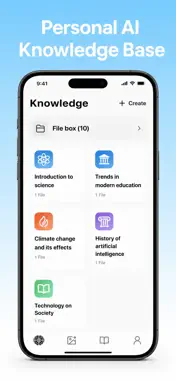
OmniSide is a powerful AI assistant application that seamlessly integrates leading large language models (LLMs) into your mobile device. Whether you're conducting in-depth research, writing important emails, or watching long videos on YouTube, OmniSide significantly boosts your productivity through AI-powered intelligent tools. Your dedicated AI assistant is ready. OmniSide makes video watching more efficient, multilingual reading easier, and content creation more professional. No need to switch between multiple apps - a one-stop solution for all your intelligent needs. 「Core Features & Highlights」 [Intelligent Video Summarization & Interaction] Watching long videos on mobile too time-consuming? Now, OmniSide makes video watching unprecedentedly efficient. Simply click to summarize video and instantly extract video highlights without needing to watch the entire content to grasp core information. Summary content comes with precise timestamps - click to jump directly to corresponding video segments, reaching the parts you care about most. Additionally, supports one-click copying of complete video subtitles for easy note-taking, content repurposing, or translation. [Multi-Model AI Aggregated Conversations] OmniSide provides seamless access to various state-of-the-art AI assistants within a single, unified interface. You can ask different AIs the same question and compare their answers side by side to gain the most comprehensive and accurate insights. [Immersive Reading & Translation Assistance] While browsing any webpage, instantly summarize lengthy articles to quickly grasp key points. Encountering complex terms or foreign languages? Select text to get explanations and accurate translations between over 50 languages. OmniSide can read your current screen. You can directly converse with webpages, summary content, or images to get contextually relevant help. [Expert-Level AI Writing & Rewriting] Generate high-quality articles, report outlines, social media posts, or professional emails from scratch. Use tone adjustment, grammar correction, and sentence optimization tools to make your written expression more natural and persuasive. [Interactive Content Rendering] Say goodbye to plain text - directly transform AI output results into highly readable documents, code blocks, or tables. Render real deliverables within the app for easy preview, copying, and further sharing. [Deep Optimization & Context Control] Don't know what to ask next? AI will customize follow-up questions based on current conversation topics for one-click deep exploration. Automatically refines your input in the background - no need to master prompt engineering to get expert-level clear and accurate answers. In long conversations, you can freely trim or retain AI's memory content to ensure conversations remain coherent and focused. [Why Choose OmniSide?] Set your preferred language once (supports 50+ languages), and all AI responses will default to that language thereafter, eliminating repetitive instructions. One account seamlessly syncs your history, preference settings, and prompt library across different devices and operating systems. Download OmniSide now and start your new mobile intelligence experience!
What's New
Version 1.1.3 2026-11-11
• Improved image selection, file reading, and retry feedback. • Improved saving images. • Agents in All now prioritize those used most by your account on this d...• Improved image selection, file reading, and retry feedback. • Improved saving images. • Agents in All now prioritize those used most by your account on this device. • Fixed sending failures caused by overly long summary titles. • Improved image and file previews and onboarding layouts when resizing. Technical Analysis
Package Overview Basic metadata
Bundle ID
com.omniside.omniside-app Current Version 1.1.3
Minimum iOS 16.4
Package Size App Store Size
Package Metadata 1 / 18 version records
Detailed binary, privacy manifest, framework, and Info.plist results have not been indexed for this package yet. The verified App Store and archive metadata above remains available.
Developer Information
Known Version Records
1 version record with stored package metadata • 18 known version records
Stored metadata does not guarantee a package is currently available to download.
| Details | Version / IDs | Version date | Action |
|---|---|---|---|
| Not archived | v1.0.85 App Store ID: 890099688Build: 1.0.85 | 2026-08-21 19:41:58 | Request Version |
| Not archived | v1.0.83 App Store ID: 889116716Build: 1.0.83 | 2026-08-15 14:22:06 | Request Version |
| Not archived | v1.0.70 App Store ID: 888379641Build: 1.0.70 | 2026-07-16 23:08:52 | Request Version |
| Not archived | v1.0.62 App Store ID: 888106061Build: 1.0.62 | 2026-07-10 20:13:01 | Request Version |
| 109.98 MB | v1.0.85 App Store ID: 887933914Build: 1.0.85 | 2026-08-21 19:41:58 | Get Version |
| Not archived | v1.0.60 App Store ID: 887799047Build: 1.0.60 | 2026-07-04 07:21:59 | Request Version |
| Not archived | v1.0.50 App Store ID: 887584293Build: 1.0.50 | 2026-07-01 00:08:00 | Request Version |
| Not archived | v1.0.40 App Store ID: 887523533Build: 1.0.40 | 2026-06-27 20:50:06 | Request Version |
| Not archived | v1.0.36 App Store ID: 886603191Build: 1.0.36 | 2026-06-06 18:44:57 | Request Version |
| Not archived | v1.0.35 App Store ID: 886286189Build: 1.0.35 | 2026-05-29 20:46:07 | Request Version |
| Not archived | v1.0.31 App Store ID: 886024005Build: 1.0.31 | 2026-05-22 21:59:18 | Request Version |
| Not archived | v1.0.29 App Store ID: 885860561Build: 1.0.29 | 2026-05-20 00:31:55 | Request Version |
| Not archived | v1.0.25 App Store ID: 885521744Build: 1.0.25 | 2026-05-12 04:08:47 | Request Version |
| Not archived | v1.0.20 App Store ID: 885311476Build: 1.0.20 | 2026-05-09 05:27:01 | Request Version |
| Not archived | v1.0.16 App Store ID: 884365908Build: 1.0.16 | 2026-04-10 19:01:32 | Request Version |
| Not archived | v1.0.14 App Store ID: 884148313Build: 1.0.14 | 2026-04-04 19:16:04 | Request Version |
| Not archived | v1.0.12 App Store ID: 884100406Build: 1.0.12 | 2026-04-03 20:02:02 | Request Version |
| Not archived | v1.0 App Store ID: 882406399Build: 1.0 | 2026-04-01 15:39:36 | Request Version |