
Preview







Description
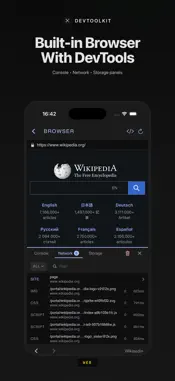
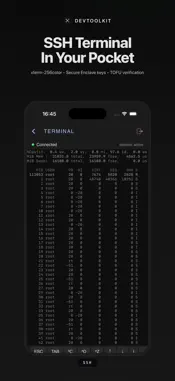
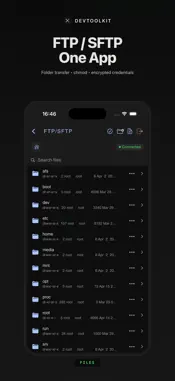
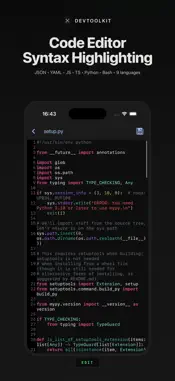
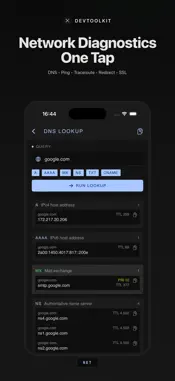
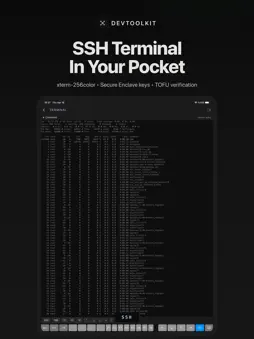
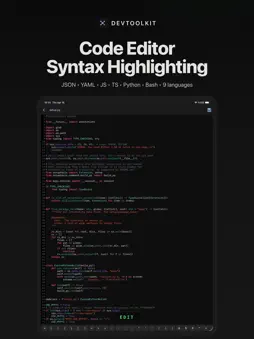
A developer's toolkit in your pocket. SSH, SFTP, FTP/FTPS, DNS, Ping, Traceroute, HTTP, WebSocket, SSL and more — all in one app, no accounts, no data sent to the cloud. A single password encrypts everything and keeps it on your device. 13 professional tools, one interface. Native iOS 17 app; no ads, no tracking, no backend. NETWORK DIAGNOSTIC TOOLS • DNS Lookup — A, AAAA, MX, NS, TXT, CNAME records; multiple types in one query • Ping — live latency chart, avg/min/max and packet loss statistics • Traceroute — UDP-based, per-hop latency with reverse DNS • Redirect Checker — follows the HTTP redirect chain step by step; loop detection • SSL Checker — TLS certificate, chain, expiration, cipher suite, SAN list FILE TRANSFER (FTP/SFTP) • FTP, FTPS and SFTP protocol support • Folder upload and download (recursive, including subdirectories) • File permissions (chmod) — numeric mode with preview • Rename, move, copy, bulk delete • Tappable breadcrumb for fast directory navigation • Home icon jumps to the root directory in one tap • Connection details and passwords stored encrypted REMOTE SHELL (SSH) • xterm-256color emulation — top, htop, vim and other screen apps work smoothly • Password, OpenSSH Ed25519 private key, and Secure Enclave-backed P-256 key auth • TOFU host key verification; warns against MITM attacks • Customizable keyboard shortcuts: Ctrl, Esc, Tab, arrow keys, pipe, tilde, slash • Reorder shortcuts by drag and drop • Active SSH sessions stay alive in the background WEB DEVELOPMENT • Built-in browser — WKWebView with Console, Network, and Storage panels • HTTP client — GET, POST, PUT, PATCH, DELETE, HEAD, OPTIONS; header editor, JSON/Form/Raw body • WebSocket — connect, send/receive text and binary frames, live log, 500-frame buffer • History for previous requests (HTTP and WebSocket) FILE MANAGER • Local file browser with tappable breadcrumb • Syntax-highlighted code editor: JSON, YAML, Markdown, JavaScript, TypeScript, Python, Bash, HTML, CSS • Image viewer and editor — crop, resize, convert to PNG/JPG/WEBP/HEIC/GIF/ICO, quality control • PDF reader • Media player: MP4, M4V, MOV, MP3, AAC, WAV, MKV, WEBM, AVI, FLV, TS, OGG • Archives: ZIP, TAR, GZIP, BZip2, XZ, 7Z, RAR extraction; ZIP compression • Hardened against archive attacks like zip-slip MEDIA PLAYER (from URL) • MP4, MOV, MP3, M4A, AAC, WAV • HLS live streams (.m3u8) • Custom headers like Authorization and Cookie (HTTPS only) • History of loaded streams NOTES • End-to-end encrypted notes — protected by your app password • Attach photos and files • Attachments open directly in the in-app viewers SECURITY • On-device PBKDF2 (200,000 iterations, SHA-256) and AES-GCM encryption • All connections, passwords, SSH keys, notes, and history stored encrypted • Atomic password change with automatic rollback on failure • Auto-lock — immediate, 1 min, 5 min, 10 min, 30 min, 1 hour • Auto-wipe after too many wrong password attempts (optional; 3, 5, 10, 15, 20) • SSH private keys can be generated inside the Secure Enclave; the key never leaves the device • No data is sent to any cloud. No backend. No account required. WHO IS IT FOR? System administrators, backend and web developers, DevOps and network engineers, and anyone who tinkers with servers and networks. One app, one password, fully local — a professional workstation in your pocket. WHAT CAN YOU DO? • Connect to a remote server via SSH, run commands, tail logs • Transfer files and folders over SFTP, change permissions remotely • Verify DNS, SSL, and redirect chains when launching a new domain • Diagnose network issues with ping, traceroute, public/local IP • Test a REST API, try a WebSocket endpoint • Watch live console output and network traffic in the built-in browser • Download a ZIP archive, extract it, edit the code inside with syntax highlighting
Technical Analysis
Package Overview Basic metadata
Bundle ID
tr.appdev.devtoolkit Current Version 1.0
Minimum iOS 17.0
Package Size App Store Size
Package Metadata 1 / 1 version records
Detailed binary, privacy manifest, framework, and Info.plist results have not been indexed for this package yet. The verified App Store and archive metadata above remains available.
Known Version Records
1 version record with stored package metadata
Stored metadata does not guarantee a package is currently available to download.
| Details | Version / IDs | Version date | Action |
|---|---|---|---|
| 51.85 MB | v1.0 App Store ID: 884559737Build: 1.0 | 2026-04-20 03:21:03 | Get Version |