
Preview



Description
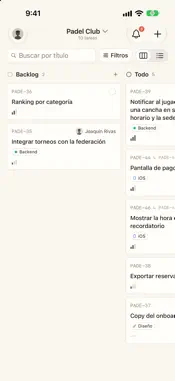
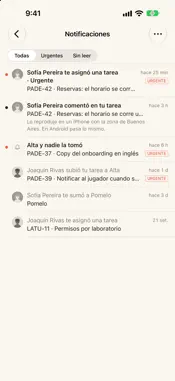
Matecito is Ombú Studio's task tool: where the studio and its clients' teams keep the work of every project. It is the same Matecito as matecito.ombustudio.com, now on iPhone, iPad and Mac. Matecito is invite-only: whoever runs your team adds you to their projects and the invitation reaches your email. Then sign in with the code we email you or with your password. BOARD AND LIST - Each project as a board or a list, or every project together. - Group by status, project, assignee or priority, and sort by priority, due date, last updated or newest. - Filter by assignee, label or priority, or show only your tasks, and search by title. - Drag a card to another column to change its status, assignee or priority. - Add a task in one line from any column, or a full one from a template. EVERY TASK - A formatted description with images, subtasks, labels, priority, due date and assignee. - Comments with images: paste them, drag them in, pick them from your photos or files, or take a photo right there. - Links to matecito.ombustudio.com open the task in the app. NOTIFICATIONS - An inbox with All, Urgent and Unread. - Push notifications for what reaches you, like a task assigned to you or a comment on your task. Tap one and the task opens. - Your unread count on the app icon and in the Dock. WIDGETS AND CONTROLS - My tasks and Notifications, on the Home Screen, the Lock Screen and StandBy. - Focus: the task you are on, with Done, or the next one, with Start. - Week: your tasks with a due date, Monday to Sunday. - Project pulse: what is open, what is overdue and the last two weeks of a project. - Unowned: urgent work nobody has taken, with Take it. - The New task and My tasks controls, for Control Center, the Lock Screen and the Action button. ON THE MAC AND IPAD - Projects in the sidebar, the board in the middle and the task in a panel at the side. - Keyboard shortcuts to create a task, search, open the inbox and refresh. - The same widgets on the Mac's desktop. SETTINGS - Your name, your password, which emails you get and push notifications. - For project leads: the project's labels, templates and people, and invitations. - Light, dark or the system's, in Spanish or English.
What's New
Version 1.0.2 2026-10-14
What's new: - A notice when a new version is on the App Store. - A formatting bar while writing: bold, headings, lists, checklists and links. - @ mentions someo...What's new: - A notice when a new version is on the App Store. - A formatting bar while writing: bold, headings, lists, checklists and links. - @ mentions someone and # links a task; whoever you mention is told. - React to comments. - Notifications show the project's logo, and a long press offers more actions. - While you use Matecito on another device you get no duplicate notifications, and what you read on one clears from the others. - The project's logo on every card, and the assignee filter with photos. Technical Analysis
Package Overview Basic metadata
Bundle ID
com.ombustudio.matecito Current Version 1.0.2
Minimum iOS 18.0
Package Size App Store Size
Package Metadata 0 / 0 version records
Detailed binary, privacy manifest, framework, and Info.plist results have not been indexed for this package yet. The verified App Store and archive metadata above remains available.
Known Version Records
0 version records with stored package metadata
Stored metadata does not guarantee a package is currently available to download.
| Details | Version / IDs | Version date | Action |
|---|