
Preview



Description
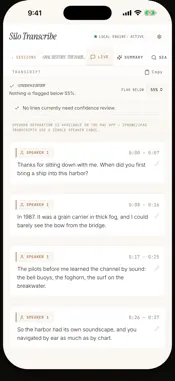
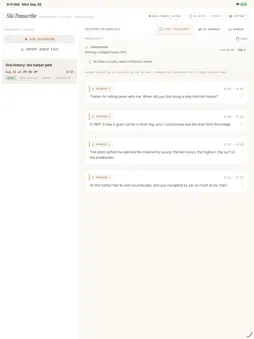
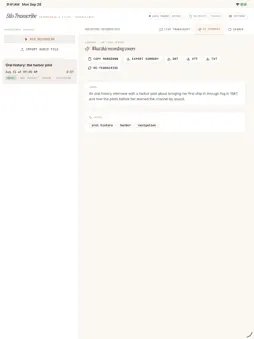
Silo Transcribe turns recordings and audio files into transcripts you can read, correct and search on your iPhone or iPad. Transcription happens on the device, and there is no account. • Import an audio file, or record a lecture, interview or voice note with the microphone. Imported files get an audio check that flags clipped, quiet or noisy recordings. • Lines the recognizer is unsure of are flagged, so you review the ones that matter; a line you correct or accept leaves the review list. • Teach it names and terms in Custom Vocabulary, and new transcripts use your spelling. • On devices with Apple Intelligence, make a short summary with topic tags. • Search every session and share a transcript as text, SRT or WebVTT. Transcription uses Apple’s on-device speech model for the language you choose, which the app downloads from Apple only after you agree; transcription itself runs offline. Recordings and transcripts are kept inside the app until you share one. On iPhone and iPad the app records the microphone only; system-audio capture, speaker labels and lecture practice questions are in the Mac version. One purchase covers the app on iPhone, iPad and Mac.
What's New
Version 1.11.0 2026-11-18
When you re-transcribe or resume a session in a language whose speech model isn’t on your iPhone or iPad yet, the app now asks before downloading that model fro...When you re-transcribe or resume a session in a language whose speech model isn’t on your iPhone or iPad yet, the app now asks before downloading that model from Apple. If you agree, it shows the download with a Cancel download button and then transcribes; if you decline, nothing is downloaded. If you chose Skip for now during setup, recording or importing no longer downloads the speech model without asking. The audio is kept, and you can transcribe it once you agree to the download. The language picker’s default choice now names the language it will use, such as “Device language (English)”. It used to say Auto-detect, but on iPhone and iPad that choice transcribes in the device language (or English if the device language isn’t supported); it doesn’t detect the language. On iPad, File › Import Audio… (⇧⌘I) opens the file picker. There, and with the Import Audio File button, you can now choose several files at once; they are imported one after another. Fixes: • Fixed a problem that caused readable recordings to be rejected as unsupported or unreadable. You can also import audio from QuickTime movies. • The last second of a recording is now transcribed, and a recording shorter than a second is no longer empty. • A recording’s length no longer includes the time before the microphone started, such as the wait for the microphone permission. • Opening a transcript line from Global Search now shows that line, highlighted, instead of the top of the transcript. • Clearing the search box while a search is running no longer leaves the spinner on. Technical Analysis
Package Overview Basic metadata
Bundle ID
com.silosystems.silotranscribe Current Version 1.11.0
Minimum iOS 26.0
Package Size App Store Size
Package Metadata 0 / 0 version records
Detailed binary, privacy manifest, framework, and Info.plist results have not been indexed for this package yet. The verified App Store and archive metadata above remains available.
Developer Information
Known Version Records
0 version records with stored package metadata
Stored metadata does not guarantee a package is currently available to download.
| Details | Version / IDs | Version date | Action |
|---|