Preview






Description
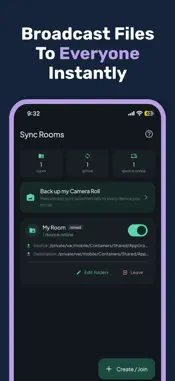
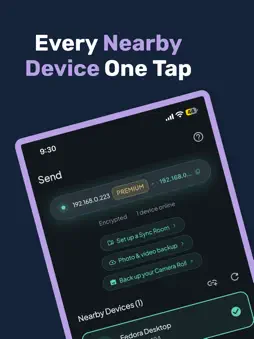
Transfer files instantly between your iPhone, iPad, Mac and any device you need — no internet, no cloud, and no accounts required. Local Share delivers blazing-fast, secure local file sharing across all your Apple devices over your local network. Whether you are sending gigabytes of 4K video from your Mac to your iPhone or backing up photos across devices, Local Share keeps your data completely private and off third-party servers. 100% FREE LOCAL TRANSFERS Core file sharing between devices on the same Wi-Fi network is completely free and unlimited forever. WHY CHOOSE LOCAL SHARE? • ULTRA-FAST LOCAL TRANSFERS Skip slow cloud uploads and file size limits. Local Share uses your local Wi-Fi network to transfer photos, full-resolution videos, documents, folders, and archives at full local speed. • ZERO CLOUD & ZERO TRACKING Your files never touch an external server, and no data is ever collected. Everything stays strictly inside your local network. • AUTOMATIC DEVICE DISCOVERY No setup or tedious pairing. Nearby iPhones, iPads, and Macs on your network are discovered automatically in seconds. • AUTO CAMERA ROLL BACKUP Keep your media library safe automatically. Wirelessly back up photos and videos from your iPhone or iPad directly to your Mac or network storage over Wi-Fi. • TRANSIT ENCRYPTION FOR PUBLIC WI-FI Share confidently in coffee shops, coworking spaces, and public networks with enhanced end-to-end encryption in transit. • SYNC ROOMS & LIVE ANALYTICS Set up dedicated sync rooms to share files with multiple devices simultaneously. Monitor live activity, connection speeds, and transfer logs in real time. • BUILT FOR TEAMS & ENTERPRISE Manage team sharing with advanced administration settings. Set custom security rules, network policies, guest access limits, and access controls for secure workplace collaboration. • BRAND-NEW KIOSK MODE Deploy high-speed, unattended file transfer setups for events, studios, kiosks, or dedicated workflow stations. DESIGNED NATIVE FOR iOS & macOS Enjoy a seamless experience crafted specifically for macOS, iPadOS, and iOS. Drop files directly on Mac, monitor transfer progress from your menu bar, and manage sync rooms effortlessly on any screen size. --- HOW IT WORKS 1. Connect your devices to the same Wi-Fi or local network. 2. Open Local Share on your iPhone, iPad, or Mac. 3. Select your files or camera roll and send — fast, simple, and private. --- Terms of Use: https://www.apple.com/legal/internet-services/itunes/dev/stdeula/ Privacy Policy: https://kodemill.com/privacy/localShare
What's New
Version 2.0.0 2026-10-26
- Redesigned Experience: Enjoy a fresh, modern interface crafted for faster navigation. - Sync Room Visibility: Get real-time, detailed insights into active syn...- Redesigned Experience: Enjoy a fresh, modern interface crafted for faster navigation. - Sync Room Visibility: Get real-time, detailed insights into active sync room transfers. - Advanced Analytics: Track file transfer trends, network performance, and sharing history. - Automatic Camera Roll Backup: Automatically back up photos and videos seamlessly over your local network. - Enhanced In-Transit Encryption: Extra protection on public Wi-Fi networks to keep your transfers secure. - Team Administration: Manage security rules, guest access, and network policies with new enterprise controls. - Brand-New Kiosk Mode: Set up simple, fast, unattended transfers for high-volume sharing environments. Technical Analysis
Package Overview Basic metadata
Bundle ID
com.kodemill.localtransfer Current Version 2.0.0
Minimum iOS 18.6
Package Size App Store Size
Package Metadata 0 / 0 version records
Detailed binary, privacy manifest, framework, and Info.plist results have not been indexed for this package yet. The verified App Store and archive metadata above remains available.
Developer Information
Known Version Records
0 version records with stored package metadata
Stored metadata does not guarantee a package is currently available to download.
| Details | Version / IDs | Version date | Action |
|---|