
Preview

Description
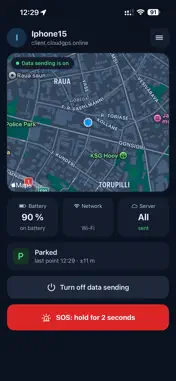
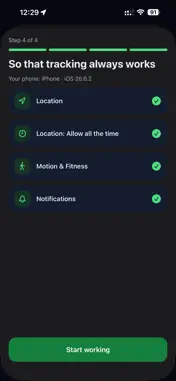
cloudGPS Tracker turns a work phone into a GPS tracker of the cloudGPS telematics platform. It is made for employees of companies that use cloudGPS: field staff, couriers, service engineers, security guards. HOW IT WORKS Your administrator gives you a QR code or a link. Scan the code in the app or open the link on your iPhone, and the phone joins your company's account. Turn on data sending when you start work: the app sends your location in the background, also with the screen locked. Turn data sending off when work is over. Location is collected only while data sending is on. ON THE MAIN SCREEN A map with your position and the time of the last point. Battery, network and sending status: everything sent, or how many points are waiting for the network. An SOS button: hold it for 2 seconds to send an alarm to your company. GENTLE ON THE BATTERY Points are sent often while you move and rarely while you stand still. The app recognises driving, walking and parking to pick the right mode, and keeps points recorded without a network to send them later. PRIVACY Your location goes only to your company's cloudGPS account over an encrypted connection. While data sending is on, iPhone shows the location indicator in the status bar. Servers are located in the European Union. The app works with a connection code from a cloudGPS administrator. Four interface languages: English, Ukrainian, Russian and Polish.
What's New
Version 1.0.1 2026-11-02
Apple Watch: SOS button, turning data sending on and off, shift summary and an SOS complication for the watch face. Control Center: a button that turns on data ... Technical Analysis
Package Overview Basic metadata
Bundle ID
com.cloudGPS.tracker Current Version 1.0.1
Minimum iOS 16.0
Package Size App Store Size
Package Metadata 0 / 0 version records
Detailed binary, privacy manifest, framework, and Info.plist results have not been indexed for this package yet. The verified App Store and archive metadata above remains available.
Developer Information
Known Version Records
0 version records with stored package metadata
Stored metadata does not guarantee a package is currently available to download.
| Details | Version / IDs | Version date | Action |
|---|