
Preview




Description
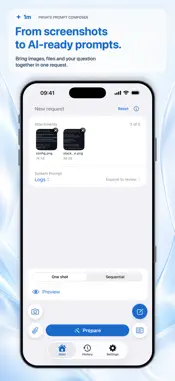
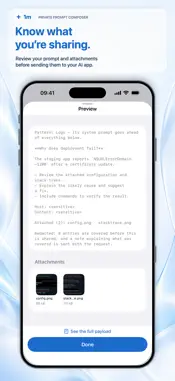
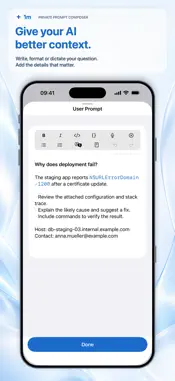
Turn logs, code, screenshots, and short videos into a request for the AI app you already use. 1m brings your prompt and attachments together and helps you review and hide sensitive text before sharing from your iPhone. CAPTURE THE CONTEXT • Photograph logs or code on another screen, record a clip of up to 15 seconds, or import photos, videos, and files. • Add up to five attachments: up to 10 MB per image and 30 MB per video or other file. Archives are not supported. READ AND REVIEW • Extract text from images and the first 20 pages of a PDF. 1m reads existing PDF text layers directly and also recognizes text in embedded images and scanned pages. Review the extracted text and tap a line to copy it. • Enable text recognition in video frames when you need it. Processing can take time, and longer videos may not be read to the end. • Check your user prompt, supported UTF-8 text files up to 512 KB, and recognized attachment text for keys and tokens, email addresses, hostnames and URLs, IP addresses, home-directory paths, card numbers, and people's names. • Detected items start hidden. Choose what to hide or reveal individually, by attachment, or across the request. Select additional text to hide anything the scan missed. • Hidden text is covered in the shared image, PDF page, or video frames, and replaced with a redaction marker in your user prompt and supported text files. COMPOSE AND SHARE • Choose from five system prompt templates for logs, code, troubleshooting, explanations, and text extraction. Create your own, build on a template, or use no system prompt. • Format your text, hold the microphone to dictate, or translate your written prompt. • Preview your request and attachments, then inspect or copy the full assembled prompt. • Send the prompt and attachments together through the iOS share sheet, or share items one at a time, depending on what the receiving app supports. • Reuse requests from History with redactions preserved in stored attachments. Newly prepared requests retain their saved prompt and files when you change settings or templates. ON YOUR IPHONE Text recognition, sensitive-text checks, and masking run on your iPhone. 1m needs no account or API key and has no developer-run server. Dictation may use Apple's servers; translation may require language downloads. Detection can miss sensitive text. Only text the app can read can be hidden. Unprocessed content, video audio, and system prompts are not checked and may still be shared. Always review what you send. A compatible AI app provides the answers. Its terms, limits, and charges apply separately. CHOOSE YOUR LANGUAGE Use 1m in English, German, Ukrainian, Russian, or Hindi, independently of your iPhone's language. You can add an instruction asking your AI app to answer in the selected language and keep code and identifiers unchanged. TRY ALL FEATURES, THEN UNLOCK ONCE Activate the free 3-day trial in the app through the App Store. It lasts 72 hours from activation and requires an internet connection to start. Restoring the trial does not restart it. Buy Full Access at any time with a one-time purchase. The trial never turns into a paid subscription, and there is no automatic charge. Restore your purchase on compatible devices using the same Apple Account, or share Full Access through Family Sharing. Without an active trial or Full Access, you can compose and share text in “One shot” mode and resend saved History entries. Attachments, system prompts, text recognition, and sensitive-data checks are unavailable for new requests.
What's New
Version 1.1 2026-10-07
1m now supports Hindi. • Improved text recognition in PDFs containing both text and images. • Improved name detection and masking of sensitive text. • Changes ... Technical Analysis
Package Overview Basic metadata
Bundle ID
com.mobileproblemsolver.app Current Version 1.1
Minimum iOS 18.0
Package Size App Store Size
Package Metadata 0 / 0 version records
Detailed binary, privacy manifest, framework, and Info.plist results have not been indexed for this package yet. The verified App Store and archive metadata above remains available.
Known Version Records
0 version records with stored package metadata
Stored metadata does not guarantee a package is currently available to download.
| Details | Version / IDs | Version date | Action |
|---|