
Preview



Description
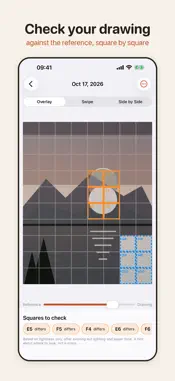
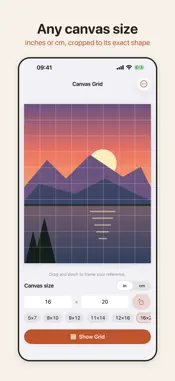
Canvas Grid is for artists who use the grid method: it puts a grid on your reference photo in the real units of your canvas, then checks your drawing against it, square by square. CHECK YOUR DRAWING Photograph your canvas at any angle. Canvas Grid finds its edges (or you drag the four corners, with a magnifier), flattens the photo to your canvas's exact proportions and lays it over the reference with the same grid. • Overlay with an opacity slider, a swipe divider, or side by side. • Squares whose lights and darks differ most are outlined, and squares that are still blank paper are marked "not started". Lighting and paper tone are evened out first, so a pencil drawing of a colour photo still compares fairly. It's a pointer to where to look, not a score. • Tap any square to see the reference and your drawing of it next to each other. • Keep a timeline of progress photos for the drawing. A GRID IN CANVAS UNITS Enter your canvas size in inches or centimeters, or tap a common size (8×10, 11×14, 16×20, 30×40 cm…). The photo is cropped to exactly that shape and the lines are measured from the top-left corner like a ruler: 2-inch squares on screen are 2-inch squares on your canvas. If the canvas isn't an exact multiple, the last row or column is a partial square, just as it is on the canvas. LABELLED SQUARES Columns are lettered and rows numbered (A1, B2…). Tap a square to zoom in, see where it sits on the canvas in inches or cm, and step to the next one. VALUE STUDY See your reference as 3 values (light, mid, dark) before you paint. CANVAS GRID PRO (ONE-TIME PURCHASE) • Print-ready grid sheets at full resolution, with labels and your canvas size printed on them. • 5-value study. • Keep every progress photo (free keeps the last 3) and export side-by-side comparison sheets. Your reference and progress photos stay on your iPhone. Nothing is uploaded and the app has no analytics.
Technical Analysis
Package Overview Basic metadata
Bundle ID
com.oguzcamur.canvasgrid Current Version 1.0
Minimum iOS 17.0
Package Size App Store Size
Package Metadata 0 / 0 version records
Detailed binary, privacy manifest, framework, and Info.plist results have not been indexed for this package yet. The verified App Store and archive metadata above remains available.
Known Version Records
0 version records with stored package metadata
Stored metadata does not guarantee a package is currently available to download.
| Details | Version / IDs | Version date | Action |
|---|