Preview



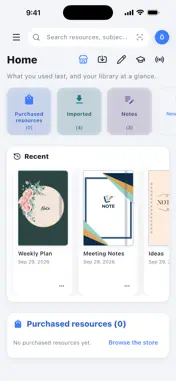





Description
Open your documents. Think them through. Leave the rest to Notevian. Notevian is a workspace for your own documents. Import your PDF files, write on them with Apple Pencil or your finger, add text, tidy the shapes you draw, and organise your notebooks. Your documents and notes open and can be edited without a connection, and are stored encrypted on your device. You can start straight away, without an account. The app is in Turkish, English, German and Spanish and opens in your device's language. WRITE WITH A PEN • Pressure-sensitive pen, fountain pen, pencil, highlighter, whiteout and eraser • Colour, thickness and dashed-line options • Colour picker: preset colours, your own colours, HEX codes and picking a colour from the page • Snap to shape: a line, triangle, rectangle, circle, arrow or curve drawn by hand becomes a clean shape; drag its corners to adjust it • Ruler and laser pointer • Tap with two fingers to undo the last stroke TYPE AND EDIT • Text box: tap the page and type straight onto it; move, rotate and resize the box • Bold, italic, underlined and struck-through text; four fonts; sticky notes • Move, copy, cut and paste drawings, text and photos with the Select tool • Focus: enlarge part of a page and write in detail • Tidy up your handwriting or turn it into text • Add photos and remove their backgrounds; place your signature and stickers NOTEBOOKS AND LIBRARY • Notebooks and folders • Plain, lined, squared, dotted, Cornell, music and many more papers; planners and your own templates • Keep a document and your note pages open in tabs in one workspace and switch between them with a tap • Search titles, inside documents and in your handwriting • Lock a notebook or a single page with a passphrase and open it with Face ID or Touch ID STUDY SETS • Circle a question to make a study card; revise with sets SHARE • Export the whole document or the pages you choose as PDF, Word or images LIVE SESSIONS • Join a live session with its code and watch the streamer's writing live on your screen • In Normal sessions, write on the page too if the streamer lets you STORE • Buy publishers' digital resources, or rent them for the terms the publisher offers (1 month, 3 months or 1 year); they go straight into My Library • Add free resources to My Library • Save resources to your favourites and see your purchase history in the app • Top up your balance in the app for your purchases PRO AND PLATINUM • Unlimited documents and notes; your notes and documents sync across your devices • Share your pages with a time-limited quick link and QR code • Start live sessions; in real time with Platinum • Get the plans in the app as App Store subscriptions: Pro yearly, Platinum monthly or yearly PRIVACY • Your documents and notes are stored encrypted on your device and open even without a connection; if you turn on sync, they are also sent to our servers • You can delete your account in the app at any time SUBSCRIPTIONS Pro (yearly) and Platinum (monthly or yearly) are auto-renewable subscriptions. Payment is charged to your Apple Account at confirmation of purchase. A subscription renews for the same period and price unless it is cancelled at least 24 hours before the end of the current period; the renewal is charged within the 24 hours before the period ends. You can manage or cancel your subscription in Settings → Apple Account → Subscriptions. Support: notevian.com/destek Privacy Policy: notevian.com/gizlilik Terms of Use: notevian.com/kullanim-kosullari Apple Standard Licence Agreement (EULA): https://www.apple.com/legal/internet-services/itunes/dev/stdeula/
What's New
Version 1.2.0 2026-11-08
We keep improving Notevian based on your requests. In this version: VOICE NOTES • Add voice notes to your notes, book pages and infinite pages. • A voice note ...We keep improving Notevian based on your requests. In this version: VOICE NOTES • Add voice notes to your notes, book pages and infinite pages. • A voice note is a small player on the page: listen, pause, jump to any moment, and choose a speed from 0.25x to 4x. • When a page opens, voice notes show only as a microphone; tap it to open or fold them. • Move a voice note, resize it, or touch and hold it and choose "Make vertical". • Tap something you wrote during a recording to play from that moment. • If the app closes unexpectedly, an unfinished recording isn't lost. TEXT BOX • A new toolbar: colour, text size, typeface, bold, italic, alignment, bullets and highlight. • Add a text box with your finger too; spelling mistakes are underlined as you type. PEN AND PAGES • The pen menu now has three quick colours, and the colours you picked last stay there. • Pull the first or last page halfway and let go to add a new page. • With a document open, the notes in the left panel show only that document's notes. • "Start Live Session" has moved to the ⋯ menu at the top right. OTHER • Search also finds text you typed. • When you edit the same page on two devices, your changes are combined. • Many speed improvements and bug fixes. Technical Analysis
Package Overview Basic metadata
Bundle ID
com.notevian.client Current Version 1.2.0
Minimum iOS 15.5
Package Size App Store Size
Package Metadata 0 / 0 version records
Detailed binary, privacy manifest, framework, and Info.plist results have not been indexed for this package yet. The verified App Store and archive metadata above remains available.
Developer Information
Known Version Records
0 version records with stored package metadata
Stored metadata does not guarantee a package is currently available to download.
| Details | Version / IDs | Version date | Action |
|---|