
Preview




Description
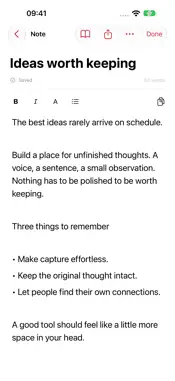
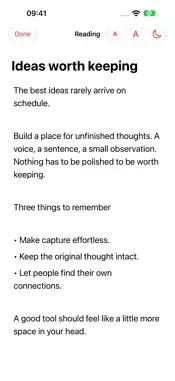
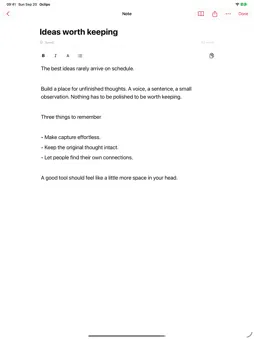
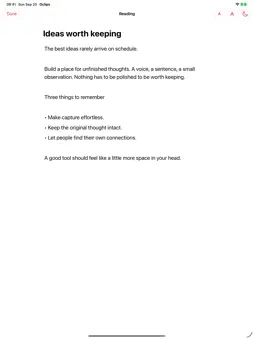
Oclips brings voice capture, a searchable clip library, and notes together across your devices. Record an idea on your iPhone, get a transcript after recording, and pick it up again wherever you sign in. CAPTURE YOUR THOUGHTS Tap the microphone to record a voice clip, then stop to upload it for transcription. Keep the audio alongside the text so you can listen back or copy the transcript when you need it. FIND AND ORGANIZE Search your clips by text and filter by favorites and categories. AI-assisted titles, tags, and category assignment help organize your library. Create categories with a description of the clips that belong there. WRITE AND READ IN NOTES Create and edit rich-text notes with headings, bold and italic text, and lists. Adjust the text size, switch to a dark reading mode for scripts, or open a note full-screen. Copy a note or share it through an expiring public link that you can disable. Only share notes you intend to make available to others. PICK UP ON ANOTHER DEVICE Sign in to the same Oclips account on your other devices to access your synced clips and notes. Use the web app alongside the iPhone and iPad app. Copy text from Oclips and paste it into the app where you want to use it. DESIGNED FOR EVERYDAY CAPTURE Use Oclips for ideas, message drafts, personal reminders, and scripts. The iOS app keeps its main controls in place while your library scrolls. ACCOUNT AND CONNECTIVITY Sign in with Apple is supported. Account deletion is available in Settings. An Oclips account and an internet connection are required. Sign in with your Oclips email or username and password, or use Google Sign-In. Microphone access is requested when you record audio. Transcription and AI organization are server-based, not offline features. PRIVACY Recordings and notes are associated with your account. Audio is uploaded for transcription; text is processed to provide AI-assisted organization. For details about data handling, sharing, and deletion requests, please read the privacy policy. Privacy: https://oclipsapp.octodance.com/privacy.html Terms: https://oclipsapp.octodance.com/terms.html
What's New
Version 1.2 2026-11-11
Redesigned keyboard: live waveform while recording, a new Send key, and left/right-hand layouts. Recordings are now compressed before upload, so long recordings...Redesigned keyboard: live waveform while recording, a new Send key, and left/right-hand layouts. Recordings are now compressed before upload, so long recordings upload faster and more reliably on weak networks. Technical Analysis
Package Overview Basic metadata
Bundle ID
com.octodance.clipchat Current Version 1.2
Minimum iOS 27.0
Package Size App Store Size
Package Metadata 0 / 0 version records
Detailed binary, privacy manifest, framework, and Info.plist results have not been indexed for this package yet. The verified App Store and archive metadata above remains available.
Developer Information
Known Version Records
0 version records with stored package metadata
Stored metadata does not guarantee a package is currently available to download.
| Details | Version / IDs | Version date | Action |
|---|