Preview


Description
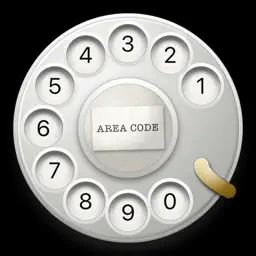
Take your iPhone back to the 20th Century. "And iRetroPhone, the goofiest $2.99 I've spent so far, draws an old-fashioned rotary dial on the screen." - Saul Hansell (New York Times - Bits Blog) A real rotary dial for your iPhone. And it really calls. Put your finger in a hole, turn the dial to the metal stop and let go. It spins back on its governor, clicking ten times a second, and lands with a clack. Dial the number, tap the green button, and your iPhone places the call. Or pick someone from Contacts and watch the dial do it for you, digit by digit. Never used a rotary phone? Tap the question mark and a ghost finger shows you how: into the hole, round to the stop, let go. Made for iPhone Duo: open it and the dial stays where it was, with a paper card beside it for Speed Calling, eight numbers under the digits 2 to 9 as on the phone company's old service, and How to dial. iRetroPhone went on sale on July 10, 2008, the day the App Store opened. Version 3 rebuilds it from the dial up. THE DIAL - Drawn, not photographed, so it is sharp on every iPhone - The letters above the numbers, as on the classic dial: ABC, DEF, GHI, JKL, MNO, PRS, TUV, WXY, and OPERATOR over 0 - A brass finger stop and a paper slip under the center cap - You pull every digit yourself, as on a real phone. Prefer to tap a hole and let it dial? Turn on Tap to Dial in Settings. THE SOUND - Every tooth of the ratchet clicks as you turn, so a quick turn zips and a slow one ticks - A pulse every 30 degrees on the way back, then the clack of the dial landing - The landing clack and the hang-up are the original 2008 recordings - Haptics follow every click, the stop and the landing - Plays with the ring switch off, like a music app. Sound and haptics can each be switched off in Settings. MAKE IT YOURS - Type your own exchange and number on the slip in the middle, the way real dials carried them, like LAkewood 3697 - Set the dial on black, graphite, green felt, oxblood or navy - Letters on the dial, or digits only ON IPHONE DUO - Closed, Delete, Contacts, Call and Settings stand down the side, Call level with the middle of the dial - Open it and the dial stays right where it was, the way the Home Screen keeps its icons in place. A paper card opens beside it. - Speed Calling, on the card: eight numbers under the digits 2 to 9, the digits the phone company's own Speed Calling service used. Tap a name and the dial turns by itself and calls. - How to dial, on the card: four steps, and a tap shows you on the dial - Stand it upright and the card moves to the top, the dial at the same size IN YOUR LANGUAGE English, German, French, Spanish, Italian and Japanese. NOTHING COLLECTED No account, no ads, no analytics, no network requests. The system contact picker shares the name and number you choose. Speed Calling saves those entries on your device. Calls go through the Phone app.
What's New
Version 3.2 2026-11-02
- Made for iPhone Duo. Closed, the keys stand down the side of the dial. Open it and the dial stays where it was, with a paper card beside it. - Speed Calling, ... Technical Analysis
Package Overview Basic metadata
Bundle ID
com.objectgraph.iRetroPhone Current Version 3.2
Minimum iOS 17.0
Package Size App Store Size
Package Metadata 1 / 9 version records
0.0 / 5.0 (0 ratings)
Detailed binary, privacy manifest, framework, and Info.plist results have not been indexed for this package yet. The verified App Store and archive metadata above remains available.
Developer Information
Known Version Records
1 version record with stored package metadata • 9 known version records
Stored metadata does not guarantee a package is currently available to download.
| Details | Version / IDs | Version date | Action |
|---|---|---|---|
| 6.61 MB | v2.2 App Store ID: 875406262Build: 2.2 | 2025-06-09 07:07:21 | Paid / Arcade |
| Not archived | App Store ID: 864628059 | Unknown | Paid / Arcade |
| Not archived | App Store ID: 4134269 | Unknown | Paid / Arcade |
| Not archived | App Store ID: 1457464 | Unknown | Paid / Arcade |
| Not archived | App Store ID: 1446412 | Unknown | Paid / Arcade |
| Not archived | App Store ID: 967366 | Unknown | Paid / Arcade |
| Not archived | App Store ID: 133361 | Unknown | Paid / Arcade |
| Not archived | App Store ID: 20461 | Unknown | Paid / Arcade |
| Not archived | App Store ID: 17631 | Unknown | Paid / Arcade |