
Preview


Description
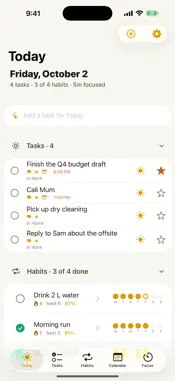
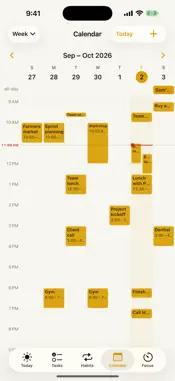
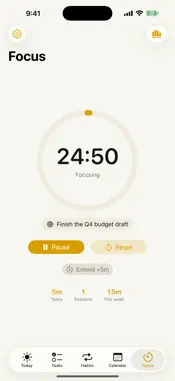
Goaldyn is a calm, private planner that brings your tasks, calendar, habits, focus sessions, and goals together in one place. No account needed, and what you add is stored on your iPhone. START WITH TODAY • One screen for the day: overdue, due today, planned for today, habits, a Focus card, your schedule, and what you finished • Add to Today from a task with a tap on the sun, a swipe, or a long-press — a plan, not a deadline, so the task keeps its list and due date • Plan today: pick the day's work from every list in one pass • Fold Overdue, Tasks, and Habits away; the headers keep their counts TASKS THAT STAY OUT OF YOUR WAY • Quick-add with natural language, or dictate a task with the voice button • Organize with lists, tags, priorities, and subtasks — subtasks sit indented under their parent, right in the list • A task can live in several lists: one task, one checkbox, everywhere • Sort any list by My order, Due date, Title, or Date created • New tasks appear at the top; move them up and down or drag to reorder • Swipe to complete or delete; star what matters most; delete all completed tasks at once, with a confirmation • Due dates are color-coded by urgency so today never sneaks up on you REMINDERS THAT GET THROUGH • Set one or more reminders on any task, and alerts on any event • Alerts ring once, even for events you sync to your calendar • Turn on Ring as alarm and a reminder repeats several times in a row, so it is hard to miss • Pick your own sound for reminders, alarms, the focus timer, and habit check-ins — or go silent HABITS THAT STICK • Flexible schedules — daily, weekly, or specific days • Streaks and consistency stats over 7, 30, or 90 days, or all time • Check in with a tap from Today or Habits • Up to three short check-in reminders a day, each with an encouraging line DEEP FOCUS • A clean focus timer with short and long breaks, from five minutes to three hours • Pause and resume without losing your place • Live countdown in the Dynamic Island and on the Lock Screen, with Pause, Resume, and Cancel right there • Link sessions to a task or habit and watch your focus time add up • Focus statistics for the last 7, 30, or 90 days PLAN YOUR TIME • List, day, 3-day, week, month, and year views • Tap an empty slot to add an event with its start and end filled in, or switch it to a task • Events with all-day, location, link, alerts, repeat, and notes • A true time grid: overlapping events side by side, an all-day row, and a line at the current time • Touch and hold an event to drag it to another time or day; drag its bottom edge to resize • Delete one day of a repeating event and only that day goes • Sync by choice: your events, and tasks with a time if you like, go to the calendar you pick on your iPhone, and changes you make in the Calendar app come back • Show my other calendars: events from the calendars on your iPhone appear in Goaldyn and in Today's schedule, read-only, in their own colors; choose which calendars to show THE EISENHOWER MATRIX • Sort tasks by urgent and important • See at a glance what to do first, schedule, delegate, or eliminate PROGRESS YOU CAN FEEL • Completion, habit consistency, and goal momentum at a glance • Track goals with targets and units — books read, miles run, anything • Choose how far back the habit view looks PRIVATE BY DESIGN • No account. No ads. No tracking. No data collection. • Everything you add is stored on your device. Goaldyn makes no network requests of its own. • Calendar features use the calendars already on your iPhone, through Apple's on-device calendar framework. • If you turn on calendar sync, your events go to the calendar you pick, through the accounts already on your iPhone. Goaldyn never signs in to them. • Dictation prefers on-device recognition and asks before using the system speech service. Also includes Home Screen widgets and Siri Shortcuts.
What's New
Version 1.1 2026-10-03
Your calendar and your tasks now share one page. Add events with a tap, see the calendars already on your iPhone, and control a focus session from the Dynamic I... Technical Analysis
Package Overview Basic metadata
Bundle ID
com.nrdyn.productivityhub Current Version 1.1
Minimum iOS 17.0
Package Size App Store Size
Package Metadata 0 / 0 version records
Detailed binary, privacy manifest, framework, and Info.plist results have not been indexed for this package yet. The verified App Store and archive metadata above remains available.
Developer Information
Known Version Records
0 version records with stored package metadata
Stored metadata does not guarantee a package is currently available to download.
| Details | Version / IDs | Version date | Action |
|---|