
Preview


Description
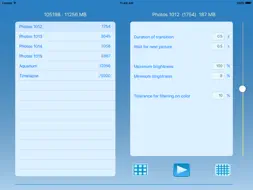
Play thousands of pictures fast. Filter them instantly on brightness and color. Ideal for time lapse photo streams when you want to sift through tens of thousands frames using a color pattern or simple filtering out dark or light images. Or if you want to take lots of photos to show but do not have a time to select them. Just take them all - even if thousands. PlayPictures will automatically scale them down and compress, so e.g. 10,000 photos will take only about 1 GB. There are two ways to import pictures: via iTunes sharing and from local Photo library. Picture files have to be copied with folders which contain them, i.e. no separate files. Subfolders will be copied automatically. All pictures from local Photo library (not cloud) will be processed as well. To transfer pictures to this app please connect your device to computer, run iTunes, select Apps under your device, find File Sharing on lower half of right panel. Then select PlayPictures and drop desired folders with picture files (no loose files, please) into Documents on the right side. Then start PlayPictures on device - copied pictures will be processed. It will take some time, typically a minute for 100-200 photos (it is compression which takes that long). After processing folders will be removed from the shared area. If you add new pictures to a folder, just add same folder again to PlayPictures - it will process only new pictures, leaving old intact. To remove a folder from PlayPictures, swipe it to left and tap Delete, then Ok. To play through pictures, tap Play icon. Playback will start if Autoplay is On. To toggle Autoplay, please "drag" Play button far enough (though there will be no real dragging). Controls on player screen are as follows: - Pause: tap bottom of image. - Show next / previous picture while in Pause: tap on right / left edge. If tap on a top part of edge, direction will be reversed to allow one-hand operation. As a tip, there are small yellow notches on the sides separating these parts. - Reverse while playing: tap on the left edge (right edge to play forward). The blue arrow will show direction. - Skip 1/20 of pictures: tap >>, << buttons. The slide indicator will move accordingly. - Select playing interval: pause at first desired picture, tap A. Move to the end desired picture, tap B. Tap bottom of image to play. Tap blue arrow to toggle loop direction. Filtering on brightness is straightforward and selected by default, just set desired minimum and maximum levels. The "sun" icon indicates filtering on brightness. To filter on a color pattern, select a picture (which will be "reference" picture) in the player and tap "sun" icon. It will change to a colored rectangle. Then play pictures - only those matching the color pattern of reference picture will be shown. Matching is done on 3x3 zones of a picture: all 9 zones will be matching in color within precision selected using "Tolerance for filtering on color". Use this for example to filter only photos with lot of water, bright sky, similar light conditions for time-lapse frames etc.. Do not expect too much, however: only 9-zones matching will not provide great exactness. Experiment with different tolerance setting. Tap on color rectangle to return to filtering on brightness. Tap the date to hide/unhide controls and/or filename. Please note, that the main screen with settings is supported only in Landscape.
What's New
Version 1.5 2016-02-27
This app has been updated by Apple to display the Apple Watch app icon. Get pictures from local photo library. Can cancel processing pictures (resumes at next ... Technical Analysis
Package Overview Basic metadata
Bundle ID
com.notucom.PlayPictures Current Version 1.5
Minimum iOS 8.1
Package Size Latest Recorded Package Size
Package Metadata 10 / 15 version records
Detailed binary, privacy manifest, framework, and Info.plist results have not been indexed for this package yet. The verified App Store and archive metadata above remains available.
Known Version Records
10 version records with stored package metadata • 15 known version records
Stored metadata does not guarantee a package is currently available to download.
| Details | Version / IDs | Version date | Action |
|---|---|---|---|
 21.71 MB | v1.5 App Store ID: 841503905Build: 1.5 | 2016-02-27 02:32:54 | Get Version |
| 8.06 MB | v1.5 App Store ID: 816197610Build: 2 | 2021-04-16 18:38:24 | Get Version |
| 6.88 MB | v1.4 App Store ID: 814035564Build: 4 | 2015-10-18 07:35:46 | Get Version |
| 6.88 MB | v1.4 App Store ID: 813899083Build: 4 | 2015-10-18 07:35:46 | Get Version |
| 6.88 MB | v1.4 App Store ID: 813711479Build: 4 | 2015-10-18 07:35:46 | Get Version |
| 6.88 MB | v1.4 App Store ID: 813703399Build: 4 | 2015-10-18 07:35:46 | Get Version |
| Not archived | App Store ID: 813524446 | Unknown | Request Version |
| Not archived | App Store ID: 813454952 | Unknown | Request Version |
| 6.67 MB | v1.3 App Store ID: 813354277Build: 6 | 2015-09-15 06:39:14 | Get Version |
| 6.67 MB | v1.3 App Store ID: 813344131Build: 6 | 2015-09-15 06:39:14 | Get Version |
| 6.67 MB | v1.3 App Store ID: 813340156Build: 6 | 2015-09-15 06:39:14 | Get Version |
| 6.67 MB | v1.3 App Store ID: 812889960Build: 6 | 2015-09-15 06:39:14 | Get Version |
| Not archived | App Store ID: 812375692 | Unknown | Request Version |
| Not archived | App Store ID: 812281757 | Unknown | Request Version |
| Not archived | App Store ID: 812124616 | Unknown | Request Version |