Preview




Description
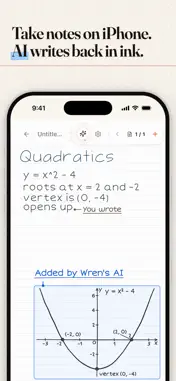
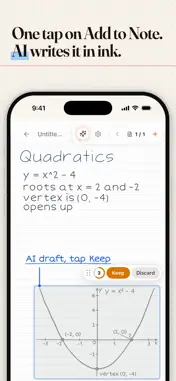
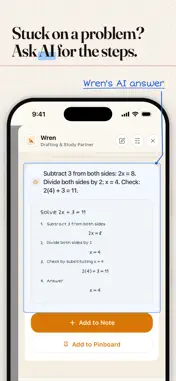
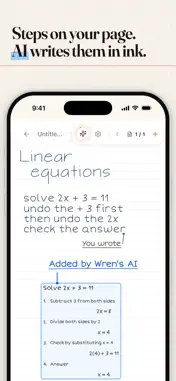
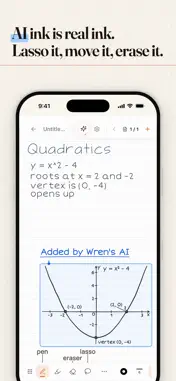
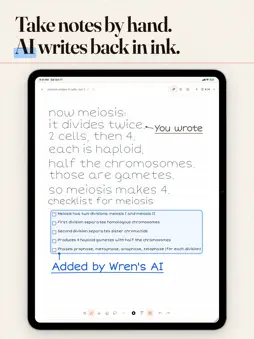
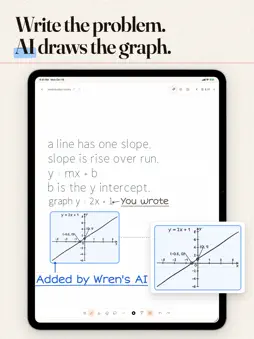
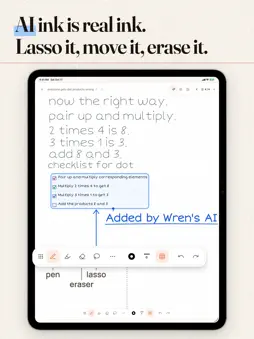
Write class notes by hand. Wren's AI writes back in ink, right on your page. Pause your Apple Pencil and get the next step, a graph or a worked solve beside your work. On iPhone, ask Study Buddy for steps or a table. It lands on your page. Tap Keep. Most AI answers in a chat window. Wren answers on the page you are already writing on, in its own neat hand, so your notes stay yours. Pause your pen. AI writes the next step. Write the start of a problem, a definition or a list, then stop. Wren's AI reads your handwriting and picks up where you left off. A preview appears in the nearest clear space. Drag it where you want it, then tap Keep or Discard. What Wren's AI writes for you, in ink • Step-by-step solves for math and science problems • Graphs of the function you are working on • Formulas • Tables that line facts up side by side • Timelines, from cell division to the Cold War • Checklists for what to study next • A few lines of text, like a definition or a short explanation Three ways to ask Pen pause, on iPad. Write what you want with Apple Pencil, like "graph y = x^2 + 1", then pause. Study Buddy, on iPhone and iPad. Ask about the page you have open. The answer lands on your page as an ink draft. Tap Keep and it stays. AI Tutor. Pin a Tutor answer you like and add it to your page as ink. You decide what stays Every AI answer starts as a draft you can Keep or Discard. Kept ink is real ink: lasso it, move it, erase it or undo it, just like your own strokes. Built for class notes • Infinite whiteboards for working a problem out, and paged notebooks for lectures • Lined and Cornell paper • Apple Pencil with pressure and palm rejection on iPad • Write with your finger on iPhone • Sign in and your notes sync between your devices and the web at web.wrenapp.ai One night at the board 9pm, calculus. You write "graph y = x^2 - 4" and pause. The curve appears next to your work. 10pm, biology. You ask Study Buddy for the stages of mitosis. A timeline is written beside your sketch of the cell. You tap Keep. 11pm, physics. You write the first two steps of a projectile problem and pause. Wren's AI writes the next step underneath. Midnight, chemistry. You ask for a table comparing ionic and covalent bonds. It is written in neat rows, right on the board. For every class Math, algebra, geometry, calculus, biology, chemistry, physics and history. Why we built it We are college students, a brother and a sister. We were tired of copying answers out of a chat window and into our notes, so we made the notes answer back. We use Wren every day. It is the whiteboard we wanted. Wren is free to download. Terms of Use: https://www.wrenapp.ai/terms Privacy Policy: https://www.wrenapp.ai/privacy
What's New
Version 1.5.9 2026-11-24
Full support for foldable displays: your paged notebooks and infinite whiteboards now fill the whole screen across both outer and unfolded displays, and folding...Full support for foldable displays: your paged notebooks and infinite whiteboards now fill the whole screen across both outer and unfolded displays, and folding or unfolding keeps your place on the page. Wren now remembers the language of each page you write on, so notes in Spanish, French, and other languages read more accurately as you keep writing. Faster note sync: large pages with lots of handwriting and drawings upload compressed and save as one whole page without splitting your strokes across pages. Cleaner note creation cards and compact headers on phone screens, plus a responsive whiteboard minimap that stays out of the way of your notes. Pen pause answers arrive faster. Large whiteboards use less memory and stay smooth as they grow. Technical Analysis
Package Overview Basic metadata
Bundle ID
com.bennour.notenest Current Version 1.5.9
Minimum iOS 16.6
Package Size App Store Size
Package Metadata 1 / 26 version records
5.0 / 5.0 (10 ratings)
Detailed binary, privacy manifest, framework, and Info.plist results have not been indexed for this package yet. The verified App Store and archive metadata above remains available.
Developer Information
Known Version Records
1 version record with stored package metadata • 26 known version records
Stored metadata does not guarantee a package is currently available to download.
| Details | Version / IDs | Version date | Action |
|---|---|---|---|
| 99.11 MB | v1.3.4 App Store ID: 887261532Build: 1.3.4 | 2026-06-22 21:25:47 | Get Version |
| Not archived | App Store ID: 887028110 | Unknown | Request Version |
| Not archived | App Store ID: 885109666 | Unknown | Request Version |
| Not archived | App Store ID: 884413092 | Unknown | Request Version |
| Not archived | App Store ID: 882909495 | Unknown | Request Version |
| Not archived | App Store ID: 882678095 | Unknown | Request Version |
| Not archived | App Store ID: 882287404 | Unknown | Request Version |
| Not archived | App Store ID: 882221735 | Unknown | Request Version |
| Not archived | App Store ID: 882050635 | Unknown | Request Version |
| Not archived | App Store ID: 881912771 | Unknown | Request Version |
| Not archived | App Store ID: 881873759 | Unknown | Request Version |
| Not archived | App Store ID: 881837821 | Unknown | Request Version |
| Not archived | App Store ID: 881561947 | Unknown | Request Version |
| Not archived | App Store ID: 881271483 | Unknown | Request Version |
| Not archived | App Store ID: 881242401 | Unknown | Request Version |
| Not archived | App Store ID: 881140544 | Unknown | Request Version |
| Not archived | App Store ID: 880648397 | Unknown | Request Version |
| Not archived | App Store ID: 880269642 | Unknown | Request Version |
| Not archived | App Store ID: 880142619 | Unknown | Request Version |
| Not archived | App Store ID: 880034286 | Unknown | Request Version |
| Not archived | App Store ID: 879830963 | Unknown | Request Version |
| Not archived | App Store ID: 879440942 | Unknown | Request Version |
| Not archived | App Store ID: 879259127 | Unknown | Request Version |
| Not archived | App Store ID: 878884820 | Unknown | Request Version |
| Not archived | App Store ID: 878727314 | Unknown | Request Version |
| Not archived | App Store ID: 878495718 | Unknown | Request Version |