Preview






Description
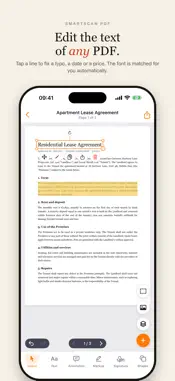
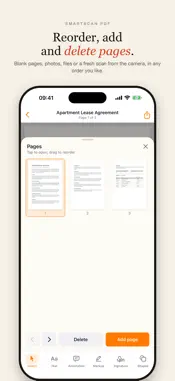
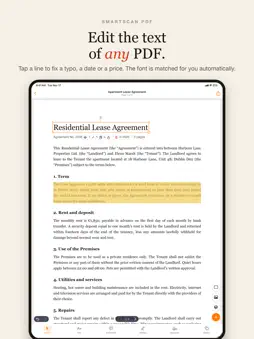
Scan paper, import any PDF or photo, and edit it like a real document: retype a line, add text in your own fonts, mark it up, sign it and share it in a tap. Everything runs on your iPhone or iPad, nothing is uploaded. SCAN AND IMPORT • Scan with the camera: automatic edge detection, perspective and lighting correction, multi-page scans. • Import PDFs from Files, photos from your library, or start a blank page. • Every scan and photo gets an invisible text layer, so it is searchable and selectable right away. EDIT THE TEXT OF ANY PDF • Tap a line and retype it: the font, size and colour are matched automatically, even in scanned documents. • Add new text anywhere in 24 bundled font families with bold, italic, underline and strike-through. • Move, resize and rotate text, pictures and shapes with snapping guides. OCR FOR PICTURES AND SCANS • One tap recognises the text on any picture page: a scan, a photo, a slide. • Keep the picture and make its text selectable and searchable, or create a new page with the text fully editable. • Recognised text feeds the library search, so you find documents by what is written inside them. MARK UP AND SIGN • Highlight, underline, strike through, draw, add shapes and sticky notes. • Draw your signature once and place it in any document, resize it, keep several signatures. • Fill in form fields and send the result. PAGES AND SHARING • Reorder, rotate, insert, delete and merge pages; pull pages in from another PDF. • Export to Files, Mail, Messages, WhatsApp, Telegram, AirDrop or any app that accepts PDFs. • Undo and redo for every change; autosave on exit. PRIVATE BY DESIGN • No account. Documents never leave the device; text recognition runs on-device. • Works fully offline, on a plane or in a basement. FREE AND PRO SmartScan PDF is free: scan, edit and export after a short ad. SmartScan Pro removes ads and unlocks unlimited editing, signatures and OCR. Subscriptions renew automatically unless cancelled at least 24 hours before the end of the period; manage them in your Apple ID settings. Have a promo code? Settings → Subscription → Redeem a code. Terms of Use: https://www.apple.com/legal/internet-services/itunes/dev/stdeula/ Privacy Policy: https://northalliance.kz/smartscan/privacy/ Support: https://northalliance.kz/smartscan/support/
What's New
Version 1.3 2026-11-18
Now in 20 languages • The whole app, from onboarding to the editor, settings and system prompts, is available in English, Spanish, Portuguese, German, French, I...Now in 20 languages • The whole app, from onboarding to the editor, settings and system prompts, is available in English, Spanish, Portuguese, German, French, Italian, Turkish, Indonesian, Hindi, Japanese, Korean, Chinese (Simplified and Traditional), Ukrainian, Russian, Kazakh, Polish, Dutch, Vietnamese and Thai. • SmartScan follows your iPhone language. To pick a different one just for this app, open Settings → Apps → SmartScan PDF → Language. Coming from 1.1? Version 1.2 added OCR for picture pages, "Redeem a code" in Settings and fixed PDFs from Safari turning black after an edit. Technical Analysis
Package Overview Basic metadata
Bundle ID
kz.northalliance.ScannerApplication Current Version 1.3
Minimum iOS 17.0
Package Size App Store Size
Package Metadata 0 / 1 version records
Detailed binary, privacy manifest, framework, and Info.plist results have not been indexed for this package yet. The verified App Store and archive metadata above remains available.
Developer Information
Known Version Records
0 version records with stored package metadata • 1 known version records
Stored metadata does not guarantee a package is currently available to download.
| Details | Version / IDs | Version date | Action |
|---|---|---|---|
| Not archived | App Store ID: 879262133 | Unknown | Request Version |