
Preview





Description
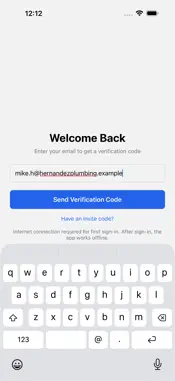
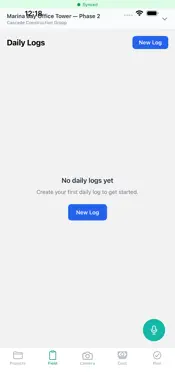
StructurSurge WorkKit is the field worker companion for construction projects. Built for subcontractors and field crews, WorkKit streamlines daily reporting, time tracking, expense management, and safety compliance — with full offline support. DAILY FIELD LOGS - Create daily logs with crew hours, weather, equipment, and progress notes - Voice commands for hands-free entry while on the job site - Automatic sync when connectivity returns — nothing is lost TIME TRACKING - GPS-enabled clock in/out by project and cost code - Track crew hours and overtime with approval workflows - Export time data for payroll processing EXPENSE MANAGEMENT - Capture receipts with your camera and categorize expenses instantly - Submit expenses for approval from the field - Track reimbursement status and payment history SAFETY AND QUALITY - Report safety incidents and observations with photos and severity ratings - Run quality inspections from templates with pass/fail tracking - Create punch list items and assign corrective actions - Critical incidents trigger automatic alerts to project leadership PHOTO DOCUMENTATION - Capture job site photos with automatic geotagging - Annotate photos with markups before uploading - Photos sync in the background — shoot now, upload later CONNECT TO YOUR GC - Link to your general contractor's StructurSurge organization - Receive project assignments, daily log templates, and inspection schedules - Submit reports that flow directly into the GC's project management system WORKS OFFLINE WorkKit is built offline-first with PowerSync. Create daily logs, track time, capture expenses, run inspections, and take photos without a network connection. A pending upload badge shows exactly what's waiting to sync. STANDALONE MODE WorkKit works immediately without signup. Create a local profile and start logging. Connect to a GC organization when you're ready — your data migrates automatically. MULTILINGUAL Available in English, Spanish, French, and Portuguese. SINGLE-HANDED OPERATION Every screen is designed for one-handed use on the job site. Large touch targets, thumb-zone layouts, and haptic feedback work even with gloves. Download WorkKit and start tracking your work today — no account required.
What's New
Version 1.6.0 2026-11-02
- A new look built for the job site: Today, My work, Time, Pay and More, with larger buttons, glove mode and a see-through microphone button. - Join a company o... Technical Analysis
Package Overview Basic metadata
Bundle ID
com.structursurge.sub Current Version 1.6.0
Minimum iOS 15.1
Package Size App Store Size
Package Metadata 0 / 5 version records
Detailed binary, privacy manifest, framework, and Info.plist results have not been indexed for this package yet. The verified App Store and archive metadata above remains available.
Developer Information
Known Version Records
0 version records with stored package metadata • 5 known version records
Stored metadata does not guarantee a package is currently available to download.
| Details | Version / IDs | Version date | Action |
|---|---|---|---|
| Not archived | App Store ID: 889454914 | Unknown | Request Version |
| Not archived | App Store ID: 888995565 | Unknown | Request Version |
| Not archived | App Store ID: 888345313 | Unknown | Request Version |
| Not archived | App Store ID: 888133545 | Unknown | Request Version |
| Not archived | App Store ID: 885399745 | Unknown | Request Version |