
Preview

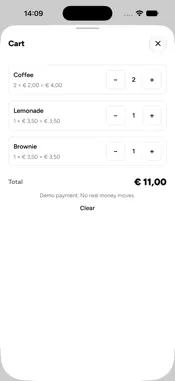


Description
unlisted ops is a free operations companion for teams using unlisted to run events and venues. Built for teams already using unlisted, it connects product sales, tabs, ticket sales and attendee check-in to your organization's workspace. PRODUCT SALES Browse your product library, search products, adjust quantities and send an in-person payment to a connected Mollie terminal. View payment status as it updates. TABS Record product consumption on a tab. Members can create and manage tabs, review entries, correct mistakes and settle a tab through terminal payment or without charge. EVENT OPERATIONS Choose an event to sell tickets and check in attendees. Search the attendee list, open a pass or scan its QR code to record admission and see when a pass has already been used. ACCESS FOR YOUR TEAM Sign in with a free account that belongs to an unlisted organization, or scan an operations access QR supplied by your organization to use permitted operations without a personal account. Access QR permissions are limited to the assigned organization and event; tab management requires membership. An internet connection and an existing unlisted organization are required. Paid in-person sales require a configured Mollie account and payment terminal, including a compatible device running Mollie Tap. Organization setup and administration take place in the unlisted web dashboard.
What's New
Version 1.0.2 2026-10-31
Bug fixes and stability improvements. Technical Analysis
Package Overview Basic metadata
Bundle ID
co.noquarter.unlisted.ops Current Version 1.0.2
Minimum iOS 16.4
Package Size App Store Size
Package Metadata 0 / 0 version records
Detailed binary, privacy manifest, framework, and Info.plist results have not been indexed for this package yet. The verified App Store and archive metadata above remains available.
Developer Information
Known Version Records
0 version records with stored package metadata
Stored metadata does not guarantee a package is currently available to download.
| Details | Version / IDs | Version date | Action |
|---|