
Preview





Description
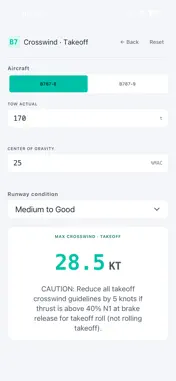
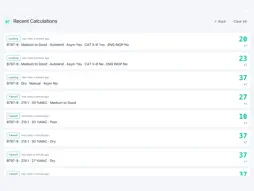
B787 Tools is a fast, offline advisory suite for Boeing 787 pilots covering both takeoff and landing crosswind operations. WHAT YOU GET - Crosswind Takeoff: enter aircraft variant (B787-8 or B787-9), takeoff weight, center of gravity, and runway condition (RWYCC 1-6). Get the maximum allowed crosswind component in seconds. - Crosswind Landing: enter aircraft variant, runway condition (7 AFM Rev. 20 states including separate Good Wet/Damp and Good Slush/Snow), landing mode (Manual or Autoland), and autoland-specific toggles (CAT II/III, one engine inoperative). Get the maximum crosswind limit in knots. - Recent Calculations: your last 20 calculations are saved locally, ready to recall with one tap. CONSERVATIVE ADVISORY LIMITS All values are derived from Boeing 787 publicly available reference data and conservative operational practice. They are intentionally cautious — designed to give pilots a fast first pass before consulting the FCOM. Validated with active line pilots on B787-8 and B787-9. KEY FEATURES - Two phases of flight: Takeoff + Landing - Two aircraft variants: B787-8 + B787-9 (per-aircraft FCOM envelopes) - Seven RWYCC runway conditions: Dry, Good, Medium to Good, Medium, Medium to Poor, Poor - Tactile feedback on iPhone (Taptic Engine) - Custom in-app numeric keypad designed for cockpit use - Locally persisted calculation history (last 20) - Fully offline — no network requests, no analytics, no third-party SDKs - Dark and light themes for cockpit and briefing-room use - Localized in English and Russian FOR WHOM Licensed Boeing 787 pilots, type-rating candidates, instructors, and aviation professionals familiar with operational performance reference materials. NOT FOR The app must not be used as a primary navigation, planning, or operational tool. It does not replace certified Electronic Flight Bag software or official Boeing 787 documentation. Final operational decisions must always be based on Boeing 787 FCOM/QRH and your operator's procedures. PRIVACY We collect no data. The app makes no network requests. All settings and recent calculations are stored locally on your device. No third-party SDKs for analytics, advertising, or attribution. Privacy Label: "No data collected". ROADMAP Future updates may add Weight & Balance, Performance V-speeds, and Fuel Planning modules to make B787 Tools a comprehensive pilot reference companion. WHAT'S NEW IN 1.1.2 - Takeoff: FCOM CAUTION advisory shown below the max-crosswind result (5 KT reduction reminder when thrust >40% N1 at static brake release). - Takeoff: runway condition selector switched to dropdown picker for single-tap selection. - Numeric keypad on iPhone now docks to bottom of screen for natural input UX.
What's New
Version 1.1.2 2026-06-11
Curator-driven update following continued review. CROSSWIND TAKEOFF - FCOM CAUTION advisory now displayed under each takeoff result — reminds pilots to reduce ... Technical Analysis
Package Overview Basic metadata
Bundle ID
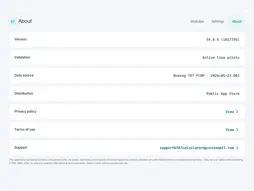
com.niktyan.b787calculator Current Version 1.1.2
Minimum iOS 16.0
Package Size App Store Size
Package Metadata 1 / 2 version records
Detailed binary, privacy manifest, framework, and Info.plist results have not been indexed for this package yet. The verified App Store and archive metadata above remains available.
Known Version Records
1 version record with stored package metadata • 2 known version records
Stored metadata does not guarantee a package is currently available to download.
| Details | Version / IDs | Version date | Action |
|---|---|---|---|
| 31.65 MB | v1.1.2 App Store ID: 886801829Build: 1.1.2 | 2026-06-11 17:17:50 | Get Version |
| Not archived | App Store ID: 886220621 | Unknown | Request Version |