
Preview



Description
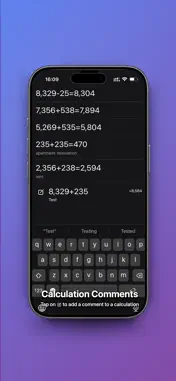
Calculator with history; all your previous calculations remain active, as if you had an infinite number of calculators in your hands at once. You can always find a calculation you've done previously. - By tapping the desired calculation, you can make edits, add or remove numbers, or correct an incorrect number. Italics will also activate at this point, allowing you to conveniently select the location in the calculation where you want to make changes or remove numbers. - You can add notes to your calculations so you don't forget what you were calculating. - Long-pressing on a calculation result copies the result and automatically enters it into the input window (for example, if you want to continue calculating with an existing result). This result will also be copied to the clipboard, ready to be pasted anywhere, such as into a notepad. - Long-pressing on an equation copies it, allowing you to paste it anywhere, not limited to the Live Calculator app. - Long-pressing the input field activates the paste function for anything you've copied previously from the Live Calculator app or any other app, such as Notepad. - All equations are conveniently sorted by date. Tapping any date displays all the dates on which you performed calculations, and selecting the desired date displays all calculations performed on that day. - Long-pressing the AC completely deletes the history. - You can add a note to any calculation in the history. https://www.apple.com/legal/internet-services/itunes/dev/stdeula
What's New
Version 1.4 2026-10-03
iOS 27 optimization; color tags and note search added. Technical Analysis
Package Overview Basic metadata
Bundle ID
com.calc.calcApp Current Version 1.4
Minimum iOS 17.4
Package Size App Store Size
Package Metadata 0 / 4 version records
Detailed binary, privacy manifest, framework, and Info.plist results have not been indexed for this package yet. The verified App Store and archive metadata above remains available.
Known Version Records
0 version records with stored package metadata • 4 known version records
Stored metadata does not guarantee a package is currently available to download.
| Details | Version / IDs | Version date | Action |
|---|---|---|---|
| Not archived | App Store ID: 887005755 | Unknown | Request Version |
| Not archived | App Store ID: 886962499 | Unknown | Request Version |
| Not archived | App Store ID: 886798966 | Unknown | Request Version |
| Not archived | App Store ID: 883745169 | Unknown | Request Version |